


For years, website owners had no way to know whether AI systems were using their content or ignoring it. That changed in February 2026 when Microsoft launched the AI Performance tool inside Bing Webmaster Tools as a public preview.
For the first time, website owners now have actual data on how AI uses their content. Before diving into what this tool tracks, it’s important to understand why tracking brand mentions in AI search matters and why it differs from traditional search metrics.
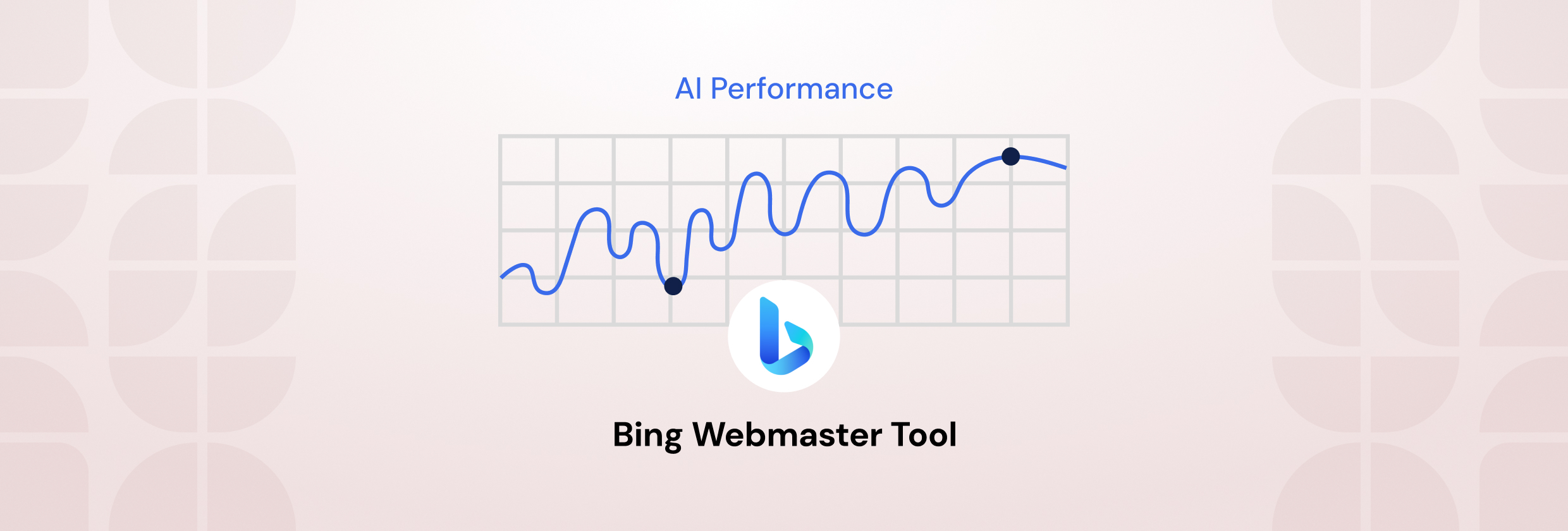
The AI Performance in Bing Webmaster Tool shows you directly how Microsoft Copilot and Bing’s AI-generated summaries pull from your pages when building responses.
That’s more significant than it first appears. For years, if an AI cited your content, you had no way to know. Now, at least inside Microsoft’s ecosystem, you do.
The tool has real limits, though, and misreading the numbers can push your content strategy in the wrong direction. Here’s what this guide covers:
- What AI Performance in Bing Webmaster actually tracks and what it misses
- How accurate the data is and where it falls short
- How to access and set up Bing AI performance
- How to optimize your content for higher AI citations in Bing Copilot
What Is AI Performance in Bing Webmaster Tool?
AI Performance in Bing Webmaster Tool is the first official reporting feature from a major search engine that shows how your content gets used inside AI-generated responses. You can access it for free. It tracks how Microsoft Copilot and Bing AI generated answers that reference your pages when answering user search queries.
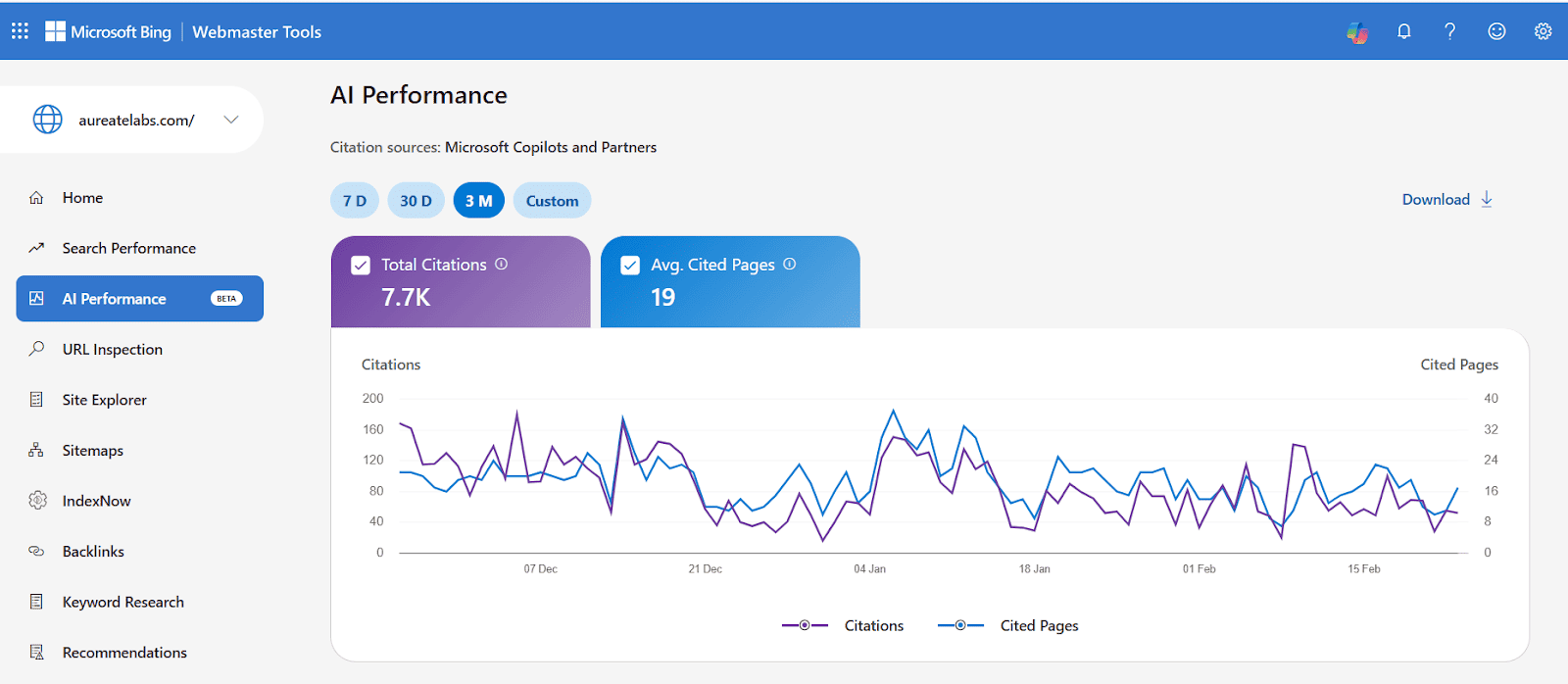
It works like a citation log. Every time Copilot pulls from your content to construct an answer, the tool registers that event. Over a rolling 90-day window, you get a picture of which pages are getting referenced, how often, and for what general topics.
This connects to a real shift in how search performance works. Rankings used to be the whole game. Now, a user might ask Copilot a query and walk away with a detailed answer without clicking a single link. If your content shaped that answer, you influenced the decision without getting a visit. That’s exactly what AI Performance in Bing Webmaster is trying to make measurable.
Here, I asked Microsoft Copilot, “What are LLMs?” Let’s see how it responded.
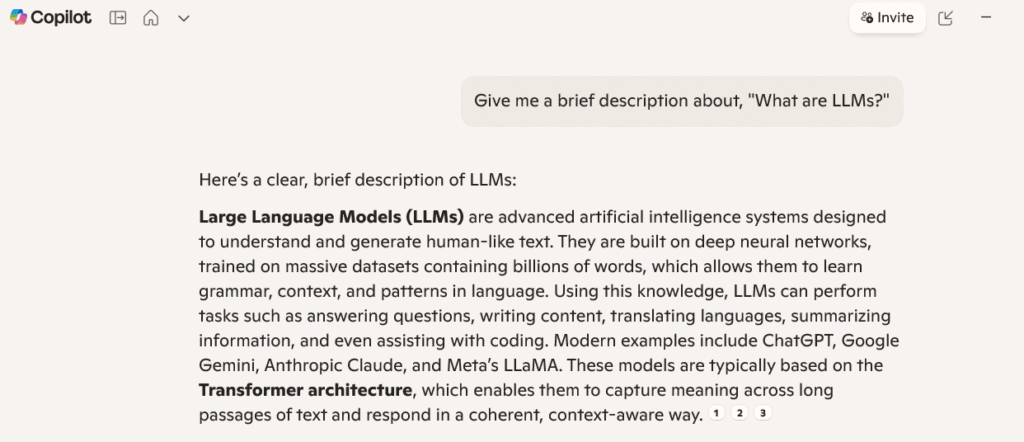
As for now, who should use it: any website owner who cares about visibility beyond page rankings. That includes marketers, SEO professionals, content teams, and publishers. If you’re blocking AI crawlers in your robots.txt, you’ll see no data here, and honestly, that’s useful information too.
What Platforms and Surfaces Does Microsoft Bing Webmaster Tool Cover?
The AI Performance in Bing Webmaster tool tracks supported AI surfaces inside Microsoft’s ecosystem. That means Microsoft Copilot first, then Bing AI-generated summaries, and a handful of select partner integrations.
| Platform / Surface | AI Visibility Data Available | What You Can See | Key Limitations |
| Microsoft Copilot | Yes | Citations, cited URLs, trends over time | Limited to Microsoft ecosystem |
| Bing AI summaries | Yes | AI citation counts and page-level visibility | No insight outside Bing results |
| Microsoft partner AI surfaces | Partial | Select citation and performance data | Coverage varies, not comprehensive |
| ChatGPT | No | None | No public citation or visibility reporting |
| Perplexity | No | None | Limited to the Microsoft ecosystem |
| Google AI Overviews | No | None | No reporting or attribution metrics |
| Claude | No | None | No source-level visibility data |
| Gemini | No | None | No external analytics access |
What this webmaster tool doesn’t include: ChatGPT, Perplexity, Google AI Overviews, Claude, or Gemini. None of those platforms shares this kind of data yet.
That’s a real blind spot. If you’re making content decisions based purely on what Bing Webmaster Tools shows you, you’re working with a partial picture. We’ll get into how to fill that gap later in this guide.
5 Core Metrics of Bing Webmaster’s AI Performance Dashboard
The webmaster tool AI Performance dashboard gives you five core metrics. Each metric tells you something specific. None of them tells you the full story on its own.
1. Total Citations
Total citations count how many times your site appeared as a source during the selected date range. This is a frequency number, not a prominence indicator. It tells you that you were cited, not how prominently, not whether you were the lead source or a supporting detail buried in a longer response.
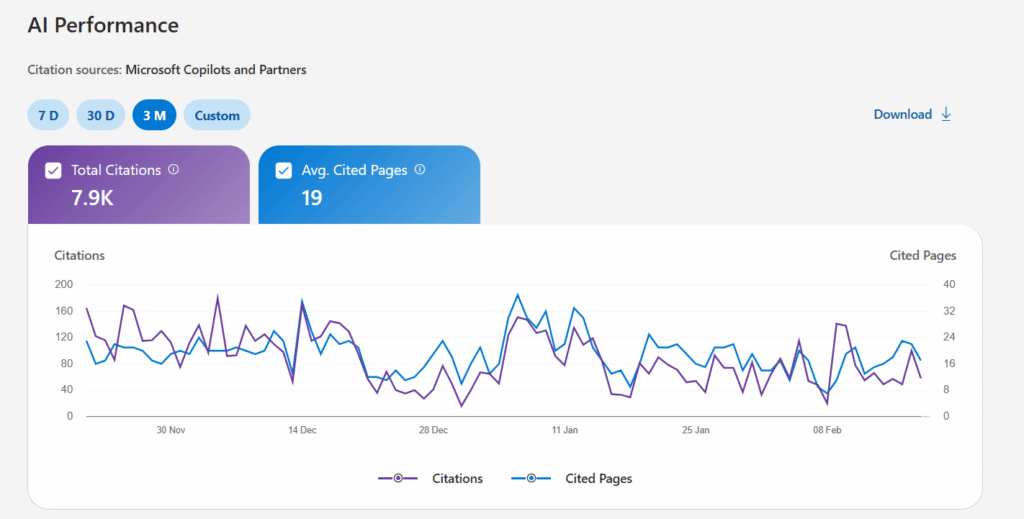
If your citation number is increasing, then that’s a positive sign. But don’t present it to stakeholders as equivalent to traffic or conversions. It isn’t.
2. Average Cited Pages
Average cited pages shows the daily average of unique URLs that were referenced. The formula is simple: total cited pages/number of days in your selected date range.
What this tells you is how much of your site the AI is drawing from. Most sites, even decent-sized ones, see 3-5 pages generating the bulk of their citation activity. That concentration is normal, but it’s also an opportunity.
If you have a hundred indexed articles and three are doing all the work, you either have a content quality gap or a content structure problem.
3. Grounding Queries
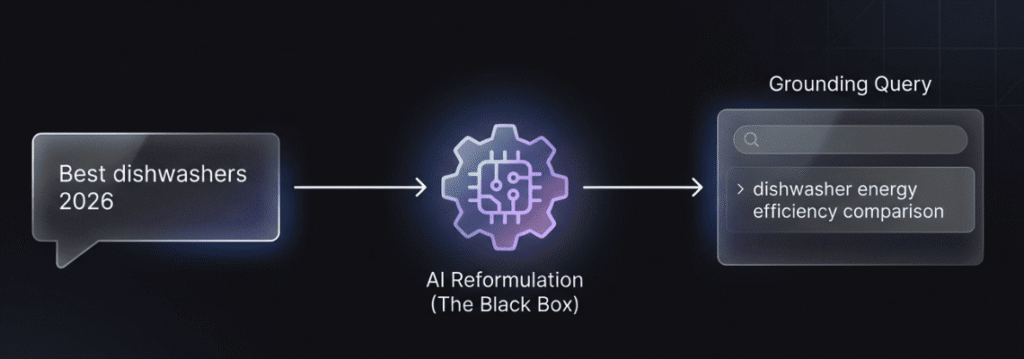
This is the most misunderstood metric. Grounding queries are the key phrases the AI used when retrieving your content. These are not what the user typed. They’re the AI’s internal reformulation of the user’s intent when it went looking for source material.
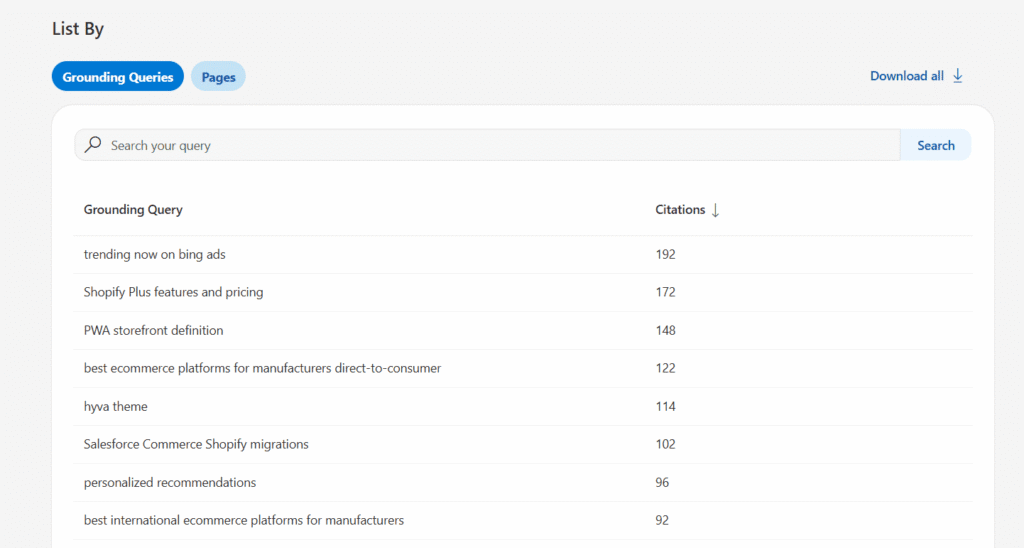
A user might ask, “Best dishwashers 2026”. The AI, when going to retrieve relevant content, might ground its search with something like “dishwasher energy efficiency comparison”. That reformulated phrase is what shows up in your grounding queries data.
Two important caveats: the data is sampled, not a complete log of every retrieval event. And these phrases represent how AI systems generate answers, not how humans phrase questions. They’re useful for content strategy, but treat them as directional signals, not exact audience data.
4. Page-Level Citation Activity
Page citation activity breaks down citation counts by specific URL. This is where you find out which pages are actually pulling weight. High-performing pages tend to share common traits such as clear structure, specific data points, and direct answers to defined questions.
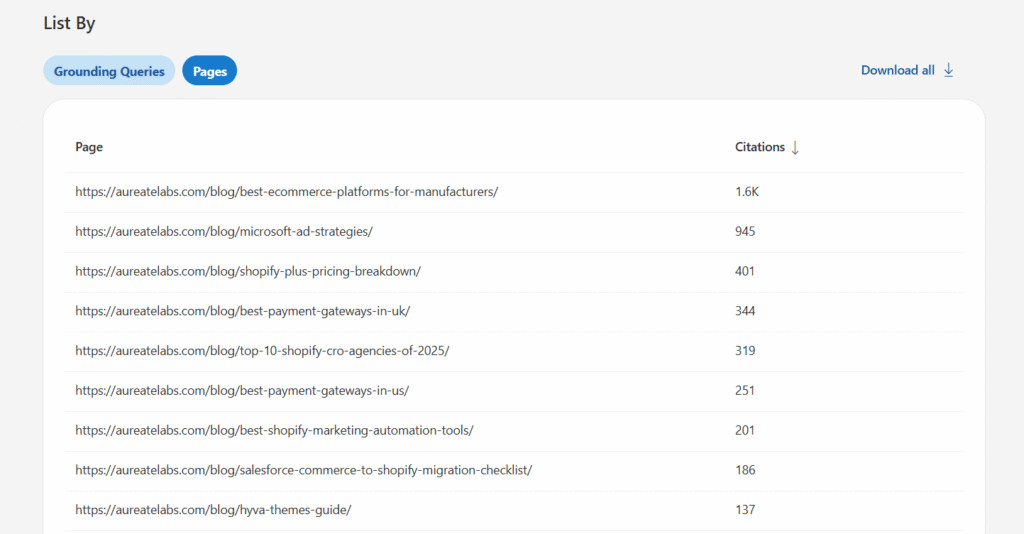
If a page is indexed but never shows up here, that’s a flag. It either has a structural problem that makes it hard for AI to extract from, or it’s getting outcompeted by more authoritative sources on the same topic.
5. Visibility Trends Over Time
The trend visualization shows your citation activity over the 90-day window. Steady growth is a good sign. Sudden drops correlate with content changes, technical issues, or competitive displacement. Seasonal patterns exist, especially for topics tied to buying cycles or industry events.
This is where the AI Performance dashboard becomes most useful for ongoing strategy rather than one-time analysis.
How Accurate Is the Bing AI Performance Report?
It is very important to know if Microsoft Bing Webmaster Tool provides accurate data before you take these numbers to a client or to your boss.
Microsoft is fairly transparent about the limitations, which is worth acknowledging. Grounding queries are sampled, not exhaustive. The AI Performance report aggregates data across supported AI surfaces, so you can’t isolate Copilot from Bing summaries.
The data measures citation frequency, not ranking or prominence within a response. There’s a typical 2-3 day reporting lag. And because this is a public preview, the methodology may change.
The data shown represents real citation events, but it’s a filtered, aggregated view of them, not a complete audit trail.
Most AI Content Use Happens Without Visible Credit
When an AI model uses your content to inform its understanding and build a response, that’s called grounding. When it explicitly names your source in the response, that’s visible attribution. The gap between the two is enormous.
Most grounding events don’t result in a visible citation. The AI absorbed your content, the content owner’s preferences expressed through structure and expertise shaped the answer, but the user never saw your brand name. The AI Performance in Bing Webmaster data captures citation events, but even that represents a fraction of total content usage.
This isn’t necessarily a problem. Grounding authority, influencing AI outputs even without visible attribution, still shapes brand perception and answer quality. But understand what you’re measuring.
 Pro Tip: Bing Webmaster Tools only shows citations within Microsoft’s ecosystem. To understand how your content performs across ChatGPT, Perplexity, and Gemini as well, you need cross-platform tracking. Learn how to track AI search visibility across all major AI platforms.
 Limitations and Gaps of Bing Search Performance Tool
To be clear about what the tool doesn’t give you:
- You will know that your brand was cited, but that citations won’t tell you if anyone visited your site.
- You can’t tell if your brand was the main source at the top or was just a footnote at the bottom.
- You only get to see reformulated grounding queries, not exactly what people actually typed.
- You only see your own stats, so you have no idea about your competitors and with whom you’re sharing citations in your niche.
- Bing search performance tool won’t tell you anything about your performance in ChatGPT, Perplexity, or Gemini.
- You will know your brand was cited, but you will never know in what answer or how.
Cross-Referencing for Validation
Given these limits, don’t use this data in isolation. Cross-reference by checking server logs for AI crawler visits (Bingbot, GPTBot).
Run manual spot checks: take your top grounding queries and search them directly in Copilot to see whether and how you appear. If you want to repeat that check more consistently, Microsoft Copilot rank tracking can show whether your brand is mentioned, which prompts surface it, and how competitors compare.
Treat Bing search performance data from this tool as directional, not definitive.
How to Access and Set Up Bing AI Performance
Setting this up is straightforward. You need a verified site in Bing Webmaster Tools, which is free and open to any public website.
If your site has multiple subdomains or regional versions, say a .uk and a .com, each one needs to be verified separately. And when you first log in after verifying, don’t worry if the dashboard shows nothing. It takes 48 to 72 hours for the data to start populating.
Step 1: Verify Your Site
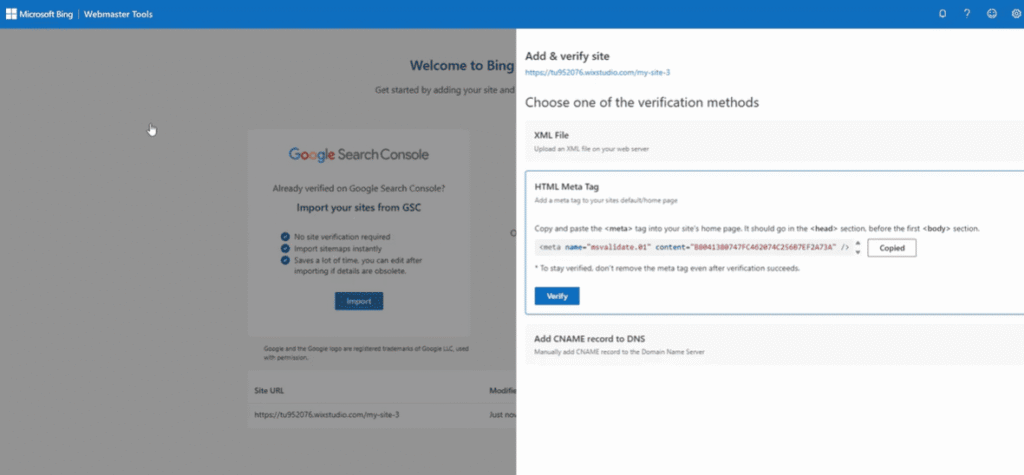
You’ve got three ways to do it: upload an XML file, drop in a meta tag, or add a DNS record. All three are valid. That said, for bigger sites, DNS is the safer bet. Meta tags have a habit of disappearing during site updates or deployments, and then you’re back to square one.
Even if most of your traffic comes from Google, this is worth five minutes of your time. Verification gives you a proper AI performance baseline and signals to Microsoft’s index that your site is actively managed.
Step 2: Navigate to the Dashboard
Head to bing.com/webmasters, select your property, and find AI Performance in the left-hand navigation. Fresh verifications need a day or two before anything shows up. Zero data initially doesn’t mean something’s broken; it’s just how the tool works.
Step 3: Select Date Range and Export
You get a 90-day rolling window to work with. The charts are useful for spotting broad patterns at a glance, but the CSV export is where you’ll do your real work. It breaks down citation counts and grounding queries, the specific phrases AI systems use when pulling your content into a response.
For a sustainable routine, a weekly check keeps you ahead of any sudden changes, and a monthly deeper look lets you decide whether the AI Performance dashboard is pointing to anything your content strategy needs to address.
You need verified site ownership in Bing Webmaster Tools. Any public website qualifies. Sites blocking AI crawlers via robots.txt won’t generate data because there’s nothing to report. Multi-subdomain and multi-region setups each need separate verification.
Expect a 48-72 hour delay after verification before data starts appearing.
Interpreting Your Microsoft Bing AI Performance Data
This dashboard works like a GPS for your content’s influence. It won’t show you foot traffic yet, but it shows exactly which maps the AI is using to guide people.
Establishing Your Baseline
Don’t panic if your numbers look thin at first. Your first 30 days of data aren’t a final grade; they’re a starting point. It’s completely normal for a local business to see lower citation activity than a national news site. Your site’s size, niche, and how well you already perform on the Bing search engine ranking will all shape what “normal” looks like for you.
High-Performing vs. Underperforming Patterns
When you’re reviewing weekly trends, watch for these signals:
- Green Flags: Steady growth in citations and a wide variety of pages being referenced. It’s a strong sign when your grounding queries actually match your core business topics and user intent.
- Yellow Flags: A dip over three or four consecutive weeks without a clear cause, or the AI relying on a single page for nearly all your citation counts. Time to diversify your content.
- Red Flags: Zero citations on your best content, or a sudden total drop-off. If that happens, check your robots.txt immediately. You may be accidentally blocking AI crawlers.
Content Type Performance
Comprehensive guides and “best of” content tend to perform well. FAQ and help center pages have high potential that’s often underused. Product pages vary considerably based on how much useful detail they contain.
Programmatic pages, thin templated content, generally see low citation activity. Case studies and original research perform well when the data is credible and well-structured.
Understanding Your Grounding Query Data
When you pull your grounding queries data, sort by volume and look at the branded versus non-branded split first.
A healthy mix is what you’re after. If 70% of your citations are coming from topic-based, non-branded queries, you’re winning on authority. If you’re only appearing for broad informational questions when you’d rather be cited for specific product comparisons or buying advice, that’s a content gap staring you in the face.
Use that signal to build out your how-to and comparison content where it matters most.
How to Optimize Your Content for Higher Bing Copilot Citations
AI isn’t just “reading” your site anymore; it is actively exploring it for facts. To get cited, you need to transition from writing for “rankings” to writing for “extraction.” If you want a deeper look at how to optimize content for AI answers, the principles apply across all AI platforms, not just Bing Copilot.
1. Content Structure That Gets Cited
Clear headings that frame a question and answer it directly. Paragraphs that make one point completely before moving on. FAQ sections with schema markup. Introductions that define your entity or topic immediately, not after three paragraphs of warm-up.
The AI Performance in Bing Webmaster data will reward you for making content easy to extract from.
2. Writing for AI Extraction
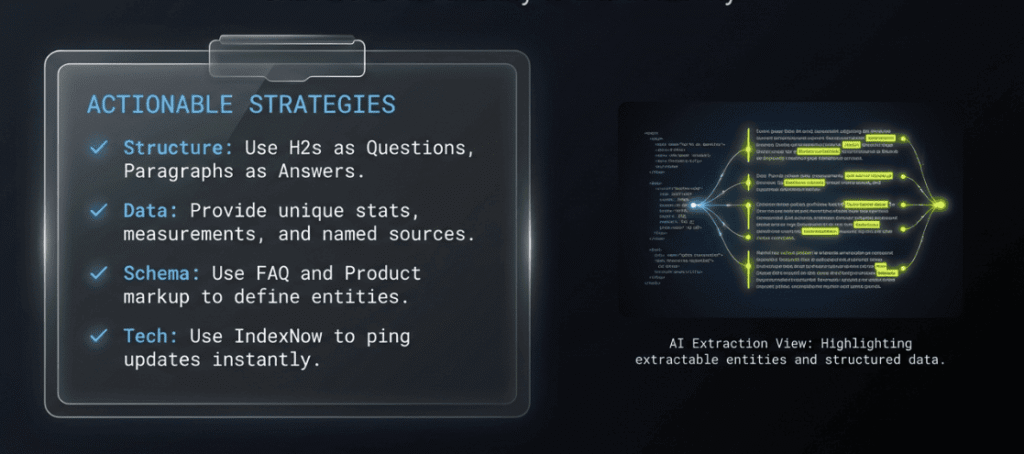
Include specific data points, measurements, and named sources. Quote experts and link to studies. Write clear, quotable statements that could stand alone as answers. Keep terminology consistent throughout a page.
Using IndexNow to ping Bing the moment you update a page is now the standard way to ensure Copilot isn’t quoting your outdated 2024 stats.
3. Technical Optimization
Schema markup matters: Product, Review, FAQ, HowTo, and LocalBusiness schemas can give AI systems clearer entity and page context. Prefer server-side rendering over client-side JavaScript. Confirm that AI crawlers are not blocked in your robots.txt.
Note that GPTBot and Bingbot are separate directives; blocking one doesn’t block the other. Internal linking that builds topical authority clusters helps both Bing search engine ranking and AI citation rates.
4. Topical Authority
AI systems cite sources they’ve determined to be authoritative on a given topic. That authority comes from depth of coverage, quality of backlinks, expert authorship signals, and consistent, accurate content over time.
There’s no shortcut. Bing search performance in AI citations correlates heavily with the same signals that drive traditional ranking.
Analyzing Page-Level Citation Performance
This section breaks down exactly which pages the AI is pulling from and how often. It’s where you stop guessing about content performance and start seeing it in plain numbers.
1. High Grounding, Low Visible Citation
Your content can influence an AI answer without ever getting a visible credit line. This happens when the AI uses your page to absorb context rather than quote a specific fact or claim. The result: your content shaped the response, but the user never sees your site name.
If you’re noticing this pattern in your page citation activity, the fix is usually about specificity. General information is easy for the AI to absorb and move on from.
Original data, firsthand research, or expert commentary gives the AI something worth naming explicitly. If visible attribution is the goal, understanding how to get LLM citations helps you turn those authority signals into content AI can confidently reference.
2. Indexed But Never Cited
You have pages sitting in Bing’s index that never show up in citation activity. That’s a common frustration, and it usually comes down to one of two things: the page is structured in a way that’s hard for AI to extract from, or it’s competing against stronger, more authoritative sources on the same topic and losing.
You’ve got three practical options. Clean up the structure and make the content more extractable. Consolidate it into a stronger existing page that already has authority. Or accept that the page isn’t earning its keep and stop investing in it. Not every page deserves a rescue operation.
3. Declining Citation Trends
If your visibility trends are heading down, content freshness is the first thing to check. AI systems favor current, accurate information. A guide that was comprehensive in early 2025 might be getting edged out by something more recently updated. A competitor may have published something better-structured on the same topic.
These drops are useful signals, not reasons to panic. They tell you where a freshness update or a content expansion would actually move the needle.
These “behind-the-scenes” search phrases are the closest thing we have to a roadmap for how AI actually thinks about your content.
What Grounding Queries Reveal About AI’s Understanding
The grounding queries show how AI interprets your content’s purpose. If your product page keeps ranking for informational queries instead of commercial ones, the page isn’t structured to signal buying intent. That’s a content architecture issue, not just a keyword issue.
Coverage gaps are also visible here. If you’re generating citations in a topic cluster but certain related subtopics never appear, you’re either missing that content, or it exists but isn’t structured clearly enough for AI extraction.
Building a Prompt Research Strategy
Export your grounding queries regularly and categorize them by funnel stage and topic cluster. Then use them to identify the right AI visibility prompts to track across the platforms that matter to your business. Cross-reference with what you’re seeing from other AI tools and platforms. Identify the highest-volume themes and build content specifically to address them. This is generative engine optimization in practice.
Troubleshooting Common AI Performance Issues
If your AI Performance dashboard is showing little to nothing, that’s diagnostic information. Here’s how to work through the most common causes.
1. Zero Citations Despite Quality Content
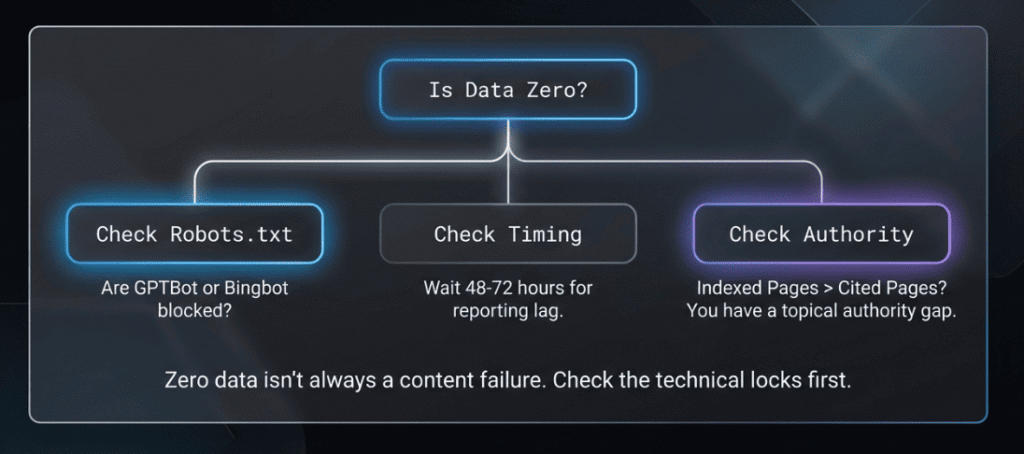
Start with robots.txt. If you’ve blocked GPTBot or Bingbot, the AI can’t access your content, and there’s nothing to report. Note that these are separate directives; blocking one doesn’t automatically block the other.
After that, check timing. There’s a 48-72 hour data lag built into the AI Performance report. New content that hasn’t cleared the processing queue yet simply won’t show up. Give it a few days before concluding.
Also, confirm your site is actually indexed in Bing. AI Performance in Bing Webmaster can only report on content that Bing has crawled and indexed. If indexing is patchy, citations will be too.
2. Low Citations Relative to Indexed Pages
If a small fraction of your indexed pages are generating all your citation activity, you likely have a topical authority gap. The AI has developed confidence in your site for one or two topics and isn’t extending that trust to the rest of your content.
Stronger internal linking between related pages helps the AI connect the dots. Adding schema markup to underperforming pages gives the AI clearer signals about what those pages are actually about. These aren’t dramatic changes, but they consistently show up in improved citation patterns over time.
3. Declining Performance Over Time
Not every dip is a problem you created. Some topics have natural seasonality, like tax content drops off in summer, and gift guides spike in November. Before diagnosing a content or technical issue, check whether the timing lines up with a predictable cycle.
If there’s no seasonal explanation, look at two things: whether a technical change was introduced around the time the decline started, and whether a competitor has recently updated their content on the same topics with better structure or fresher data.
A drop in Bing search performance that coincides with a site update is almost always a technical issue. A gradual slide without a clear trigger usually points to competitive displacement.
Track My Visibility: Best Addition to Bing’s AI Performance
Bing Webmaster Tools covers Microsoft’s ecosystem. And that is it. It tells you nothing about ChatGPT, Perplexity, Google AI Overviews, or Gemini. For most sites, that’s 80-90% of total AI search activity that remains invisible.
Track My Visibility is an AI search visibility tool that monitors brand visibility across multiple AI search platforms. It adds cross-platform citation tracking, competitor visibility data (who else is being cited for your target topics), prominence indicators, and prompt-level data closer to actual user queries.
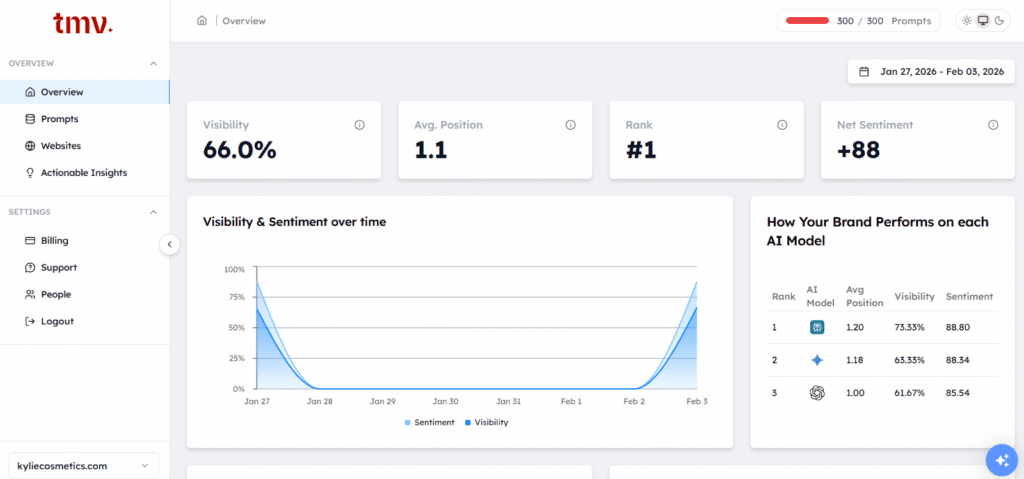
Here is what Track My Visibility actually measures and what each metric is telling you.
- Prompt-based AI Visibility Check: You pick the questions, either ones you write yourself or query sets built around real customer personas. Then the AI visibility tool runs those prompts and shows you whether AI models are pointing people to your brand or handing that visibility straight to a competitor.
- Run Across AI Models: Your prompts get tested on ChatGPT, Google AI Overviews, Perplexity, and Gemini, all at once. So instead of manually checking each AI search platform. You get a side-by-side view of where your brand is showing up and where your competitor is taking the spot.
- Competitor AI Visibility: You can see which competitor pages are getting cited for the same topics you care about, and where they are showing up instead of you. Once you know that, building a plan to close those gaps becomes a lot easier.
- Brand Mentions Dashboard: All your citations, mentions, visibility by AI model, and competitor comparisons are available in one dashboard. So, you don’t have to change tools or manually pull data together.
- AI Readiness Score: Each page gets a score based on how likely AI search engines are to cite it. It is a fast way to see which content AI already trusts and which pages are not quite there yet.
- AI-ready Recommendations: Rather than leaving you to figure out what to fix, the brand visibility tool gives you a prioritized list of specific things to act on. Such as, add this context, restructure this section, strengthen this signal. So, your team knows exactly what to work on next.
If you’re serious about a generative engine optimization strategy, you need data from more than one platform. See how Track My Visibility works to connect prompts, AI models, citations, mentions, and competitor tracking in one workflow.
How to Use Both AI Visibility Tools Together
Bing Webmaster Tools gives you the Microsoft slice. Track My Visibility helps you see the rest.
- Start with Bing Webmaster Tools to establish your citation baseline. Understand which pages and content types are performing inside the Microsoft ecosystem first.
- Export your grounding queries and categorize them by funnel stage. These become the foundation of your prompt research. Identify your strongest topic clusters.
- Layer in Track My Visibility to see how those same pages and topics perform on ChatGPT, Perplexity, and Google AI Overviews. From there, you can measure your visibility in AI content and build a clearer picture of where your brand stands. You can also cross-reference to find platform-specific gaps.
- Check server logs monthly for AI crawler activity. GPTBot, PerplexityBot, and ClaudeBot visits validate that citation activity is translating to actual crawls.
- Run manual spot checks: take your top grounding queries from Bing and search them directly in each AI platform. Note whether you appear, where you appear, and who else does.
- Build a unified reporting view that pulls Bing citation trends, Track My Visibility cross-platform data, and server log signals together. Review weekly for patterns, monthly for strategic decisions.
- A drop in Bing search performance data paired with stable Track My Visibility numbers often points to a Bing-specific technical issue. A drop across both platforms typically signals a content or authority problem.
Key Takeaways and Action Plan
AI Performance in Bing Webmaster gives you the first official window into AI visibility, but it’s one window in a much larger house.
Understand the accuracy limitations before presenting numbers to stakeholders. Citations measure frequency, not prominence, traffic, or revenue. Content structure and topical authority are the primary levers available to you. GEO builds on SEO fundamentals; it doesn’t replace them.
Multi-platform monitoring, Bing Webmaster Tools, plus Track My Visibility, plus server logs, is the only way to see anything close to the full picture of your AI visibility across search engines.
Start there.
Frequently Asked Questions
Start with the basics: clean crawlability, schema markup, and quality backlinks. Bing search engine ranking responds to many of the same signals as Google, but with a stronger lean toward exact-match relevance and overall site authority. Comprehensive topical coverage helps too, the more depth you have on a subject, the more relevant information you’re giving both the search engine and its AI surfaces to work with.
According to Statcounter, globally, Bing sits at around 4.4% of total market share, but that number doesn’t tell the full story. On desktops and in corporate environments, that share climbs to somewhere between 10-15%. For anyone targeting B2B audiences, Bing’s actual reach tends to get underestimated.
Yes. Bing integrates Copilot directly into search results, placing AI-generated answers alongside the traditional blue links. Bing search performance now covers both sides of that, your rankings and your AI citation presence. These AI-driven experiences are becoming a bigger part of how users interact with Bing, so tracking both matters.
Completely free. There’s no paid tier, no premium upgrade required. All core features, including AI Performance in Bing Webmaster, are available to any verified site owner at no cost.
Yes, it’s Microsoft’s official platform for website owners to manage their Bing presence. The data reflects real citation events, though it’s subject to the sampling and aggregation limitations covered earlier in this guide.
Bing respects publisher content and content owner preferences through supported control mechanisms like robots.txt directives, and the platform reflects those preferences in what gets reported.
It covers crawl health, search performance, index status, and now AI citation tracking through the AI Performance dashboard. The newer AI Performance section is where you see how your content feeds into supported AI experiences across Microsoft’s ecosystem, which unique pages are being cited, how overall citation patterns shift over time, and what topics the AI associates with your site.
Nothing. It is free for any verified site owner, no strings attached.