You’re staring at two browser tabs. Google Gemini in one. ChatGPT in the other. Both promise to make your work easier.
So you ask them the same question. They give you completely different answers.
Here’s what most comparisons won’t tell you: Gemini vs ChatGPT isn’t about which one is “better.” It’s about which one actually works for what you’re trying to do right now.
Over 90% of tech workers now use AI regularly, yet trust remains a major problem. For many, that “trust gap” exists because we’re guessing our way through, switching between models without understanding what each does best.
Gemini 3 comes from Google. ChatGPT 5.2 comes from OpenAI. Both handle creative writing differently. They approach keyword research from opposite angles. One integrates with Google Docs and the Sheets ecosystem, while the other connects to an expansive library of custom GPTs and professional agents.
So, the real question is which one should you choose?
To make your choice easier, in this blog, we’ll cover:
- How do Gemini and ChatGPT work?
- Key features of both LLM comparison ChatGPT vs Gemini
- ChatGPT vs Google Gemini’s actual performance when tested
- Free and Paid Plans of both the top AI models
Here are the three things you asked for:
Key Takeaways
- Gemini and ChatGPT are built differently at the core. Gemini is native to Google’s ecosystem with real-time search access, while ChatGPT is optimized for creative output and conversational depth.
- Neither model is universally better. Your workflow determines which one earns its keep.
- Gemini handles research, data analysis, and anything tied to Google Workspace. ChatGPT handles writing, tone control, and structured content.
- Most power users don’t pick one. They use Gemini to gather and structure, then pass it to ChatGPT to write.
- AI is also changing how SEO works. It’s not just about rankings anymore. It matters whether your content appears within AI-generated answers.
What Is Gemini?
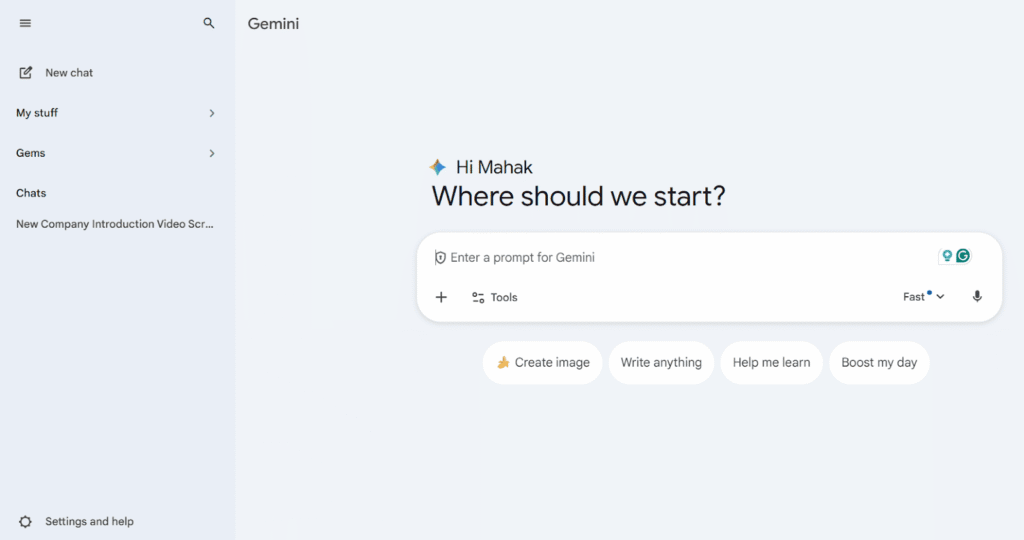
Gemini is Google’s family of AI models built to work closely with the broader Google ecosystem. It’s designed to understand and process text, images, video, and audio together, which makes it a truly native multimodal system.
The flagship version available today is Gemini 3 Flash. It’s optimized for speed while still delivering PhD-level reasoning. When tasks become more complex, Google’s Deep Think (also called Thinking Mode) allows the model to spend more time processing a problem, resulting in clearer, step-by-step reasoning.
Because Gemini connects directly with Google Search, Drive, and Docs, it’s especially strong at pulling in real-time information and working with personal or business data. This tight integration is why many teams choose Gemini to automate workflows inside Google Workspace.
How Does Google Gemini Work?
Google AI Gemini is built on large language models (LLMs) that process information by identifying patterns in text. These AI tools don’t store facts like a database. But they learn relationships between words, concepts, and ideas across millions of examples.
Understanding AI Models and LLMs
During training, the Gemini AI tool analyzes vast amounts of text, code, and media to understand context and intent. It learns the underlying logic of how information is structured.
When you ask a question, the model uses learned patterns to predict the most accurate response. Now in 2026, models like Gemini 3 also use “Thinking” processes to double-check their logic before the first word even appears.
Context Window and Response Quality
The context window is the model’s “working memory”. Gemini 3 Flash supports a 1-million-token context window, while Gemini 3 Pro can scale up to 10 million tokens. This allows the model to process thousands of pages of text, hours of video, or massive codebases in a single prompt.
A large context window is important for SEOs and researchers because it allows for “Long-Context Recall.” This means you can upload ten different competitor reports and ask Gemini to find a specific missing keyword across all of them without the model “forgetting” the details of the first report by the time it reaches the last one.
Gemini Pros and Cons
Pros:
- Direct real-time search: It integrates with Google Search and provides real-time data that other LLMs do not.
- Deep Ecosystem Integration: You can seamlessly use this for editing files and analyzing data in Google Docs, Drive, and Sheets.
- Native Multimodal Power: Unlike models that “bolt on” vision, Gemini 3 was built to process video, audio, and images simultaneously.
- Massive Working Memory: It has a 1M to 2M content window. So it can handle long content.
- Narrative Flair: It is known for a more descriptive writing style that excels in creative storytelling and metaphors.
Cons:
- Consistency Issues: It can sometimes over-explain compared to the concise outputs of GPT-5.2.
- Ecosystem Lock-in: Most “agentic” features (like Antigravity) are optimized specifically for Google’s own tools.
- Tone Control: Sometimes adopts a “corporate-neutral” stance that can be harder to push into a sharp, aggressive, or highly opinionated voice.
- Latency: While the “Flash” model is fast, the “Deep Think” mode can be significantly slower than ChatGPT’s “Instant” mode during peak hours.
Pricing and Accessibility
Google Gemini offers both paid and free versions. For many people, the free version is enough. As it runs on the Gemini 3 flash. But if you’re someone who is planning to get the paid version, see what it offers.
Free vs. Paid Versions
Free Version: It is great if you just want to test things out or if you are someone who uses Gemini AI occasionally. With the free version, you get standard web search, easy integration with apps like Google Docs and Gmail, and it’s enough to handle everyday creative tasks.
But when there is traffic, you might notice slower responses. And while you’ll get a glimpse of advanced reasoning, you won’t have full access to the heavier features like Deep Think or Deep Research modes.
Paid Version: If you have paid, then you can get access to Google AI Pro and Ultra. These are built for people who rely on AI daily, such as SEO teams, content-based strategists, and developers working on complicated projects.
If you have the paid version, you can use Gemini 3 Pro. It handles complicated reasoning and long-form coding far better than the free tier. It removes usage caps entirely, gives you priority access when everyone else is fighting for speed, and lets you use Gemini directly inside Workspace apps to tear through entire spreadsheets or slide decks in seconds.
If you’re managing SEO workflows or running data-heavy projects, the difference is night and day. The free plan gets you started. The paid plan keeps you moving.
Now that you are clear about how Gemini works. Let’s go through what an AI chatbot like ChatGPT works and see its free and paid plans.
What Is ChatGPT?
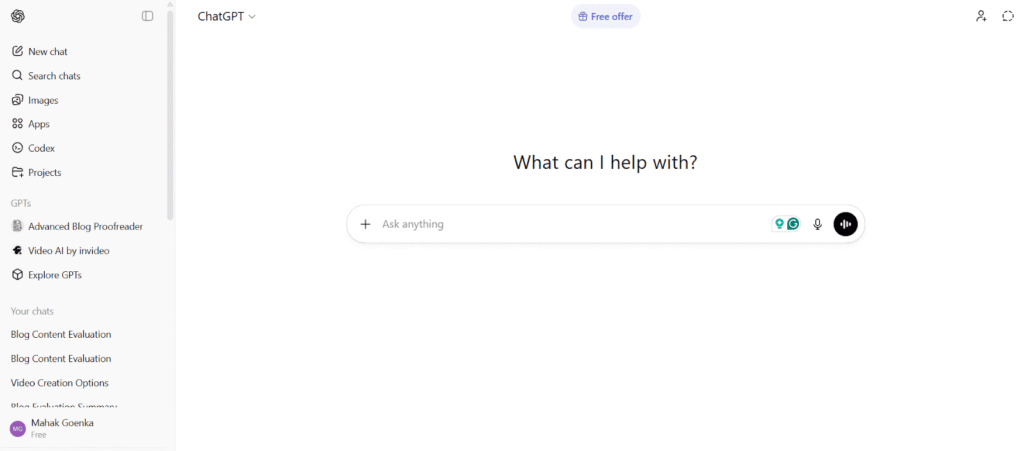
ChatGPT is OpenAI’s conversational AI assistant, and it made AI feel accessible to everyone. It is currently powered by the GPT-5.2 series. It’s the tool that brought AI into the mainstream. It is loved for its ability to feel less like a computer and more like a highly capable creative partner.
In 2026, you don’t really have to worry about picking the “right” model anymore. ChatGPT uses a smart routing system that does the heavy lifting for you:
If you are someone who wants quick responses to emails, basic questions, or simple brainstorming. The system uses a lightning-fast version of GPT-5.2.
If you throw a complicated coding bug or a deep strategic problem at it. The model will automatically switch to a “reasoning” state. It definitely takes a few extra seconds to “think” through the logic before it speaks. It makes sure the answer is accurate and verified.
ChatGPT is versatile. It can mimic specific writing styles, draft nuanced content, and act as a sounding board for new ideas if you provide a clear prompt. Whether you need a professional project plan or a creative story, it adapts its personality to match exactly what you’re looking for.
How Does ChatGPT Work?
ChatGPT is powered by large language models (LLMs), similar to Google Gemini. It generates text by predicting the next most logical word based on patterns it has learned. In short, the basic mechanics of both AI tools are similar.
Understanding AI Models and LLMs
ChatGPT was trained on an incredible range of human knowledge, from classic literature and technical research papers to casual forum discussions. With this training, it is easier for the model to understand not just facts, but how people communicate.
When you ask ChatGPT a question, it calculates the probability of each word in real-time, building a response from scratch. If you want to understand that process in more detail, here’s a closer look at how ChatGPT generates answers.
Context Window and Response Quality
In 2026, ChatGPT’s standard GPT-5.2 model features a 400,000-token context window. This is a significant jump from previous years. It lets you upload entire books or complicated project folders without the model losing its place.
ChatGPT uses “Thinking mode” for tasks such as solving a difficult math problem or debugging a large script. While answering this, the model slows down to verify its own logic before answering. This makes sure that the final answer isn’t just a “prediction”, but a verified and logical conclusion.
ChatGPT Pros and Cons
Pros:
- Natural Conversation: ChatGPT is best at creative writing and in providing conversational responses. It picks up on subtle shifts and follows the complicated instructions without sounding like a textbook.
- Creative Partner: Whether you are drafting a difficult email or brainstorming a script, it handles creative nuances better than almost any other model.
- Integrated Search: With its built-in real-time search, it can now browse the web, provide live sports scores, or check stock prices with direct links to sources.
- The GPT Store: You have access to millions of custom-built “GPTs” created by the community for specific tasks like SEO auditing, academic research, or logo design.
- Logic & Coding: The “Thinking” mode in GPT-5.2 is a powerhouse for debugging code and solving multi-step math or logic problems.
Cons:
- Usage Caps: Even on paid plans, the “Thinking” and “Pro” modes often have message limits. If you hit your cap during a busy workday, the model might downgrade you to a simpler version.
- No Native Video Analysis: Unlike Gemini, ChatGPT still struggles to “watch” a video file directly. It usually needs a transcript or a series of screenshots to understand video content.
- “Corporate” Guardrails: Some power users find that the latest safety updates make the model a bit too cautious, sometimes refusing to answer harmless prompts that it perceives as “risky.”
- Ecosystem Silo: While it has great apps, it doesn’t live “inside” your documents and email as naturally as Gemini does for Google Workspace users.
Pricing and Accessibility
ChatGPT offers a powerful free entry point, but in 2026, the experience is largely defined by how much “reasoning power” you need. While you can do a lot without paying a cent, power users and SEO professionals generally find the paid tiers necessary to avoid workflow interruptions.
Free vs. Paid Versions
The Free Plan is great for quick, everyday tasks. It gives you access to the lightning-fast GPT-5.2 instant model and even lets you use advanced tools like web search, data analysis, and image generation.
However, it comes with a “speed limit.” You typically get about 10 top-tier messages every five hours; once you hit that, the system moves you to a much simpler “mini” model. You’ll also see clearly labeled sponsored results within the chat.
For those who need more, the paid tiers unlock so many features:
- ChatGPT Go ($8/mo): This is the “middle ground” tier. It removes ads, gives you 10x more messages than the free version, and expands your model’s memory so it remembers your preferences better over time.
- ChatGPT Plus ($20/mo): This is the standard for pros. It grants access to GPT-5.2 Thinking mode. It is important for complex SEO audits or difficult coding. It also includes Sora for video generation and Deep Research for automated market reports.
- ChatGPT Pro ($200/mo): This is built for researchers and engineers. It offers unlimited use of the most powerful model available (GPT-5.2 Pro). It allows for massive data uploads (up to 2 million tokens), which is like asking the AI to read an entire library of your company’s documents at once.
Well. I hope you are fully aware of both AI chatbots. Now, let’s compare their key features.
Gemini vs ChatGPT: Comparison of Core Capabilities
Here’s how Gemini vs ChatGPT stacks up across key metrics that matter for real-world use. Here’s a table with both the LLM comparison for you to clearly find the difference.
| Feature | ChatGPT | Gemini |
| G2 Review Score | 4.7/5 (Leader in usability) | 4.6/5 (Leader in integration) |
| Primary Strength | Creative writing & logical precision | Real-time research & Google ecosystem |
| Real-time Data | Native SearchGPT with citations | Google Search & Knowledge Graph links |
| Reasoning | “Thinking” Mode for step-by-step logic | “Deep Think” for scientific/complex math |
| Agentic Power | Custom GPTs & third-party automation | “Antigravity” agents for Google Workspace |
| Content Creation | Best for blogs, emails, & marketing copy | Best for data-heavy reports & summaries |
| Conversational Depth | Human-like, empathetic, & nuanced | Fact-heavy, concise, & structured |
| Tool Integration | Strong via GPT Store & external APIs | Seamless (Gmail, Docs, Drive, Maps, etc.) |
| Multimodal | High (Images, Audio, Data, Video) | Native (Best at video/image analysis) |
| Transparency | Clear citations for web results | Follow-up links to Google Search sources |
| Flexibility | Highly adjustable “Personality” settings | Literal, instruction-following behavior |
| Best Use Case | Content creators, SEOs, & Developers | Researchers, Analysts, & Students |
| Pricing (Paid) | $20/mo (Plus) / $200/mo (Pro) | $19.99/mo (Pro) / $250/mo (Ultra) |
Both tools are powerful, but your choice depends on what you’re actually trying to accomplish.
To give you a better idea about which one is better for you. I tested both the tools in different scenarios. So, let’s look at those one by one.
Gemini vs ChatGPT: Actual Performance When Tested
To help you finalize which tool is the best, I’ll do the actual performance test. I’ll send the same prompts to both the AI search tools and see how they respond.
1. Summarized Answer
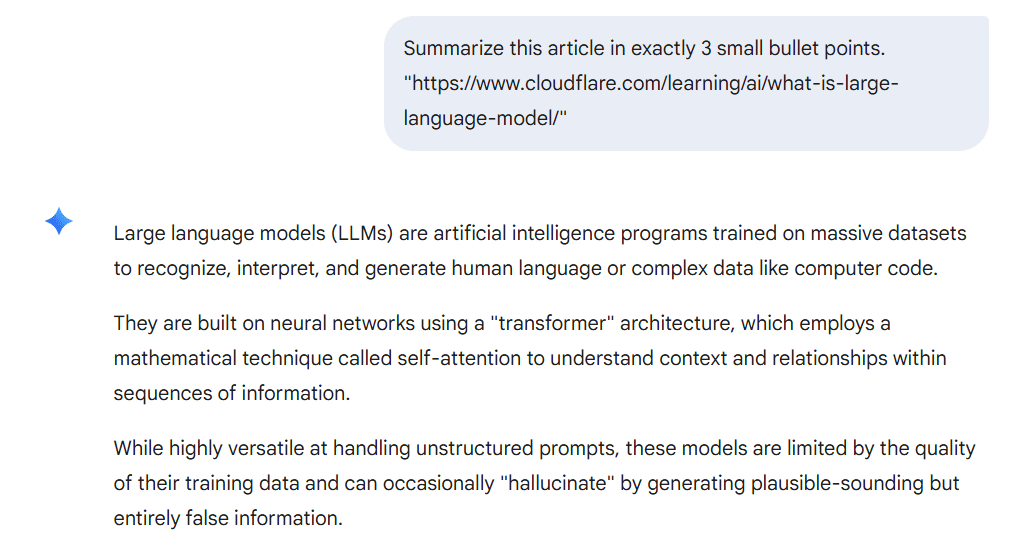
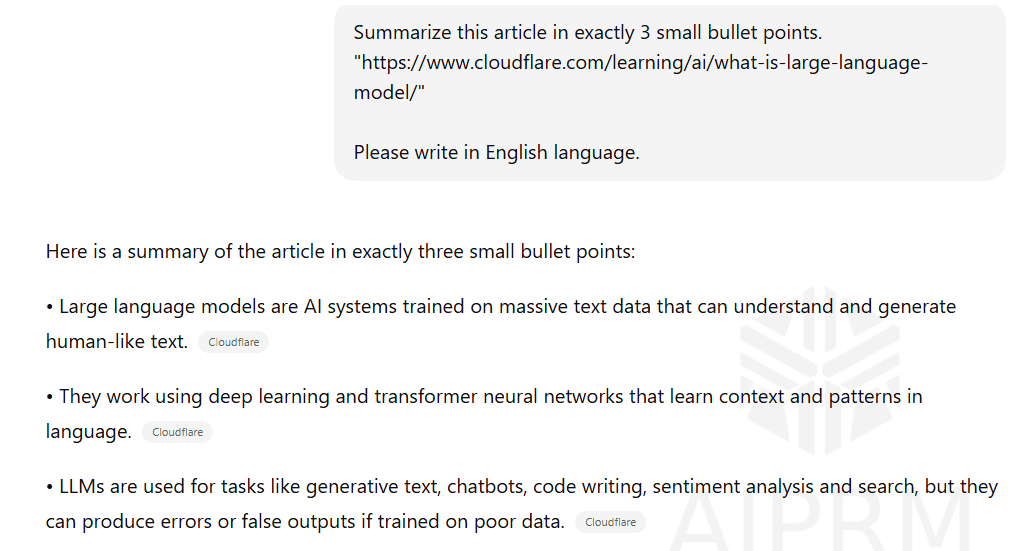
To check their summarization capabilities, I asked both ChatGPT and Google Gemini to summarize an article in exactly 3 bullet points. The article was about large language models (LLMs).
Gemini responded in 3 points as asked. It tried to cover the important points while providing brief, up to date information related to the query. But it didn’t cover what exactly LLMs are used for.
On the other hand, ChatGPT also provides exactly 3 bullet points as asked. But I feel it had a better response as it tried to cover all the important things in those points, including what they use it for.
2. Creating Content
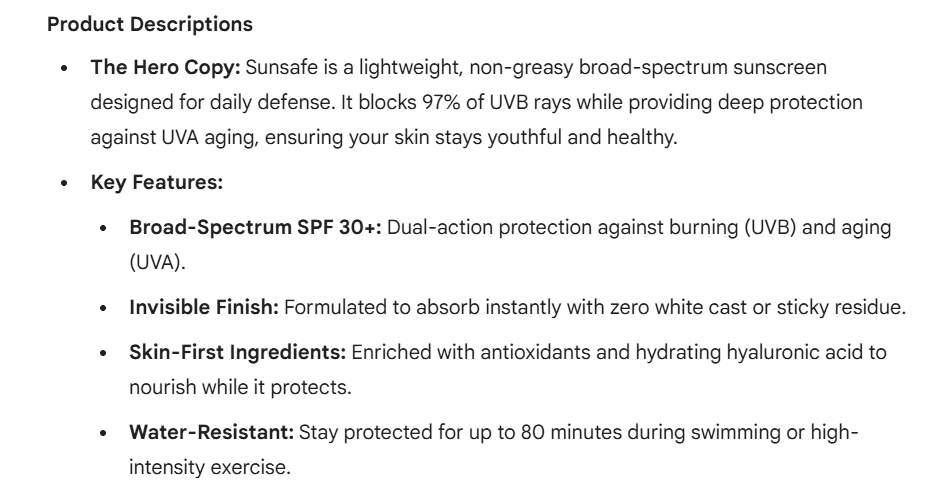
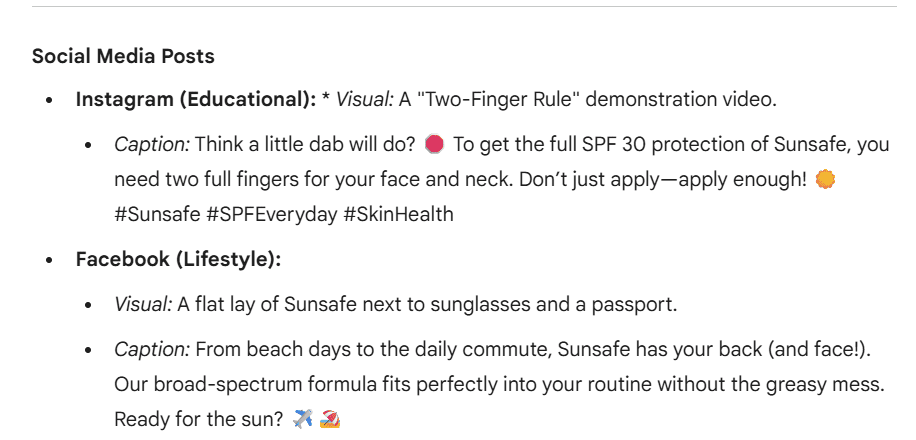
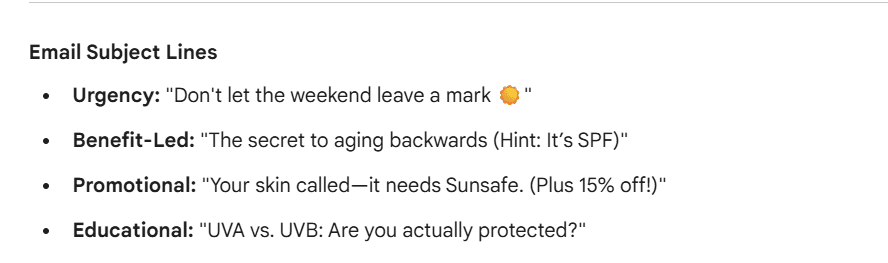
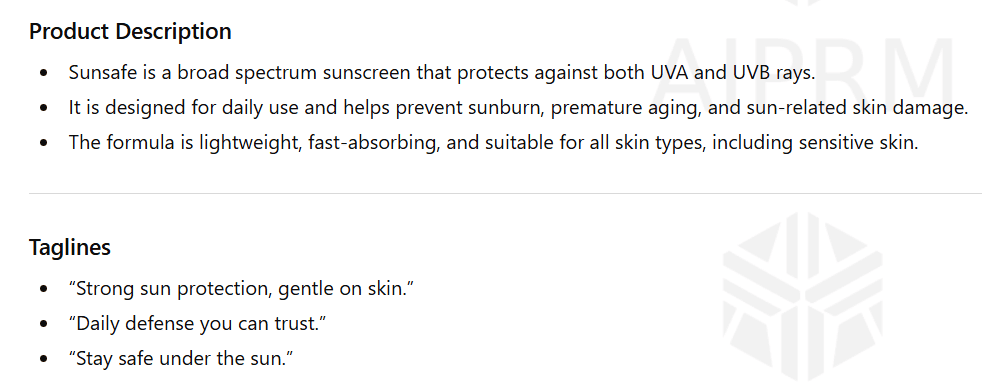
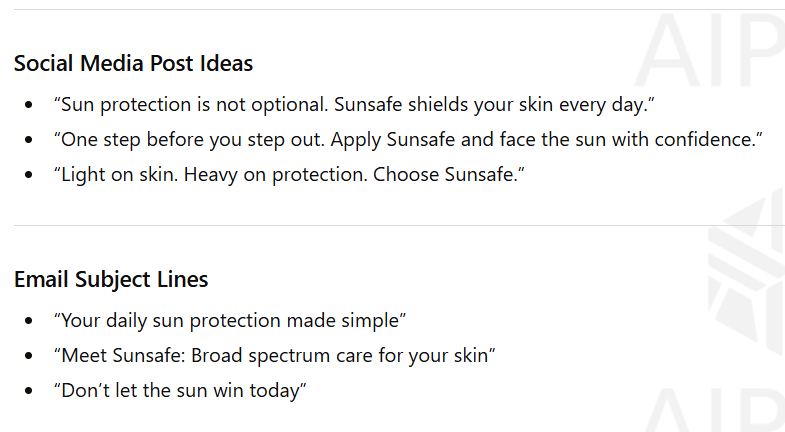
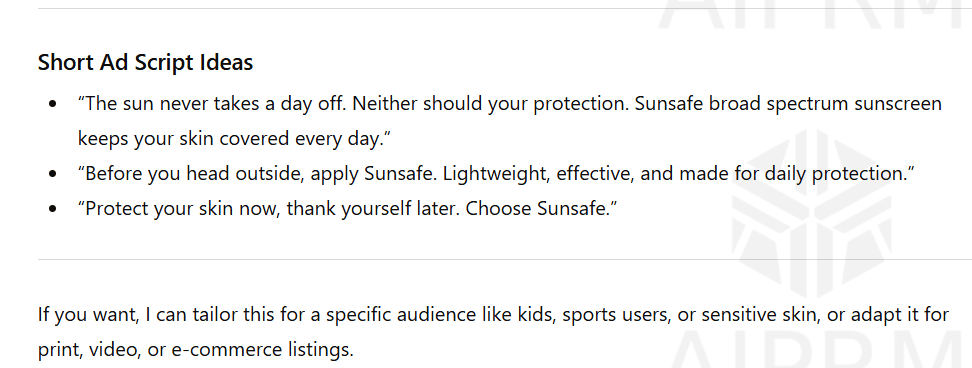
Content creation revealed clear strengths for each model. Most of the time, people use these tools for creating content. So, for this, I asked both the AI tools to generate marketing materials for the fictional product called Sunsafe (Broad Spectrum Sunscreen).
I asked both the top AI models to include product descriptions, taglines, social media posts, email subject lines, and ad scripts.
As you can see, Google Gemini gave a clearer response by mentioning its key features. It also gave a proper idea of visuals for social media posts.



ChatGPT also gave a response that included all the parts mentioned in the prompt. But it didn’t provide the exact way to publish ads for other platforms. Also, it didn’t provide any idea for music for ad scripts.
3. Creative Writing
To test the creative writing, I asked both ChatGPT and Google Gemini to write a fictional thriller story of exactly 200 words.
Gemini’s AI model delivered the engaging story and even asked a follow-up question.
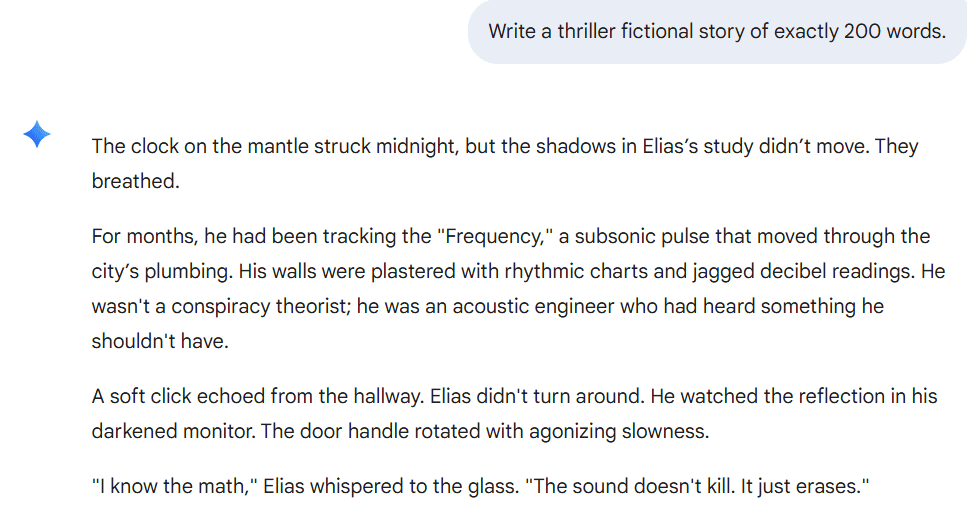
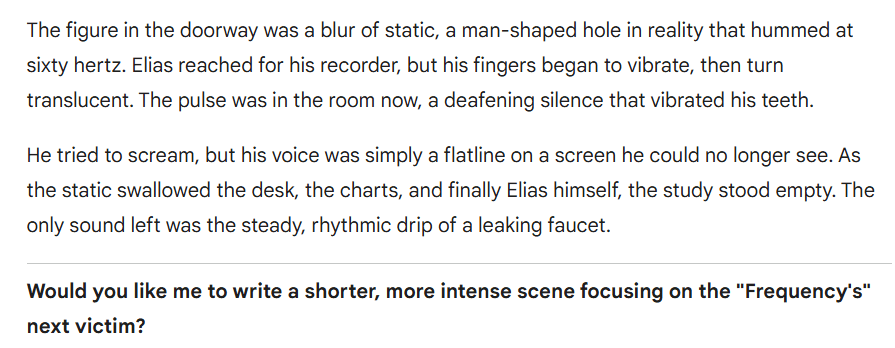
ChatGPT model also delivered an engaging story. But the tone and style were different from Gemini. But I found ChatGPT’s response more engaging.


4. Image Generation Capabilities
We have seen a lot of AI-generated images on different platforms. I also want to check how Gemini and ChatGPT generate images. So, I asked both the AI models to generate an “image with a lady standing in her boutique and displaying clothes on her display.”
Google Gemini really impressed me. It generated the image that is polished, well-lit, and spacious. As you can see, the image created by Gemini really looks legit.

ChatGPT also followed the prompt and generated the image. The image looks aesthetic and modern. But by looking at the image, you can tell that it was AI-generated.

5. Analyzing a File
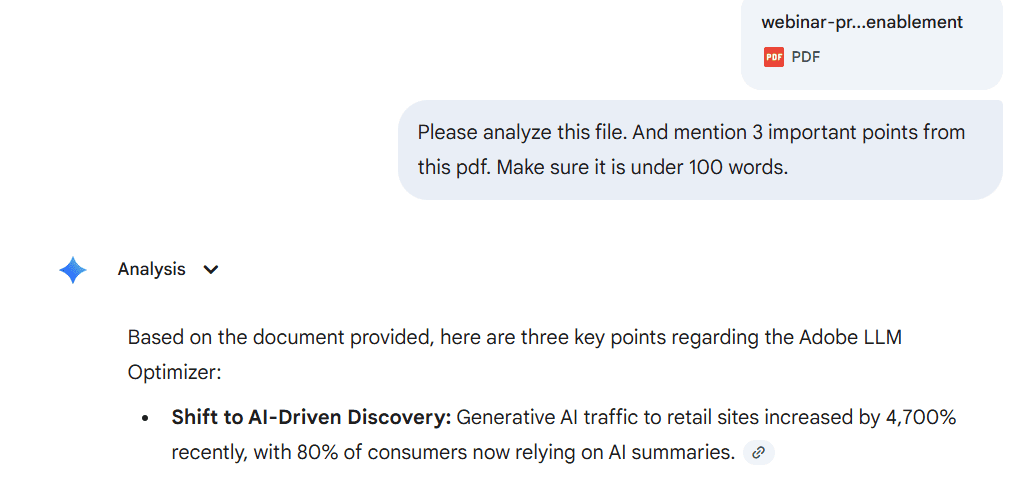
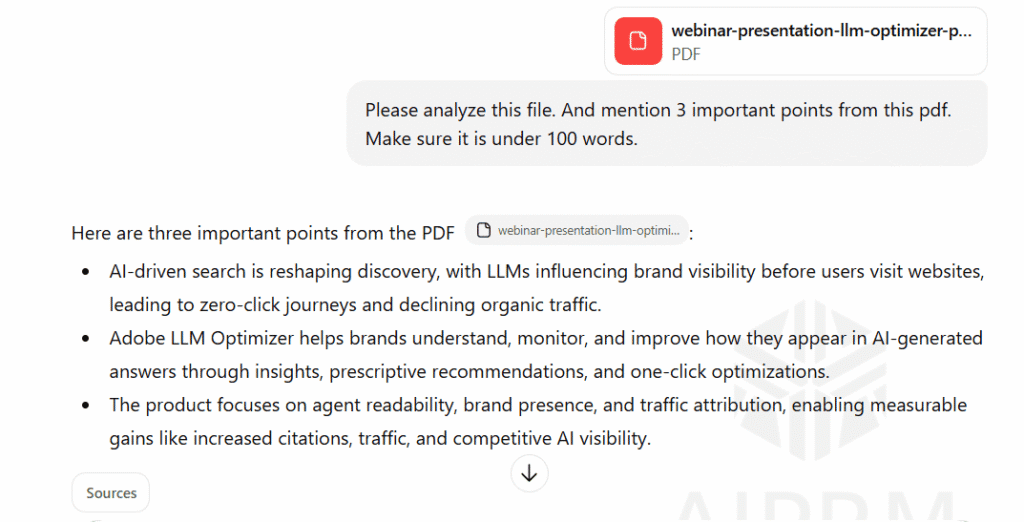
Both the AI search tools handle file uploads, but have different approaches. So, I asked both AI SEO models to analyze a file and mention 3 important points in 100 words. I gave them the PDF that talks about the Adobe LLM optimizer tool.
As you can see, Gemini’s AI tool gave me a very clear and concise summary. It also added an important point like “shift in AI-driven discovery.” This can be great for someone who doesn’t want to go through the whole PDF.

ChatGPT also provided 3 concise key takeaways. It mentioned what the tools help with, what it focuses on. But it failed to include important statistics that were mentioned in the PDF.
6. Web Search: Real-Time
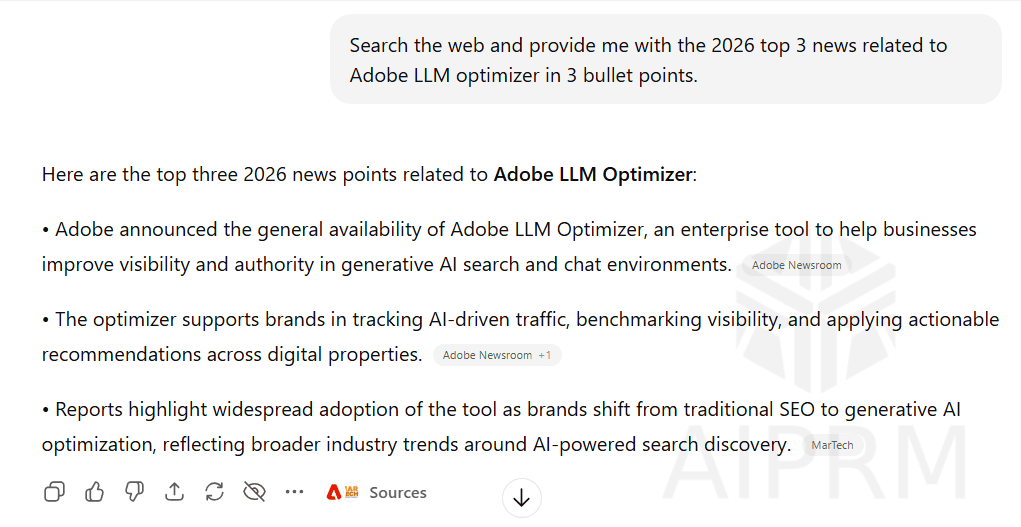
I wanted to check how both the AI SEO models perform when asked about the real-time information. To check that, I asked both the AI search tools to search the web and provide the top 3 news stories in 2026 related to the Adobe LLM optimizer.
Gemini AI search tool provided fresh information. It also summarized the information perfectly for me. But, I only had one issue: there were no citations in the response to verify the information.
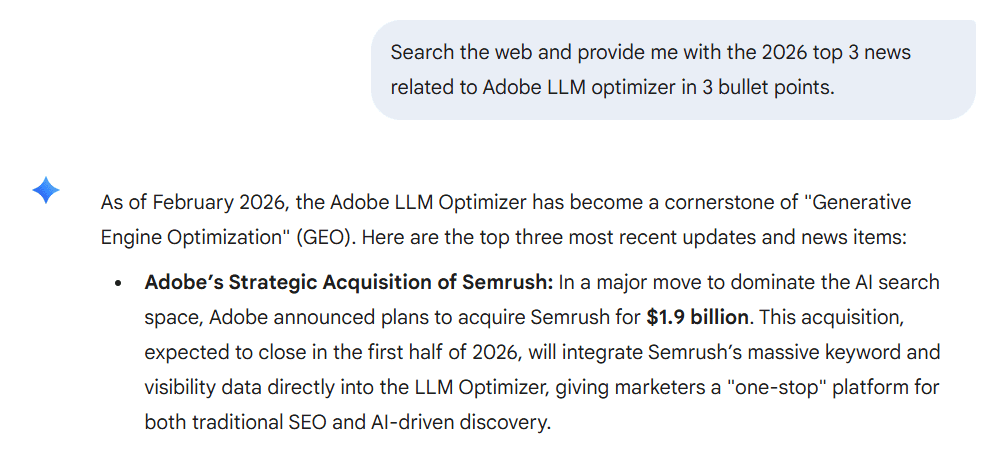

ChatGPT, on the other hand, provided responses from 2025. It did include the citations for verification, but the news was from Oct, 2025.
7. Image Analysis
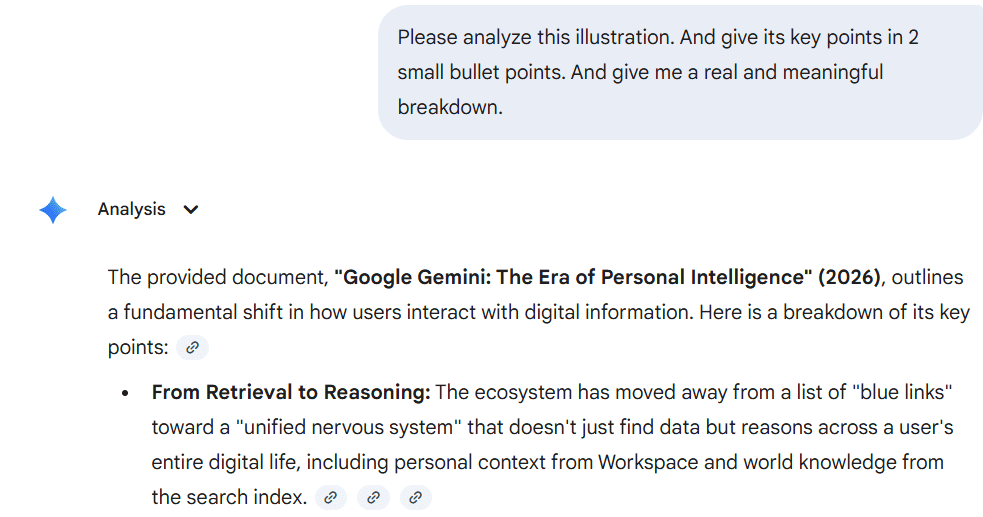
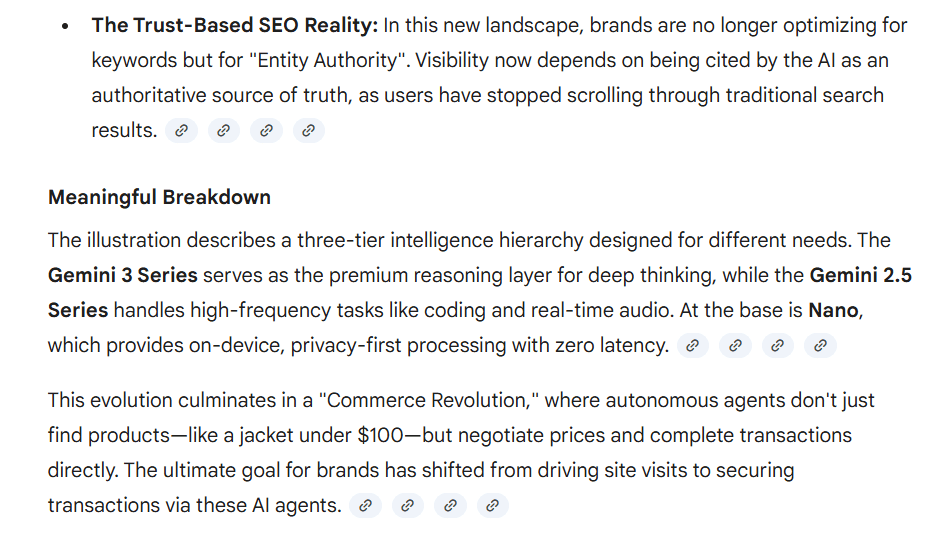
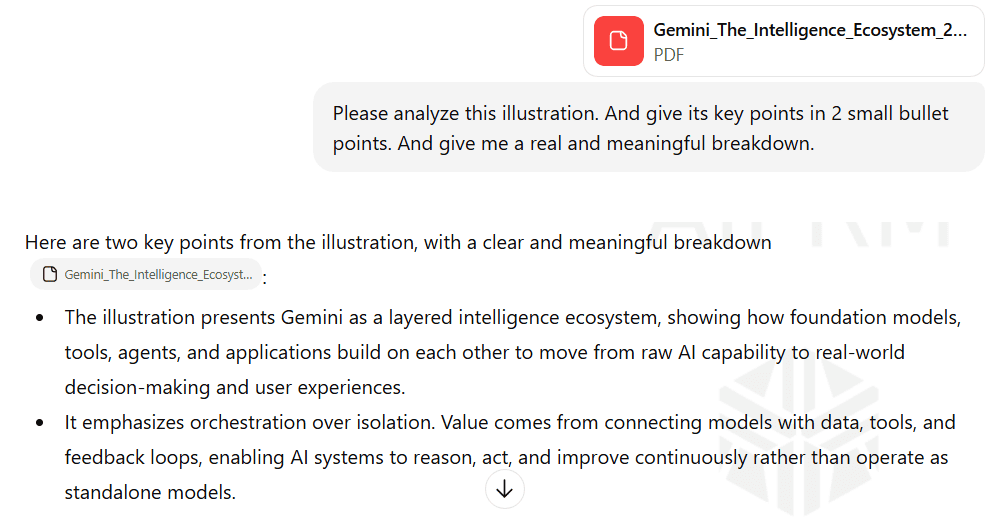
Next, I wanted to see how both models analyze the image. So, I gave both the AI search tools to analyze the image and provide me with its key takeaways in 2 small bullet points. I also wanted them to give me a real and meaningful breakdown.
Google Gemini’s AI tool analyzed the illustration quickly and provided me with the 2 bullet points. It also provided me with a meaningful breakdown of the image.
ChatGPT’s AI model provided me with 2 concise bullet points. It also explained the image properly. But if we compare it with Gemini, then the analysis was not that great.
I hope that now, you have a clear picture of Gemini vs ChatGPT. But we are not done yet. Let’s look at which tool is beneficial for SEO professionals.
8. Video Generation
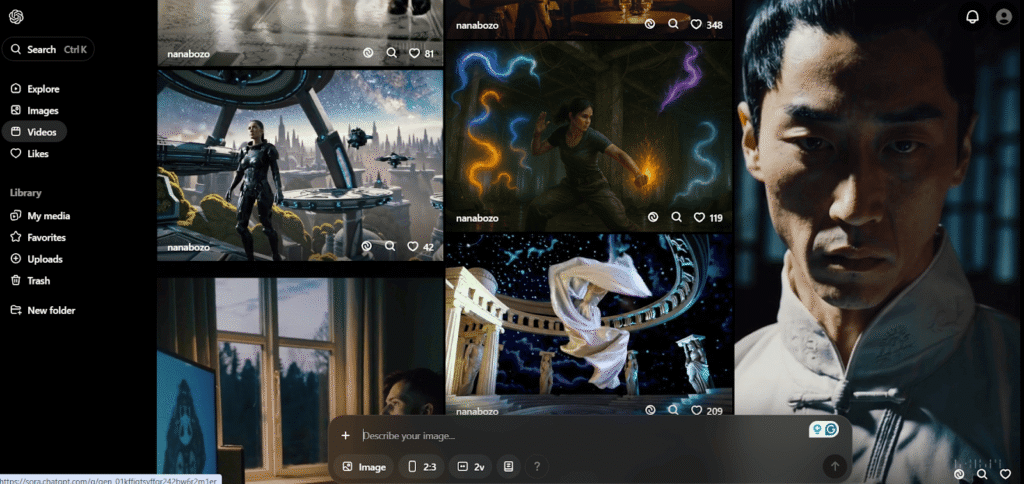
Google Gemini uses Veo 3.1 to generate the video, and ChatGPT uses Sora 2. If you want to know how both the AI search tools generate video. You can start by giving a simple prompt to both of them.
For example, create an ultra-realistic video of 8 sec of a dog playing with a ball in the middle of a peaceful forest.
Let’s look at what the Veo 3.1 dashboard looks like:

Here, you can see what the Sora 2 dashboard looks like:
Gemini vs ChatGPT for SEO Professionals
SEO work requires accuracy, speed, and access to current data. Both tools are useful when it comes to search engine optimization, but they perform well in different workflows.
Supporting SEO Workflows
Gemini is better for:
- Keyword research: If you’re looking for keyword suggestions use an AI tool. Then, Gemini is better as it taps into live Google search data to surface trending terms and related queries.
- Competitive analysis: As Gemini uses Google search, you can see who’s ranking right now for your target keywords.
- SERP analysis: It will also help you with what’s actually ranking. Such as videos, featured snippets, or listicles.
- Content research: If you want data related to the latest news reports. You can take the help of Gemini. It will provide you with the latest and entire report with related examples.
ChatGPT is better for:
- Content drafting: If you’re someone who wants to draft a blog post. Then, ChatGPT can be a right fit. As it drafts better content and is also great when it comes to creative writing.
- On-page elements: If you want AI to write meta descriptions, title tags, and headers for your blog posts.
- Ideation: If you need an idea for new content. If you want to create an outline or want better topics.
- Technical SEO: You can rely on ChatGPT if you need schema markup or code for technical SEO fixes.
There are so many SEO professionals who use both tools. And if you want to go beyond just picking the right tool and start optimizing your content for both platforms, this guide on how to rank in AI search is worth reading alongside this comparison. Gemini handles research and data gathering. ChatGPT takes care of writing and creative work.
Limitations for SEO Tasks
Neither tool replaces human judgment. AI responses tend to be generic. They miss brand voice and don’t capture the specifics of niche audiences. These AI SEO models can suggest a direction, but they can’t run a full campaign or make strategic decisions.
Always verify keyword data with actual SEO tools. AI search models sometimes make up search volumes or recommend terms with no real commercial value.
Leaning too hard on AI for content often results in shallow writing that doesn’t stand out. The best approach is to treat AI as a fast assistant, not as a replacement for someone who knows what they’re doing.
Future of AI Models and SEO
AI is changing how search engines present information. Google’s algorithms have moved past simple keyword placement, now favoring depth of the content and genuine topical authority.
The bigger change, however, isn’t just about ranking factors. It is about how people actually interact with organic search results. The traditional model of “ten blue links” is becoming less dominant as AI-powered tool features take up more screen space. That shift is exactly what makes AI search vs traditional SEO one of the more important strategic questions right now.
This means SEO professionals need to think beyond traditional metrics. Getting to position one still matters, but it is no longer the only goal. You also need to consider whether your content is being pulled into AI-generated answers, whether it is establishing your brand as an authority, and whether it provides value that cannot be replicated by a quick summary.
How AI Is Changing Search and Visibility
Search results now often include AI-generated summaries that answer questions directly. This can hurt click-through rates for basic queries. The challenge is to create content with enough depth and uniqueness that an AI summary cannot replace it.
Tracking how your brand shows up in these AI responses matters as much as traditional ranking. Tools like Track My Visibility let you see if models are citing your products or content. This tells you whether you are being referenced as a source or if competitors are getting that visibility instead. That kind of insight helps you adjust your approach.

Now that we have discussed everything. The real question is which AI search tool you should choose. Well, the answer to that is in the next section. So, keep on reading.
Which AI Model Should You Choose?
Choosing an AI model totally depends on what you need it for. Let’s break down what these AI tools are best for and what they can do, so that you can choose wisely.
Best for Content Creators
ChatGPT tends to be better for creative and marketing work. It handles creative writing, such as working on fiction and storytelling. If you want to write a long-form blog that sounds human-written rather than AI, you can use ChatGPT.
If you are someone who sends a lot of outreach emails based on your own brand voice, ChatGPT is the best for you. If you want your landing pages to persuade, use ChatGPT.
Best for SEO and Marketing Teams
Gemini works better for technical stuff and research-heavy projects. It’s particularly good at searching specific keywords by pulling data straight from the search engine. If you want a competitive analysis or want data-backed research, Gemini is best for you.
If you want to generate images to add to your blog, you can go for the Gemini AI tool. If there is a large file that you want to analyze. You can ask Gemini to go through the file and point out the important features mentioned in the file.
When to Use Both Together
So many people don’t stick to just one tool. They use both depending on the phase of work.
A typical approach is to start with Gemini for research, data, and outlining the facts. Once you have solid information, you move it over to ChatGPT for the actual writing and polishing. That way, you get Gemini’s accuracy and ChatGPT’s writing ability. Your result is both correct and readable.
A Reddit user shared that after testing both tools for over a year, he continues using both ChatGPT and Gemini because each fills a gap the other doesn’t, noting that switching entirely to one tool would mean losing valuable memory and context built up over time.
Why I Still Use Both ChatGPT and Gemini even After Gemini 3.0 – Why All The Comparisons Are Practically Useless
by u/BeingBalanced in ChatGPT
For instance, you might use Gemini to dig up high-value keywords and spot current trends. Then you hand those insights to ChatGPT and let it turn them into a blog post or report that people will actually want to read.
 Pro Tip: Ranking on page one doesn’t guarantee you’re showing up in AI-generated answers. Most businesses don’t realize there’s a gap until they check. Use this free AEO & GEO audit checklist to see where your content stands before your competitors do.
Final Thoughts!
If you’re someone who’s confused with AI tool is better. Then, understanding how Gemini vs ChatGPT works helps you choose the right tool for your needs. Google Gemini excels at real-time research, doing data analysis, and integrating with the Google ecosystem. ChatGPT dominates creative writing, conversational depth, and tone control.
There’s no single perfect AI. The best approach depends on what you’re trying to accomplish. Test both Gemini and ChatGPT AI chatbots with your actual workflows to see which one fits naturally. Track which model drives better accuracy, speed, and visibility for your content.

As AI models continue shaping visibility and search, tracking how your brand appears in AI responses becomes equally important. Tools like Track My Visibility help you monitor your presence across AI-driven platforms, giving you clarity on how AI tools represent your content and where opportunities exist.
Used thoughtfully, both Gemini and ChatGPT can support smarter, faster workflows without replacing human creativity or strategic thinking.
Many professionals now work with multiple LLMs rather than limiting themselves to just one, since each has a broad range of capabilities that complement the other. That said, if you’re looking for generic advice, either tool will get you started.
Resource: Google says 90% of tech workers are now using AI at work | KSL.com
Frequently Asked Questions
Is Gemini better than ChatGPT?
There's no clear winner. Gemini works better for heavy research, pulling real-time data through Google Search, and handling large amounts of information at once. ChatGPT is stronger for creative writing, keeping a natural conversational tone, and putting together structured content like blog posts or marketing copy. It comes down to whether you need someone to do deep research or someone to write well.
Is ChatGPT better than Gemini?
It depends on what you're doing. ChatGPT is better at the human side of things: storytelling, creative ideas, writing in a particular voice. Gemini focuses on accuracy and utility. It's better for factual research, keyword analysis, and anything involving Google Workspace. Both do their jobs well. A lot of people just use both.
Do I need ChatGPT if I have Gemini?
If you only do research and data analysis, Gemini might cover it. But most people find the creative writing ChatGPT delivers is more polished and gives you more control over tone. ChatGPT also has a bigger ecosystem of custom tools and third-party integrations. If you spend a lot of time drafting and editing, having both makes a real difference.
Is Gemini 2.0 better than GPT-4o?
Gemini 2.0 (and the newer Gemini 3 series) can handle up to 1 million tokens in one session. That means it can process entire books or huge codebases without breaking a sweat. It's also a bit stronger with multimodal stuff like video analysis. GPT-4o represents the latest model from OpenAI and feels more natural to talk to while handling complex, layered reasoning better. Pick Gemini for big data. Pick GPT for nuanced conversation.
Do I need a Google Workspace account to use Gemini's best features?
Not for the basics. You can use the Flash and Pro models with a regular personal account. But if you want Gemini embedded in your workflow, like writing emails in Gmail, organizing data in Sheets, or working with your own data. You'll need a Workspace subscription or a Google AI Premium plan to get that integration.
Which LLM is most in demand?
ChatGPT is still the most popular globally. It got to market first and built a huge, loyal user base. But Gemini is closing the gap fast. It's become the go-to for enterprise teams and SEO professionals already using Google tools, and it's growing quickly because it's built into millions of Android devices.