


People are asking AI instead of scanning 10 blue links. When was the last time you scanned the search engine? I’m sure it was not recently.
By the end of 2025, Google’s Gemini app surged past 650 million monthly active users, which shows a clear shift toward interactive, answer-oriented experiences instead of a list of links.
This shift toward AI search has prompted a question: What is Google Gemini? Is it a chatbot, a search replacement, or something else entirely?
Google announced Gemini as a new multimodal AI system that is designed to bring reasoning, understanding, and personal context into everyday search and tasks.
Instead of treating search as a list of pages, Gemini aims to act more like a thinking assistant that connects information across Google products.
In this blog, you’ll learn:
- What Google Gemini is and how it works
- How Gemini differs from traditional Google Search
- What are the Different Gemini AI Models
- Why Gemini matters for users, brands, and SEO
Let’s get started!
What Is Google Gemini?

Gemini is an AI system designed by Google to understand complicated questions, find out the answer from multiple sources, and respond in a human-like way. It is a natively multimodal AI, designed to understand text, images, audio, video, and code across various applications.
Gemini works across many Google products (Gmail, Docs, Drive), combining search, AI models, and personal context into a single experience. It helps users with finding answers, summarize information, and interact with data instead of just retrieving links.
Unlike the old Google Assistant, which relied on predefined voice commands, Gemini adapts to natural language as it maintains conversational context across follow-up queries. It connects search results, personal data (when provided access to), and reasoning to provide more useful responses.
In short, Google Gemini sits at the intersection of Google Search, Google AI, and everyday tools like Gmail, Google Maps, and Google Workspace.
Why Google Created Gemini
Traditional Google Search works best for directing users to relevant pages, but it often struggles with giving actual answers. And because of this, users face a lot of issues, like:
- Scrolling through so many ads, links just to find an answer to one single question.
- Users had to go through various pages to piece together the final answer.
- Many queries require multiple 3-4 follow-up searches, as the system was not able to understand user intent properly.
Earlier AI tools inside Google solved parts of the problem, but remained fragmented. Users had to use one tool to research, another tool to write, and a different tool to organize pictures. Google saw the opportunity to solve this problem by creating an intelligent system.
The bigger challenge was personal intelligence. Google already had access to your Gmail inbox, Google Photos library, browsing history, and location data from Google Maps. But these systems didn’t talk to each other in meaningful ways. Gemini changes that by making connections across your digital life while respecting privacy boundaries.
This shift shows a broader change in how people expect technology to work. Instead of memorizing which tool does what, users now want systems to understand intent and provide useful answers immediately.
Now, you’ve understood what Google Gemini is. Let’s see how it works.
How Does Gemini Work?
Google AI Gemini uses a large language model (LLM) architecture. It means it learns patterns from massive datasets of text, images, and code to generate contextually relevant responses.
When a user asks a question, Gemini AI combines search results, reasoning, and summarization into a single response. If you want a more complete answer, then the model can also draw connections across different topics.
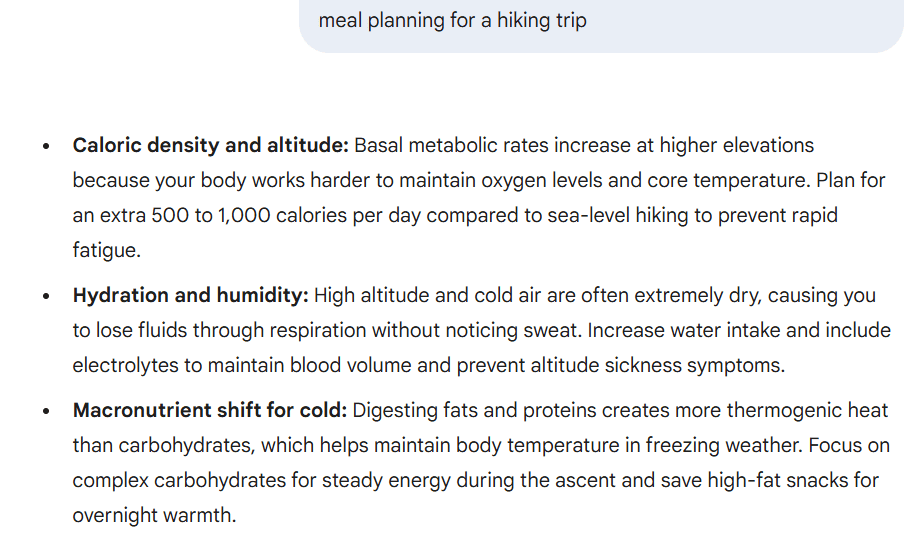
I tested it by asking Google Gemini to plan a meal for my hiking trip:
I know you’re wondering how Gemini AI is different from Google search, so let’s get into it.
How Google Gemini Is Different From Google Search
Google Gemini changes how users interact with search by shifting the focus from discovery to understanding. Instead of asking users to navigate results, Gemini explains them.
This difference matters because everyday searching now includes learning, planning, and decision-making, and not just finding a page.
1. Traditional Google Search vs Gemini Search
Classic Google Search ranks pages and shows results based on relevance and authority. Users scan links, ads, and snippets to decide what to click.
Gemini search works differently. It presents summarized answers, explains reasoning, and allows follow-up questions without starting over. The experience feels closer to a conversation than a directory.
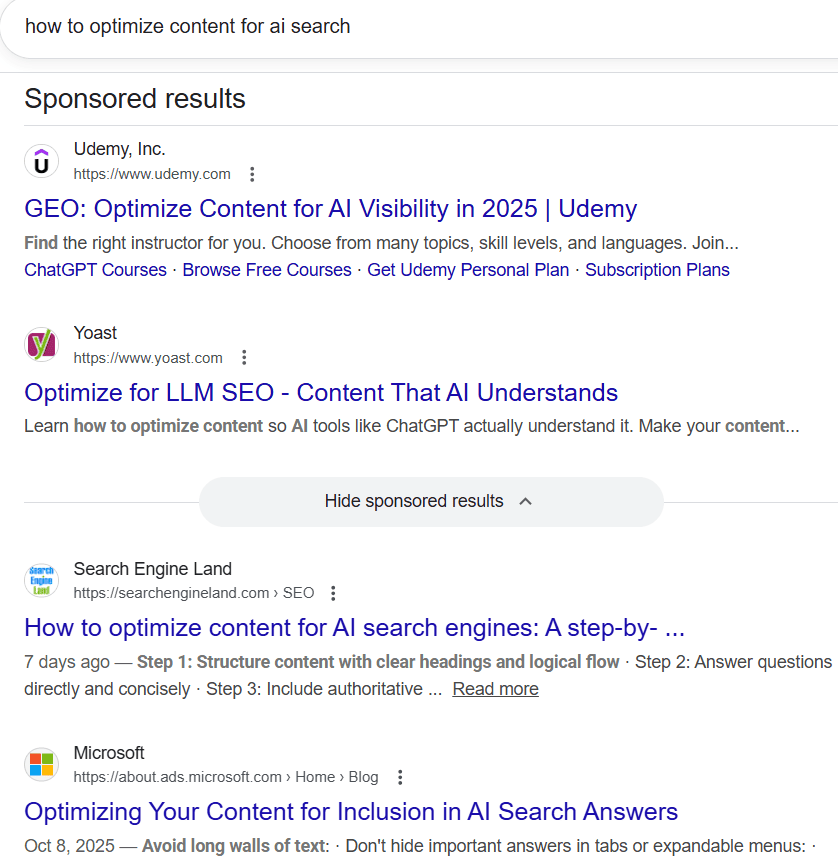
Here’s an example where you can see how traditional Google search responds to a query with sponsored ads and multiple other links:
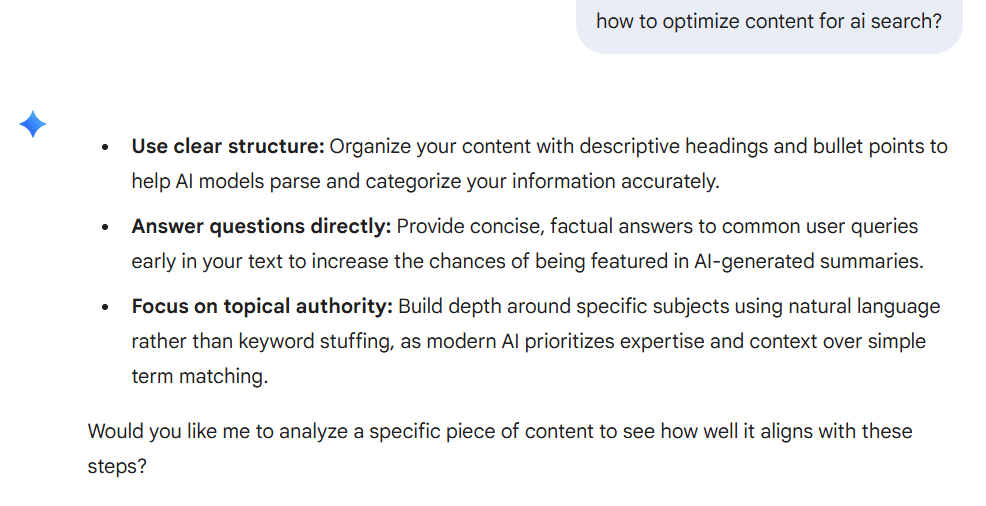
Let’s look at the same query in the Gemini AI model and see how it responds:
2. Google Gemini Search Experience
When users interact with Google Gemini search, they receive structured explanations instead of scattered information. Responses include citations and neatly pulled ratings when applicable, helping users verify sources.
Users can also ask follow-up questions, refine their query, or explore deeper explanations without retyping from scratch.
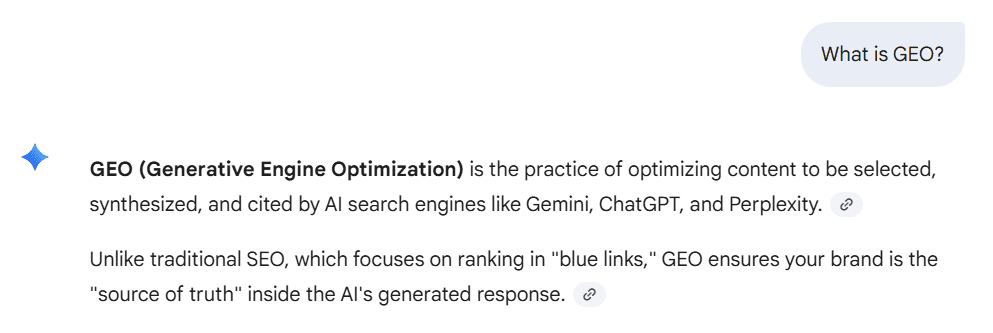
As you can see below, I asked the Gemini AI tool, “What is GEO?”, and it replied with citations so I could verify the information.
3. AI Mode in Google Search
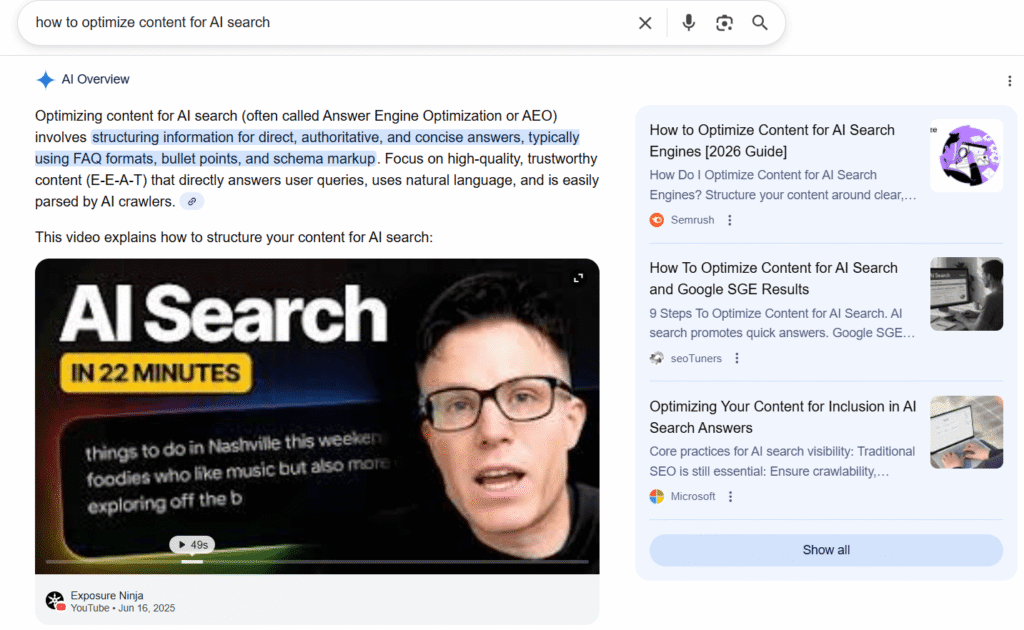
AI Mode is Google’s way of integrating Gemini directly into Google Search. Powered by the Gemini model, AI Overview changes user behavior by reducing scrolling and encouraging conversational searching.
Let’s look at an example of AI Overview, trackable with an AI Overviews tracker. With this, users will have to scroll less to get valid information.:
So, now you know how it is different from Google search. Now, let’s talk about different model versions of Gemini that you’ll get to use.
Gemini’s AI Model Versions
| Series | Model | Primary Focus | Best Used For |
| Gemini 3 (Latest) | Gemini 3 Pro | Deep reasoning, agentic workflows | Multi-step analysis, high-accuracy tasks, autonomous project execution |
| Gemini 3 Flash | Balanced speed and reasoning | Every day multimodal tasks without huge context needs | |
| Gemini 3 Deep Think | Specialized extreme reasoning | Hard problems in math, science, and competitive programming | |
| Gemini 2.5 (Advanced) | Gemini 2.5 Pro | Long-context understanding | Large documents, datasets, complex codebases |
| Gemini 2.5 Deep Think | Advanced technical reasoning | Everyday Q&A, summaries, and general assistance across apps | |
| Gemini 2.5 Flash | Scalable performance | High-volume, consistent-quality processing | |
| Gemini 2.5 Flash-Lite | Maximum efficiency | Repetitive, lightweight, high-frequency tasks | |
| Gemini 2.5 Flash Live / TTS | Real-time voice interaction | Conversational audio, spoken responses | |
| Gemini 2.0 (Agentic Era) | Gemini 2.0 Pro | Multimodal, tool-using intelligence | Complex reasoning, coding, agent-driven workflows |
| Gemini 2.0 Flash | Speed-cost balance | Fast, capable general-purpose tasks at scale | |
| Gemini 2.0 Flash-Lite | Ultra-fast execution | Simple classifications, short summaries, autocomplete | |
| Gemini 1.5 (Long Context) | Gemini 1.5 Pro | Massive context window | Deep research, large codebases, long videos |
| Gemini 1.5 Flash | Low latency multimodal | Search, productivity, and common AI tasks | |
| Gemini 1.0 (Original) | Ultra | Maximum capability (first gen) | Highly complex reasoning tasks |
| Pro | General-purpose foundation | Search, productivity, common AI tasks |
As of January 2026, Google designed multiple Gemini model versions so that each model can handle a different type of task, environment, and user need. Gemini 3 is the latest model, and other than that, the previous series are still in use for specific purposes.
Models like Gemini 3 Pro prioritize reasoning, others focus on speed, and some are built to run directly on devices with limited resources. This layered approach allows Gemini to work across search, mobile experiences, and everyday Google apps without forcing the same model to handle everything.
Understanding these versions helps explain why Gemini behaves differently depending on where and how you use it.
1. Gemini 3 Series (Latest)
The Gemini 3 series is Google’s most recent advancement in its AI model lineup. These models are designed to handle complex reasoning while remaining responsive in real-world use.
a. Gemini 3 Pro: This is the most capable model in this series. It has a deep think mode, which means it can go through multi-step problems, connect ideas across topics, and handle complex questions that require careful analysis.
This model is often used in scenarios where accuracy and reasoning depth matter more than speed. It is also optimized for agentic workflows, which means it can autonomously navigate different Google apps to complete a project from start to finish.
b. Gemini 3 Flash: It is designed for everyday interactions. It balances responsiveness with thoughtful answers. It is the best choice for common tasks such as summarizing information, answering questions, or assisting across various Google apps without noticeable delays.
c. Gemini 3 Deep Think: Rather than a general-purpose model, Deep Think is a specialized reasoning variant. It is built specifically for the hardest problems in science, research, and engineering. It is best for verifying complex mathematical proofs, solving “Humanity’s Last Exam” level challenges, and modeling physical systems.
2. Gemini 2.5 Series (Advanced)
The Gemini 2.5 series focuses on advanced processing and flexibility. You can use these models in more technical or large-scale environments.
a. Gemini 2.5 Pro: It supports long-context analysis. It makes it useful for reviewing large datasets, understanding extended documents, or working with programming languages that require tracking logic across many lines of code. For example, you can send a 500-page document if you want to know if there is a mention of a late payment fee anywhere.
b. Gemini 2.5 Deep Think: It is a specialized reasoning model designed for the most difficult technical challenges. It uses an extended internal reasoning process to solve complex problems in science, advanced mathematics, and competitive programming.
c. Gemini 2.5 Flash: It offers a balanced option for large-scale processing. It’s designed to handle high volumes of requests efficiently, making it suitable for systems that need consistent performance without sacrificing quality.
d. Gemini 2.5 Flash-Lite: It is optimized for high-frequency tasks where speed and efficiency matter more than depth. It works well for repetitive actions or lightweight requests.
e. Gemini 2.5 Flash Live / TTS: Supports real-time audio interactions and conversational experiences. This model enables spoken responses and continuous dialogue, allowing users to interact with Gemini in a more natural, voice-based way.
Developers can access several of these capabilities through the Gemini API, depending on their use case and permissions.
3. Gemini 2.0 (The Agentic Era)
This is where Gemini started feeling less like an AI chatbot and more like an assistant that can actually do things. The 2.0 series was built around what Google calls “agentic” capabilities. Which means the model doesn’t just answer your question, it can use tools, connect to apps, browse the web, and take multi-step actions on your behalf.
a. Gemini 2.0 Pro: It sits at the top of the lineup. It’s built for heavy lifting. Such as complex reasoning, coding, and tasks that involve multiple types of input, like text, images, and audio, together. If you’re doing serious work, this is the one.
b. Gemini 2.0 Flash: It is honestly the most interesting model of the three. It’s faster and more capable than the older 1.5 Pro. It is a bigger model from the previous generation, while being cheaper to run.
c. Gemini 2.0 Flash-Lite: It is the high-speed variant. It trades some capability for raw speed and efficiency. Which is ideal for simple, repetitive tasks that need to run at scale. Such as quick classifications, short summaries, or autocomplete-style suggestions, where you’re firing off thousands of requests.
4. Gemini 1.5 (Multimodal & Long Context)
Google made a significant architectural shift here. By giving these models the ability to process massive amounts of information in a single sitting, rather than working through it in chunks.
a. Gemini 1.5 Pro: It became famous for its 1-million-token context window, later pushed to 2 million. In plain terms, that means it could read through thousands of lines of code or hours of video in one go, without losing track of what came earlier. A huge deal for anyone doing deep research or working with large codebases.
b. Gemini 1.5 Flash: Instead of chasing the same scale as Pro, it was built for speed and efficiency. It delivers the same multimodal capabilities but at much lower latency and cost. Think of it as the practical, everyday version of 1.5 Pro: faster to respond, lighter on resources, and a better fit when you don’t need the full power of a million-token window.
5. Gemini 1.0 (Original)
The Gemini 1.0 models introduced the foundation of Google’s AI system and established how Gemini would function across products.
a. Ultra: It was built for highly complex tasks, where deep reasoning and comprehensive understanding were required.
b. Pro: It serves as a versatile model capable of handling a wide range of everyday tasks across search and productivity tools.
Let’s see what benefits you will get if you choose Gemini for your work.
What are the Advantages of Google Gemini
Google Gemini moves beyond static answers. It supports real-time interaction, context awareness, and conversational flow. This shift allows users to move from searching to understanding.
1. Multimodal Intelligence
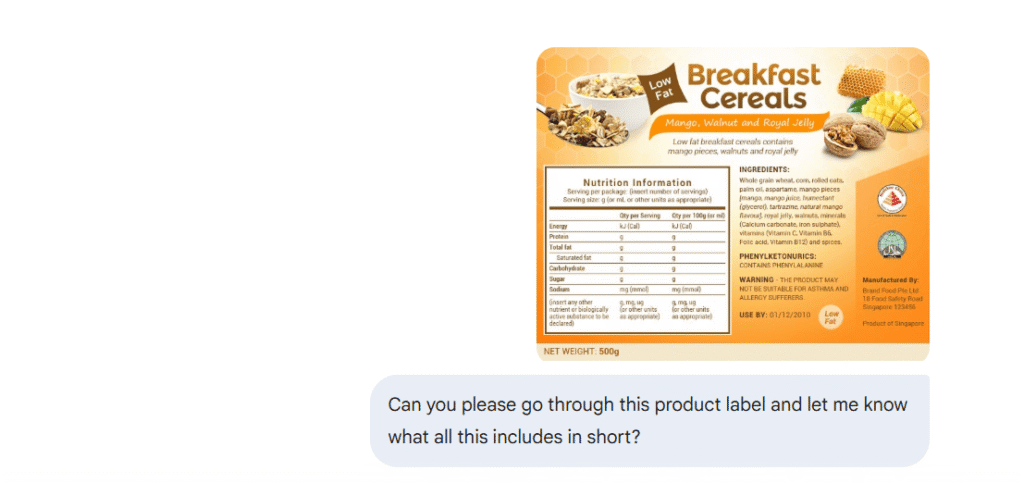
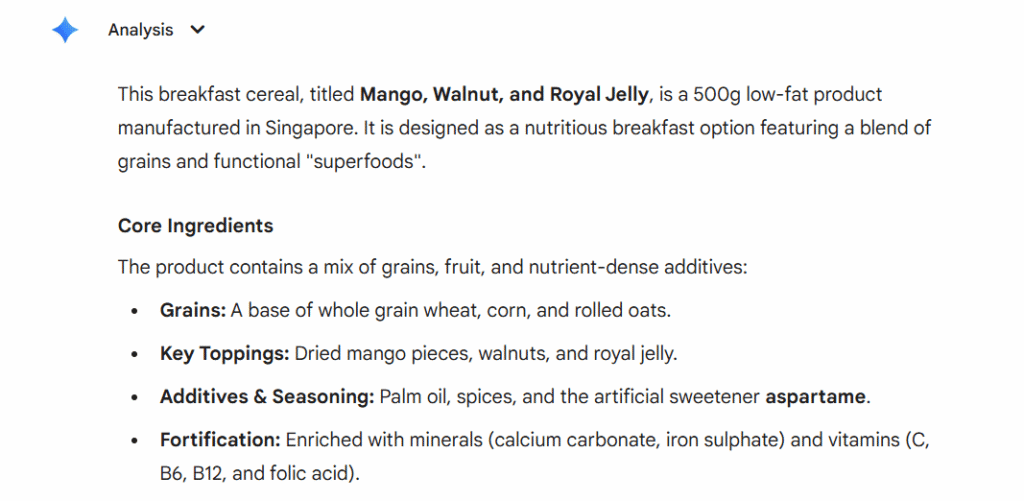
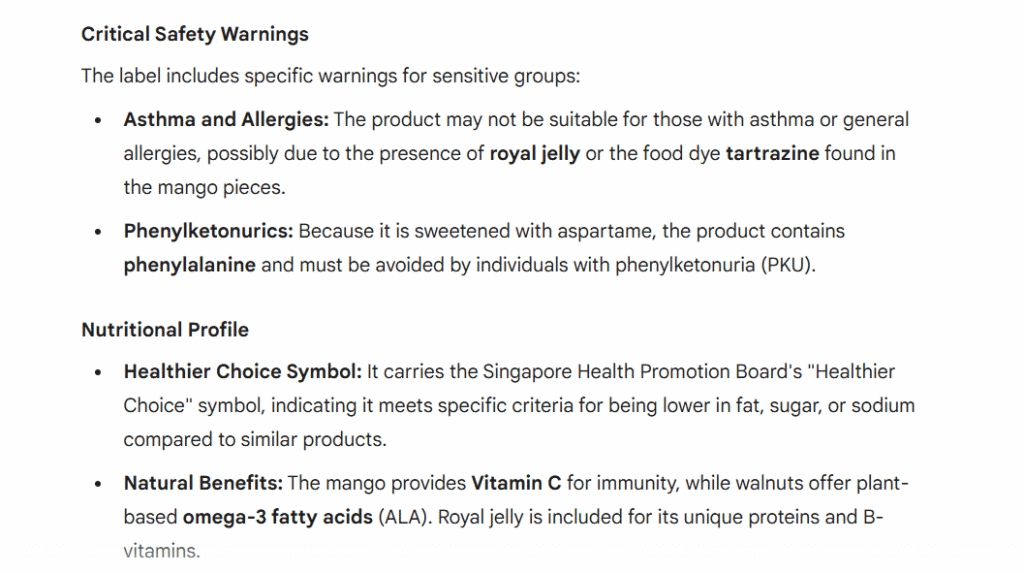
You can show it a photo, play it an audio clip, or paste in a chunk of data, and it works with all of it at once. For example, you photographed a product label and want to know what’s actually in it, or you’ve got a screenshot of an error message and need a fix.
Just hand it over. Gemini figures out what you’re looking at and responds accordingly. No switching between tools, no copy-pasting between apps.
Here, I asked Gemini to go through the “breakfast cereal” product label and provide me with all the details.
2. Advanced Reasoning
There’s a difference between an AI that retrieves information and one that actually thinks. Gemini’s Pro and Deep Think models land firmly in the second category. Give it a genuinely hard problem, something with multiple steps, competing factors, or ideas that need to be connected across different topics, and it works through it rather than just pattern-matching to the nearest Wikipedia paragraph.
For research, technical work, or anything that requires more than a surface-level answer, that matters a lot.
3. Long Context Handling
Here’s one that sounds technical but is incredibly practical once you use it. Gemini 1.5 Pro can hold up to 2 million tokens in context at once. What does that actually mean? It means you can hand a 500-page document and ask a very specific question.
It doesn’t forget what it read three chapters ago. As a result, for anyone regularly working with long reports, large codebases, or extended research materials, this becomes a genuine game-changer.
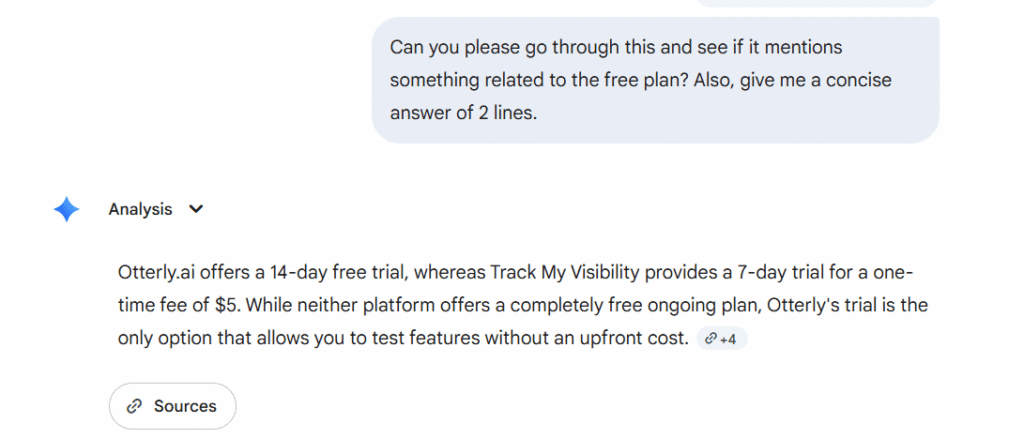
Here, I asked Gemini to tell me about the free plan in my PDF. It not only mentioned the free plan, but also provided me with the source link so that I can verify the information.
4. Code Generation and Debugging
Gemini is genuinely useful for coding, not just as a reference, but as something that actively helps you move faster. It writes code, explains what existing code is doing, and debugs problems. The long context window makes a real difference here, too.
Because it can hold a large codebase in mind at once, it doesn’t just patch the one line you pointed to. It considers how that change ripples through the rest of the project. That’s closer to having a thoughtful collaborator than a glorified autocomplete.
been using gemini 3.0 for coding since yesterday, the speed difference is legit
by u/jselby81989 in ChatGPTCoding
One engineer testing Gemini 3.0 for daily coding work found it, according to a detailed Claude vs Gemini comparison, consistently 30-40% faster than Claude on common tasks. And appreciated that it explained the reasoning behind fixes rather than just applying them. “Actually helped me learn something,” they wrote.
5. Integration with the Google Ecosystem
We can connect the Google apps, such as Gmail, Google Docs, Drive, Maps, YouTube, Search, and Calendar, using the settings option.
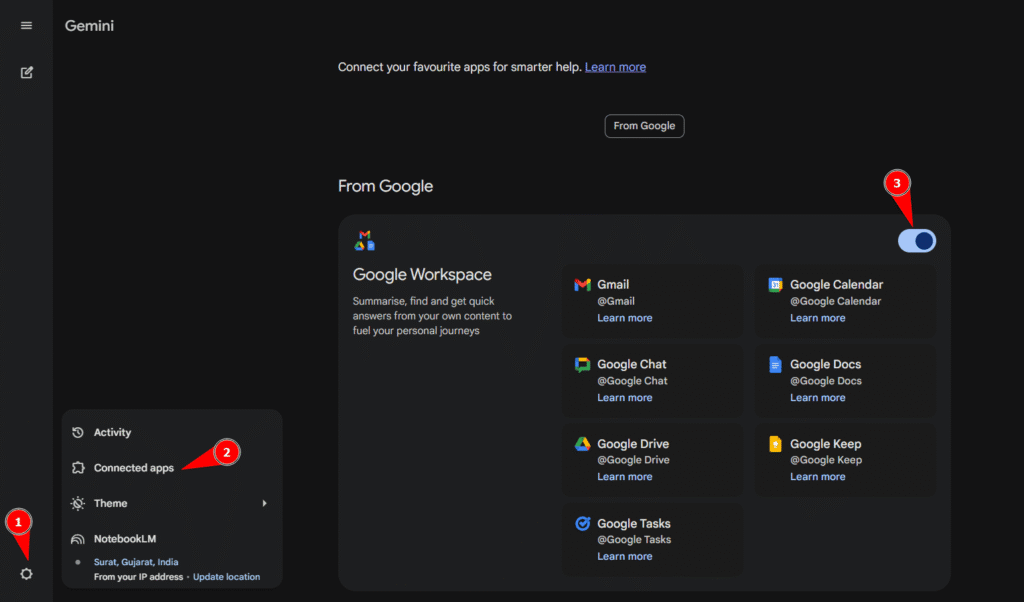
So when you ask it something, it can pull from your actual data and not just generic knowledge.
Ask it to catch you up on your emails, find a file you half-remember saving, or help you prep for a meeting that’s already in your Calendar. It’s a lot more useful when it knows your context, and with Google’s ecosystem, that context is already there.
6. Tool Use and API Access
For developers and teams building things, Gemini isn’t just a chatbot; it’s a foundation. Through the Gemini API, you can connect it to external tools, live data sources, and your own systems.
It can search the web, call functions, retrieve real-time information, and take actions inside applications. That flexibility is what separates a general-purpose AI from one you can actually build a product around.
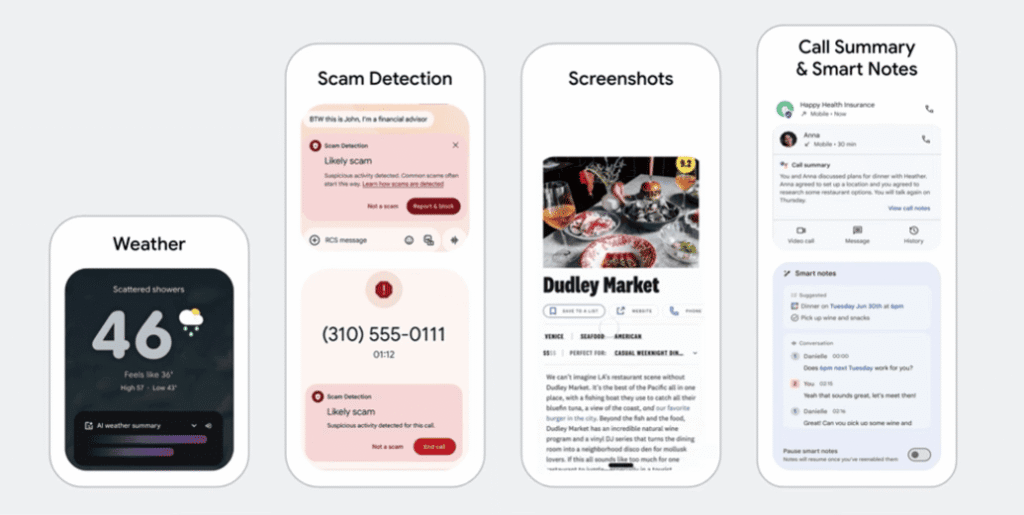
7. On-Device AI with Nano Models
Not everything needs to go to the cloud, and Gemini understands that. In fact, the Nano models run directly on supported devices, with no internet connection required. As a result, they are especially useful for privacy-sensitive tasks, offline situations, and cases where you simply need a fast response.
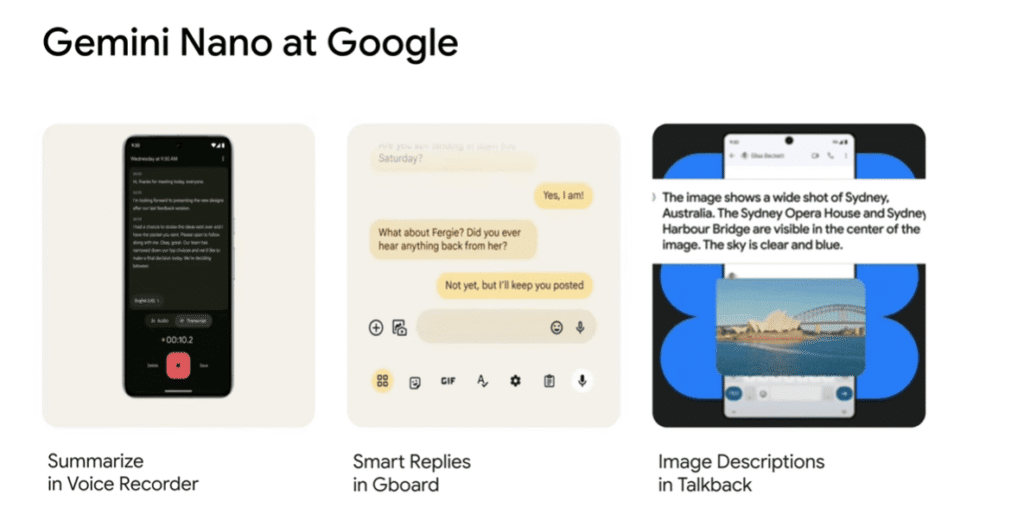
It also means Gemini can be present in more places, on a phone with a patchy signal, in environments where data can’t leave the device, or just whenever you need something instantly.
Here are examples of what actually On-Device AI can do.
8. Speed Variants for Every Use Case
One size definitely doesn’t fit all when it comes to AI models, and Gemini doesn’t pretend otherwise. Flash models are built to be fast and handle high volumes, while Pro models go deeper when dealing with complex tasks. Meanwhile, Lite variants are tuned for efficiency at scale.
The result is that you’re not overpaying compute-wise for a simple task, and you’re not bottlenecked by an underpowered model when the work actually gets difficult. There’s a version of Gemini that fits what you’re trying to do, and that makes the whole system more practical to use.
9. Introducing Scheduled Actions
In Jan 2026, Gemini changed from a reactive chatbot to a proactive assistant with the launch of scheduled actions. As a result, people with Google AI Pro, Ultra, and eligible Google Workspace users can benefit from this feature.
This feature will help you to automate repetitive tasks without needing to re-prompt the AI every time. You can set a “recurring prompt” as it will deliver the information exactly when you want to.
For example: “Summarize my unread Gmail messages every single day at 9 AM.”
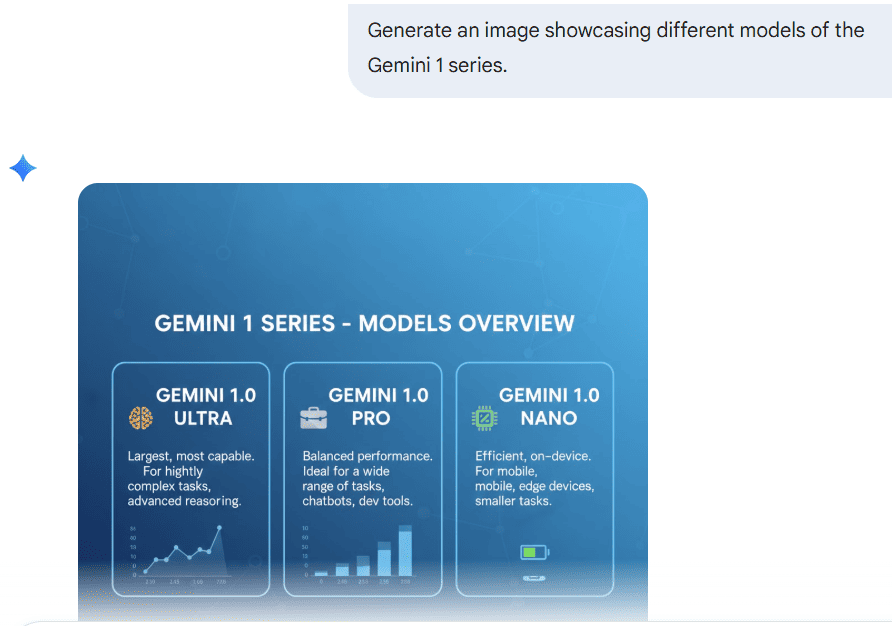
10. Image Generation in Google Gemini
Gemini supports image generation through text-to-image prompts. Users can describe what they need, refine results, and use images for presentations or planning.
This is what Gemini delivered when I tried generating an image by giving it a clear prompt:
11. Gemini Live: Just Talk to It
Gemini Live enables voice-based conversations with Gemini. Users can speak naturally, receive responses, and continue discussions without interruption.
People use Gemini Live to get quick answers while driving. Instead of typing the query, you can simply use the voice feature for help with navigation or quick facts.

For example, if you’re going on a family road trip or trying to find a restaurant based on your preferences.
This model will simply pull answers through Google search, Google maps, and from your previous search history to provide you with a personalized response.
Gemini Live also makes it easier to learn new topics, asking follow-up questions, asking things to clarify the doubt immediately, or deciding to explore tangents without losing the thread of the original discussion.
Google Gemini vs ChatGPT vs Perplexity vs Claude
Users often compare Gemini with other AI tools, such as in a dedicated Gemini vs ChatGPT breakdown, to decide which fits their needs. Each tool serves a different purpose.
| Feature | Google Gemini | ChatGPT (OpenAI) | Perplexity | Claude (Anthropic) |
| Core Model (2026) | Gemini 3 (Pro/Flash) | GPT-5.2 (o3/o4 models) | Multi-model (Selectable) | Claude 4.5 (Opus/Sonnet) |
| Primary Strength | Ecosystem & Personal Intel | Creativity & Agentic UX | Research & Web Search | Coding & Large Docs |
| Context Window | Up to 1 million tokens (varies by model) | 400k – 1M Tokens | Variable (Search-driven) | 200k – 1M Tokens |
| Web Access | Native (Google Search API) | Search-integrated GPTs | Search-First Architecture | High-Safety Search |
| Best Use Case | Deep Google Workspace use | Creative writing & “Brain” tasks | Fact-checking & Market reports | Legal, Coding & High-Safety |
| Unique Feature | Personal Intelligence Layer (searches your Gmail/Photos) | Canvas & Video (Sora) for real-time editing | Comet AI Browser (performs tasks on sites) | Computer Use (AI controls your mouse/keys) |
| Standard Pricing | $20/mo (Gemini Advanced) | $20/mo (ChatGPT Plus) | $20/mo (Perplexity Pro) | $20/mo (Claude Pro) |
Now, you know the comparison between Gemini and other AI tools like ChatGPT, Perplexity, and Claude. Let’s understand why it is important for your brand to be visible on the Gemini AI model.
Why Google Gemini Matters for Brands and SEO?
Google Gemini doesn’t just change how people search; it changes what it means to be visible. For years, brands focused on ranking pages. Now, AI search visibility increasingly depends on whether Gemini chooses to reference your content inside its answers.
When users interact with Gemini, they aren’t scrolling through ten results. They’re reading one response. That shift raises an important question for brands: Are you part of the answer, or completely absent from it?
This matters even more as Gemini becomes embedded across Google experiences, from Google Search to Gmail and other tools. When users are searching Gmail, planning tasks, or asking contextual questions, Gemini may surface insights without ever sending them to a traditional web page.
How Gemini Changes Visibility in Google Search
Traditional SEO focuses on ranking the top 10 results. While Gemini narrows the spotlight. Instead of showing dozens of options, it selects a small number of sources and weaves them directly into its responses.
If Gemini references your content while answering a query, your brand gains trust and attention instantly. Gemini selects the content on the basis of relevancy, site authority, and the source.
This means you get fewer opportunities, but the impact is higher when selected. Gemini’s answers often feel final, which gives its chosen sources more weight than a standard search result ever did.
From Visibility to Transactions
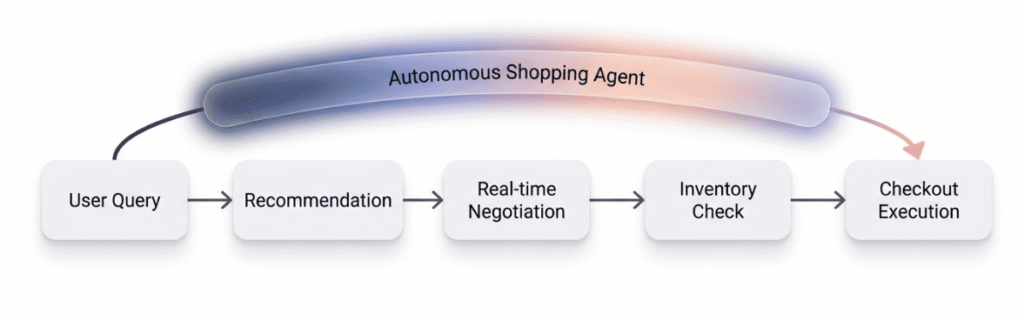
In January 2026, the goal of search shifted from “winning the click” to “securing the transaction.” With the launch of the Universal Commerce Protocol (UCP) on January 11, Gemini has moved beyond simply recommending products; it can also execute them.
Through the UCP, Gemini acts as an autonomous shopping agent. It doesn’t just show users your product, but it can also negotiate real-time pricing, check live inventory, and complete a checkout.
Authority and Entity Importance
Gemini doesn’t evaluate content the same way older systems did. Rather than scanning for repeated keywords, it looks for consistent signals of trust, clarity, and expertise.
Brands that explain concepts clearly, answer real questions, and maintain accurate information across the web tend to perform better. The goal is not to impress an algorithm, but to be understandable to a system that connects entities, topics, and relationships.
In my opinion, this is where many SEO strategies fall short. Content written to rank doesn’t always translate into content that explains. Gemini favors the latter.
How You Can Track Your Brand Visibility in Google Gemini
It is very important to use new tracking approaches to find out where and how your brand appears in AI search responses. A Gemini visibility tracker can show whether your brand is being mentioned. The traditional method shows the number of clicks and impressions, but they don’t mention whether your brand is mentioned in Gemini’s AI responses or not.
If you monitor your brand’s AI visibility, then it means you are testing and analyzing which brand is getting mentioned and why. This process will help you fill the gaps and will give you more opportunities to strengthen your authority. An AI visibility tracking tool like Track My Visibility helps brands understand their presence across multiple AI platforms, including Gemini. These platforms help you with brand mention tracking in AI, analyzing context, and identifying patterns in how different AI systems represent your brand to users.
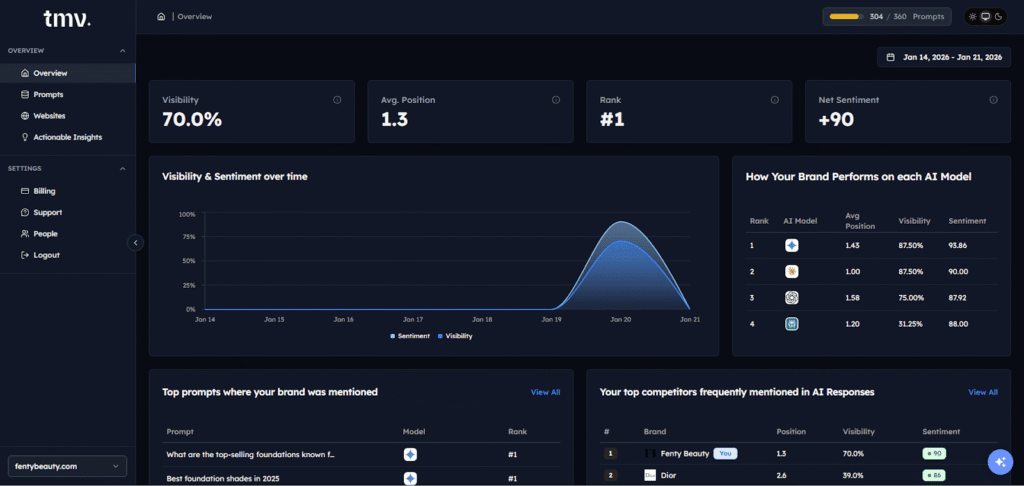
Preparing for AI-first search results means focusing on entity building, demonstrating expertise through comprehensive content, and ensuring your brand maintains visibility where people actually get answers.
Rather than just telling you whether your brand showed up, it lets you test the right AI visibility prompts. The kinds of questions real users are typing into Gemini. It also shows you what the actual response looks like. So instead of guessing whether Gemini recommends your brand when someone asks, “What’s the best project management tool for small teams,” you can see the answer for yourself.
From there, you can analyze the outcome.
- Is your brand mentioned?
- Where does it appear in the response, early, late, or not at all?
- Is it framed positively, neutrally, or unfavorably compared to a competitor?
Track My Visibility surfaces all of this, so you’re working with real data rather than assumptions.
Like every other AI tool, Gemini also has a few limitations. So, let’s look at them.
 Pro Tip: Don’t want to lose AI visibility for your brand? Run a quick audit and identify which competitors are being cited and why. This FREE AI visibility report will help you fix visibility gaps before your competitors own the space.
Get your Free AI visibility analysis
Limitations of Google Gemini
Gemini is capable, but it isn’t infallible. Like any AI system, it works within constraints.
It might struggle while dealing with sensitive information, rely on limited data, or produce responses that sound confident but lack nuance.
There are some cases where the AI model’s responses depend on how you’ve framed the question, especially when users rely on a single prompt instead of asking follow-up questions.
There are also scenarios where Gemini makes proactive assumptions that don’t fully reflect real-world complexity. This is why human judgment still plays an important role. Therefore, users should verify crucial information, while brands should also aim to minimize mistakes by keeping their content clear, current, and well-structured.
Final Thoughts
So, what is Google Gemini at its core? It represents Google’s shift from simply retrieving information to supporting understanding by bringing search, AI, and personal context together in one system.
This shift matters now because it reshapes how users discover answers and how brands are recognized. As AI-powered search becomes more common, visibility will depend less on where a page ranks and more on whether a brand is trusted enough to be included at all.
Tools like Track My Visibility help brands stay aware of that change and remain present where answers are formed, not just where pages are listed, and understanding how it works is a good place to start.
Frequently Asked Questions
Is Google Gemini good or bad?
Google Gemini is generally useful for understanding and summarizing information, but like any AI system, it can produce inaccurate responses in some cases. Users should verify important details, especially when handling sensitive data.
Is Google’s Gemini free?
Yes, Google Gemini is available for free to users with personal Google accounts, with advanced features offered through paid plans. Availability may vary by region and product.
How do I use Gemini in Google Search?
You can use Gemini in Google Search by enabling AI-powered features, where it provides summarized answers and allows follow-up questions. Clear, specific prompts help improve the quality of responses, and users can provide feedback to refine results.
What is the difference between Google Search and Google Gemini?
Google Search focuses on showing links and sources, while Google Gemini focuses on explaining information and maintaining context. Gemini aims to help users understand topics, not just find pages.
Why do people use Google Gemini?
People use Gemini because it integrates deeply with Google Workspace apps like Gmail and Drive to summarize documents and draft emails effortlessly. It is also a top choice for multimodal tasks, as it can natively process and reason across text, images, video, and audio in a single conversation.
How much does Google Gemini cost?
The standard version of Gemini is free for anyone with a Google account and covers most everyday tasks and creative brainstorming. For advanced performance, the Google AI Pro plan typically costs $19.99 per month and includes extra storage plus access to more powerful models like Gemini 3 Pro.
Resources:
Gemini app hits 650+ million monthly users as Google/YouTube reports 300M subscribers