


AI is now answering “best [category]” queries directly, and most brands’ category pages aren’t built to appear in AI generated responses. Traffic to US retail websites from AI sources grew 693% during the 2025 holiday season (Adobe Analytics). And that number isn’t slowing down.
If you’re still treating this as a traditional SEO problem, it’s important to understand how to rank in AI search before diving into how to optimize category pages specifically.
This blog is for SEO teams, ecommerce managers, marketing agencies, and growth leaders who want their category pages to appear in AI-generated answers.
The problem isn’t your products. It’s that your category pages were built for human first browsing, not AI extraction. This post covers the exact changes that fix that.
In this blog, you’ll learn:
- Why most category pages get skipped by AI tools, and what they’re actually looking for
- Six specific changes that make a category page citable in AI answers
- How to track whether your optimizations are working across ChatGPT, Perplexity, and Google AI Overviews
TL;DR
- Most category pages are invisible to AI because they’re full of thin, templated copy with no structure.
- AI pulls answers in chunks, so each section of your page needs to stand alone as a citable answer.
- Six changes make the biggest difference: answer-first descriptions, a “how to choose” section, FAQ schema, the right markup, internal linking, and crawl access for AI bots.
- Off-page signals like reviews, Reddit mentions, and editorial coverage matter just as much as what’s on the page.
- You can track whether your changes are working by monitoring AI citations directly with Track My Visibility.
How AI Pulls Information from Category Pages
AI models don’t read your category page the way a person does. They don’t scroll through your product grid or click your filters. Instead, they break your page into smaller content chunks and scan each one for a clear, standalone answer. This is how AI powered search works at a basic level, it scans for the clearest extractable answer, not the most optimized page.
They process your text using natural language understanding, looking for sections that match how people actually ask questions.
AI systems pull chunks that directly answer questions without requiring surrounding context and skip the ones that do not. AI platforms surface direct answers instead of browsing entire pages. Most service pages fail this test because brands write them to rank, not to answer questions.
The process works something like this: I asked ChatGPT, “Best running shoes for flat feet.”
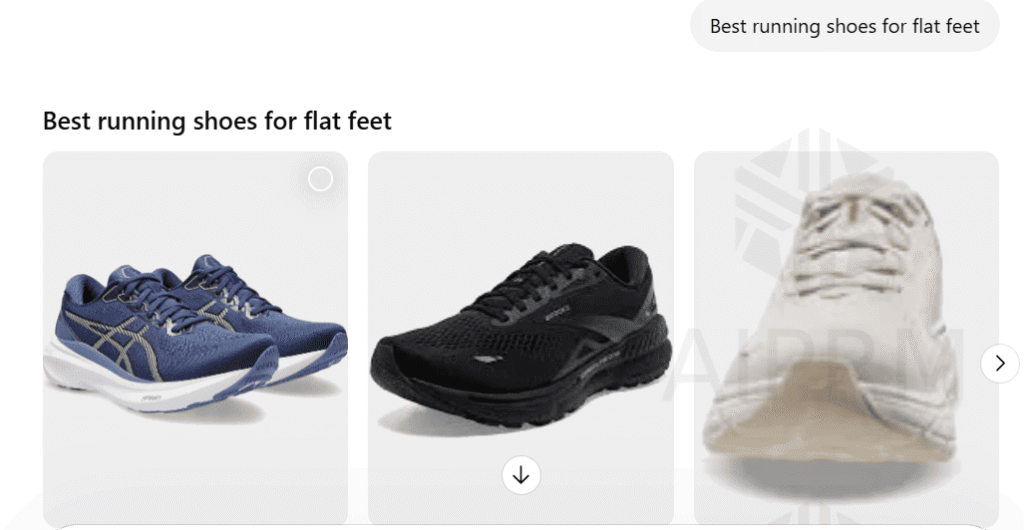
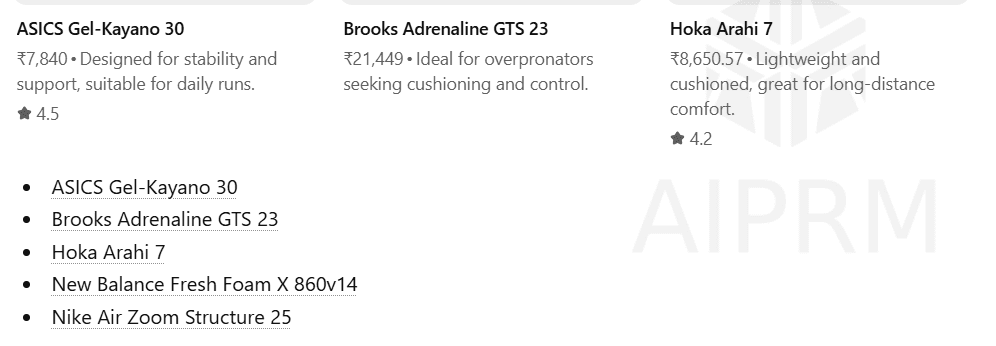
The AI runs sub-queries, retrieves pages that contain relevant content, and extracts the sections that give a direct, structured answer to that specific question. A category page with an answer-first description, clear subheadings, and a FAQ block gives AI multiple extraction points. A category page with a generic 50-word paragraph gives it none.
Generative AI platforms like ChatGPT, Perplexity, and Google AI Overviews now pull from category pages when answering queries like “best [product type] for [use case]” or “top [category] under [budget].” But the selection isn’t random. How LLMs choose content to cite explains exactly why most category pages get skipped; they simply don’t contain extractable answers.
Before you change anything, run your top five category queries in ChatGPT, Gemini, and Perplexity, and screenshot the results or use Track My Visibility to do this across platforms in one place. That’s your baseline. You’ll come back to it monthly to measure progress.

Why Category Pages Perform Differently in AI Answers
Product pages have one clear subject. A page about a specific pair of running shoes answers a specific question. Category pages for SEO are harder; they need to define a space, explain what belongs in it, help users compare options, and guide a decision, all at once.
AI assistants break content into smaller pieces and evaluate each chunk for relevance and authority. AI systems assemble answers from the content pieces that pass evaluation and skip the ones that do not. Structured pages give AI cleaner extraction points.
The typical category page fails this test badly. It’s a product grid, a filter bar, and 50 words of copy written for keyword density. That copy doesn’t define the category. It doesn’t explain who the products are for. It doesn’t help anyone decide anything.
What AI is actually looking for: a clear definition of the category, context for what differentiates the products within it, guidance on who each type suits, and enough structure to extract a standalone answer from any single section.
Pages that match user intent at every section give AI cleaner extraction points. This is also where E E A T comes in. AI systems favor pages that show genuine expertise and position the brand as a trustworthy source, not just a page that targets the right keywords.
6 Practical Changes to Make Your Category Pages AI-Ready
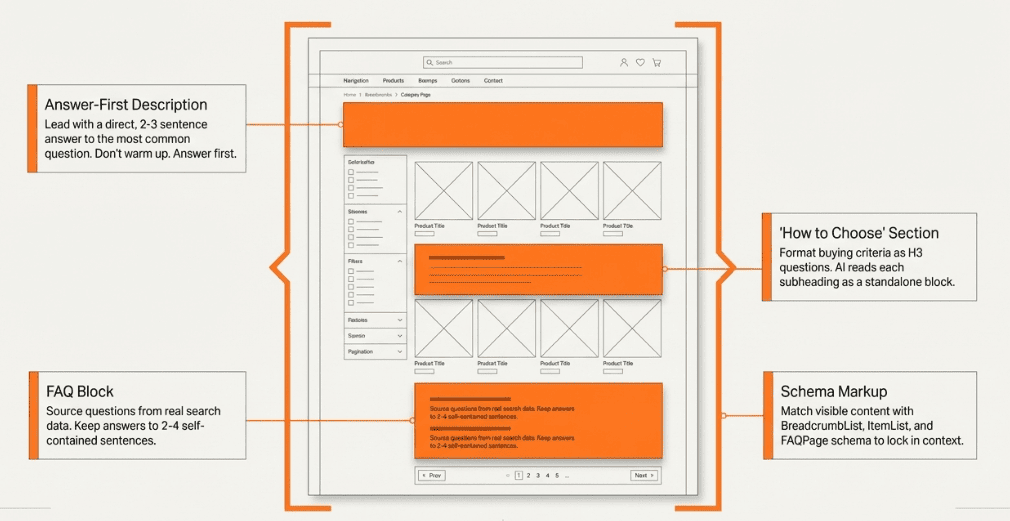
These aren’t broad recommendations; each one is a targeted content optimization that addresses a specific reason artificial intelligence tools skip category pages. Work through them in order, and you’ll have a page that’s built to be cited.
1. Write an Answer-First Category Description
Lead your category page with a direct, 2-3 sentence answer to the most common question about that category. Don’t warm up. Don’t set context. Answer first.
A simple structure that works: “[Category] is [definition]. The best options for [use case A] are [type X], while [use case B] is better served by [type Y].”
The first sentence needs to give an accurate answer to the primary question completely. AI tools look for that immediate validation before pulling more content from the rest of the page.
This isn’t just theory. A user on Reddit shared that after running a 30-day experiment optimizing posts for AI answers, the biggest takeaway was that “AI answers seem to prefer very clear and direct information instead of long opinion style content.”
I tried optimizing for ai answers for 30 days here’s what actually happened
by u/Cultural-Bike-6860 in DigitalMarketing
AI systems cited one average post multiple times because it used a cleaner structure. They ignored a more detailed post because structure mattered more than depth.
This is the same principle behind all strong eCommerce category page SEO: answer the search intent, then support it.
If you want a deeper look at structuring content AI actually cites, this guide on how to optimize content for AI answers covers the full approach.
After you update your category description, re-run your prompt and compare AI results after 2–3 weeks, or use Track My Visibility to monitor citation changes automatically. If AI systems start citing your page or using your category language in answers, your rewrite is working.
2. Add a “How to Choose” Section With Structured Subheadings
This is the single highest-value addition most category pages are missing. A “how to choose” section turns a passive product list into an active decision guide, which is exactly what AI needs to cite your page for purchase-intent queries.
Format each buying criterion as its own H3 question. AI reads each subheading as a standalone answer block. Cover budget ranges, primary use cases, the specs that actually matter, and who each product type suits best.
This mirrors how someone actually asks an AI: “What should I look for when buying [category]?” When your page structure matches that question pattern, your chances of being cited go up significantly.
3. Include a FAQ Block (With FAQ Schema)
Pages with FAQ sections are more likely to appear in AI driven search experiences, including Google AI Overviews. 70% of voice search results are pulled directly from featured snippets, and FAQ schema is one of the clearest signals that your content is structured to win those spots (Semrush).
The FAQ schema makes questions and answers easy for AI to extract and surface directly, without any extra interpretation needed.
Source your questions from search data, particularly long tail keywords from ‘People also ask’ boxes, customer support tickets, and real queries people are typing into AI tools.
Keep every answer to 2-4 sentences. Clear answers that are self-contained get cited. Citable. If an answer needs additional context to make sense, it won’t work as a standalone AI response, so rewrite it until it does.
This is also why how ChatGPT generates answers is worth understanding. A 3-sentence FAQ answer is more useful to AI than a detailed 3-paragraph explanation, because AI pulls in chunks, not essays.
After adding the FAQ schema, monitor Google Search Console for FAQ-rich result appearances. Also, check whether your FAQ answers start showing in AI Overviews, which confirms the schema is being read correctly.
4. Apply the Right Schema Markup
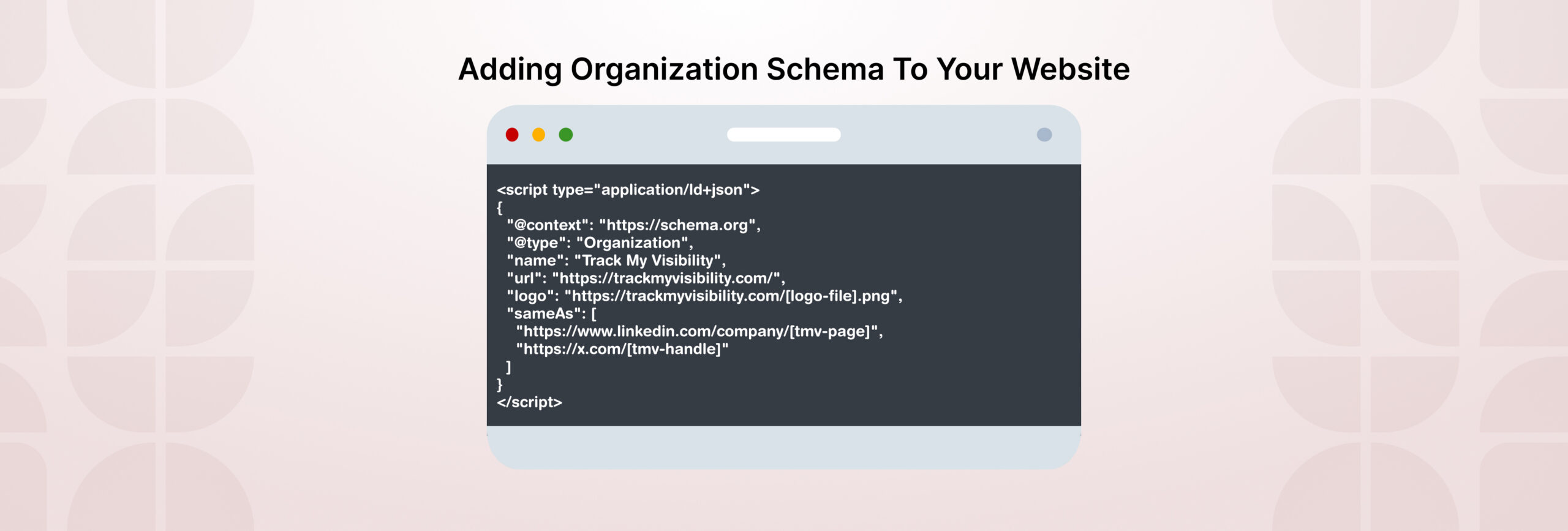
At a minimum, every category page should have BreadcrumbList, ItemList, and FAQPage schema. If you’re featuring specific products on the category page, add Product schema to those items too. Our deeper walk-through on schema markup for AI visibility covers exactly which fields move the needle.
Pages that already surface as rich snippets in traditional search engines are more likely to be referenced in AI summaries. The two reinforce each other, and strong, structured data helps both.
One important thing to note: don’t just add schema for the sake of it. Make sure what’s in the schema matches what’s actually on the page. Inconsistency between your markup and your visible content is worse than having no schema at all. AI systems cross-reference signals, and if there is a mismatch, it will damage trust.
5. Build Internal Links That Signal Topical Depth
Your category page shouldn’t be an island. Link out to related buying guides, head-to-head comparison posts, subcategory pages, and any supporting content that adds depth to the topic.
When you connect related content consistently around a core topic, you build topical authority and show AI what your site is actually about.
This is one of the eCommerce SEO best practices for category pages that directly crosses over into AI visibility. AI crawlers follow internal links the same way Googlebot does, and a well-linked category page tells them your site has genuine depth on this topic, not just a single thin page.
Watch crawl logs in Google Search Console for increased bot visits to pages you’ve linked from the category page. If AI crawlers are following those links, the structure is working.
6. Make Sure AI Bots Can Actually Crawl the Page
None of the above matters if AI bots can’t reach your category pages in the first place. Many brands accidentally block collection or category pages in robots.txt, often a leftover from an old technical decision that nobody revisited.
Check your robots.txt file. Specifically allow traffic to pages you want LLMs to find, including size guides, return policy pages, and any supporting content linked from your category pages.
Verify your XML sitemap includes all live category pages. Then check your crawl logs for OAI-SearchBot, PerplexityBot, ClaudeBot, and Google-Extended. If these bots aren’t hitting your category pages, nothing else on this list will make a difference.
 Pro Tip: Not sure if your category pages are visible to AI search tools right now? Get your free AI visibility report to check how your pages are appearing or not appearing for better visibility across ChatGPT, Perplexity, and Google AI Overviews.
What Does a Good Category Page Actually Look Like?
Take “Men’s Running Shoes” as an example. Here’s what most category pages look like today:
Before: A product grid with 40 items. A short paragraph at the bottom that reads something like: “Shop our wide range of men’s running shoes. Find the best styles and prices.” No FAQ. No schema beyond basic breadcrumbs. Missing internal links to buying guides. No explanation of what differentiates stability shoes from neutral shoes, or who needs each.
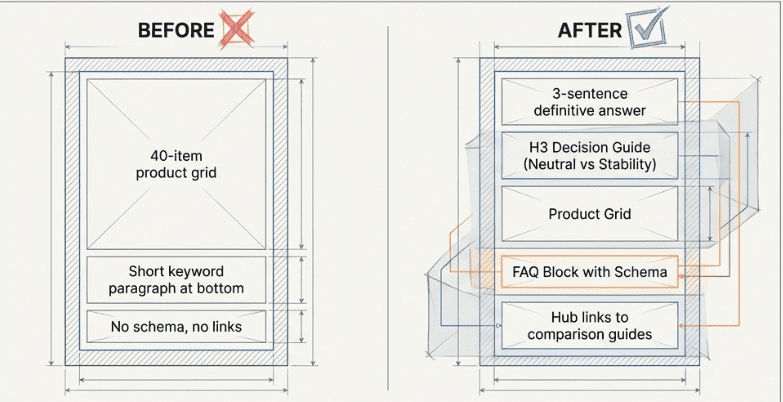
After: The page opens with a 3-sentence answer: “Men’s running shoes fall into two main types, neutral and stability. Neutral shoes suit runners with a normal arch, while stability shoes are built for overpronators who need extra support. If you’re not sure which type fits you, the guide below covers exactly what to look for.”
That’s followed by a “How to Choose” section with H3 subheadings like “What’s the difference between neutral and stability running shoes?” and “Which running shoes work best for flat feet?” Then a FAQ block with schema. Then, internal links to comparison articles.
The difference isn’t length. It’s extractability. Every section of the “after” version can stand alone as an AI answer.
After publishing the updated version, you can use Track My Visibility to monitor whether your page is being cited across AI search tools, not just clicked. GA4 shows you traffic. Track My Visibility shows you whether AI is actually referencing your content. Also, watch for branded search volume increases; users often discover you through AI first, then check Google search results to validate.
Why Your Category Pages Can’t Win Alone
On-page optimization gets you ready. AI doesn’t just read your site; it cross-references web content across YouTube, Reddit, review platforms, and industry publications.
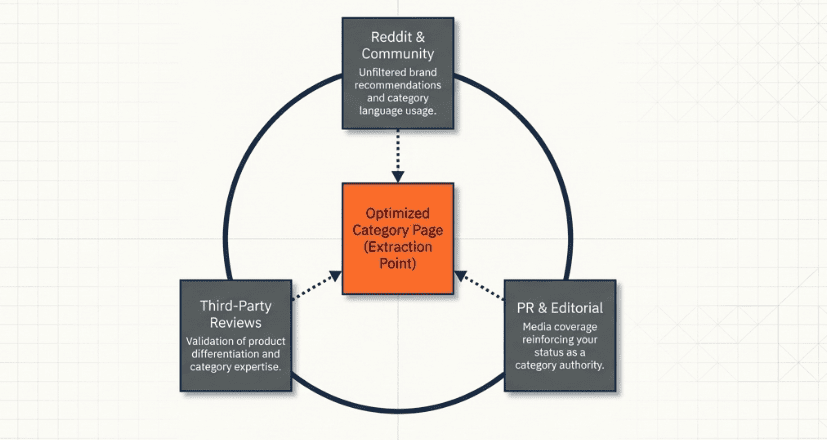
AI systems trust your category when review platforms highlight your expertise, Reddit users recommend your brand, and editorial coverage uses your category language consistently across the web.
As Ross Simmonds notes: “Less emphasis on backlinks. More emphasis on brand mentions. Less emphasis on keyword optimization. More emphasis on high-quality content on key topics.”
Most content creation for category pages has historically chased keyword signals, which is exactly the wrong approach for AI visibility.
This is where PR, content marketing, and brand teams come in. The off-page work, such as media coverage, community presence, and third-party reviews, reinforces the on-page signals.
Let’s look at the original data behind why this matters. According to a Search Engine Land analysis of 30 million AI citations, Reddit ranks as the most-cited domain across ChatGPT, Google AI Mode, Gemini, and Perplexity. Review platforms like Yelp and G2 appear frequently in recommendation queries, too. If your brand is being discussed in those places, AI is more likely to surface it.
Here’s a practical approach to tracking brand mentions in AI search so you’re not working blind on this side of the equation.
To track, you can set up Google Alerts for your brand and category terms. For AI-specific mention tracking, Track My Visibility shows you how your brand and category pages are being referenced inside AI answers, something that Google Alerts won’t catch.
Quick action: Run a prompt in ChatGPT or Perplexity: “What’s the best [your category]?” See who shows up and why. That gap is your roadmap.
What Mistakes Are Killing Your Category Page’s AI Visibility?
Most category pages make the same errors. Run through this list against your own pages.
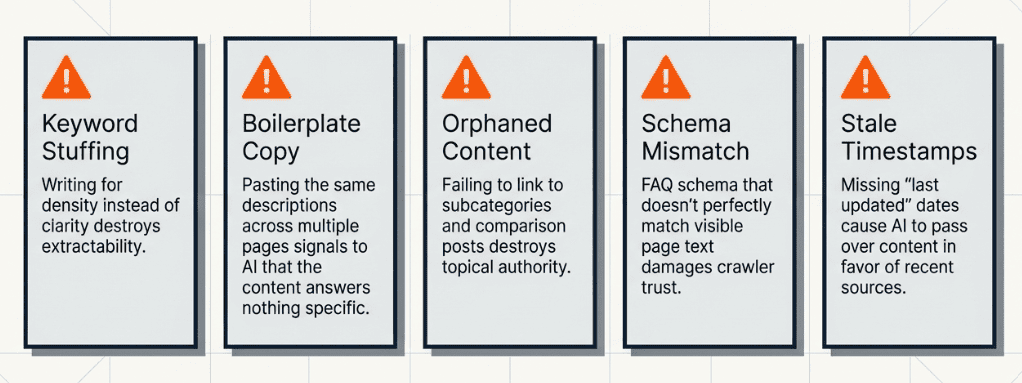
- Closed Doors for AI Bots: Many eCommerce sites accidentally block AI crawlers in robots.txt. It’s not intentional; it’s usually a leftover technical setting nobody revisited. But if OAI-SearchBot or PerplexityBot can’t get in, your page doesn’t exist to them.
- Writing for Keywords, Not Answers: Stuffing your category description with keywords might feel like solid AI search vs SEO practice, but these two need different approaches. AI doesn’t reward density. It rewards clarity. If your copy doesn’t answer a question, it won’t get cited.
- Content That Bots Can’t See: If your category description only loads after JavaScript executes, most AI bots never see it. What renders in a browser and what a bot actually reads are two different things. Static, crawlable text is what gets extracted.
- No Paths to Supporting Content: A category page with no internal links looks like a dead end to AI. It signals that your site doesn’t have depth on this topic. Link out to buying guides, comparison posts, and subcategory pages, giving AI somewhere to go.
- Copy-Pasted Descriptions Across Pages: Using the same boilerplate text across multiple category pages is a clear signal that nothing was written to answer a specific question. AI sees through it. Each category page needs a description written for that category specifically.
- Inconsistent or Incomplete Schema: A half-done schema creates mixed signals. If your FAQPage schema lists questions that don’t appear on the page, or your ItemList doesn’t match your actual products, AI loses confidence in the page. Do it properly or don’t do it at all.
- No Sign the Page Is Current: AI tools weigh recency when selecting sources. Outdated information is one of the fastest ways to get passed over, even if the rest of the page is solid. Update product listings, refresh buying criteria, swap in seasonal picks, and make that date visible.
Pro Tip: Before fixing these mistakes, audit where you actually stand. The All-in-One AEO/GEO audit checklist walks you through every element, from schema gaps to crawl issues to off-page signals. So you know exactly which mistakes apply to your site and in what order to tackle them.Final Thought
Category pages for SEO sit in the middle of the funnel and handle some of the highest-intent queries your customers run. If they’re not structured to be extracted, cited, and trusted by AI tools, you’re invisible in the places where buying decisions are increasingly getting made. That means lost organic traffic and lost AI citations at the same time.
The good news is that most competitors haven’t fixed this yet. The gap between a category page that AI ignores and one that AI cites regularly comes down to a handful of specific, fixable changes: answer-first copy, structured clear headings, FAQ schema, consistent markup, internal links, and crawl access.
Pick your top five category pages. Run them against the checklist in this blog. Fix one. Then test it before and after in ChatGPT or Perplexity.
And if you want to skip manual prompt testing, Track My Visibility automatically tracks your AI citation presence, so you always know where you stand and whether your changes are actually making a difference.
FAQs
A category page groups related products or content under one topic. In the eCommerce category page SEO, these pages have always mattered for ranking. Now they matter for AI too, because tools like ChatGPT and Perplexity pull from category pages when answering “best [product type]” queries.
Traditional category pages SEO focuses on keyword placement, crawlability, and earning backlinks. Optimizing for AI answers focuses on answer clarity.
Start with BreadcrumbList, ItemList, and FAQPage. If you’re featuring specific products, add Product schema to those items. These schema types help AI accurately interpret your page structure and increase the likelihood that your content appears in rich results and AI Overviews.
Manual prompt testing, running your category queries in ChatGPT, Perplexity, and Gemini monthly, is a start. For ongoing tracking, Track My Visibility monitors AI citation presence automatically across platforms, so you don’t have to do it by hand.
At a minimum, review your top category pages quarterly. Update product counts, revise buying criteria if the market has shifted, and add any new common questions to the FAQ block. Make the update date visible on the page. Recency is one of the signals AI engines use when deciding which sources to pull from; a page that looks stale gets passed over, even if the content is technically solid.
Resources:
- Adobe: Holiday Shopping Season Drove a Record $257.8 Billion Online with Consumers Embracing Generative AI Tools
- AI search engines cite Reddit, YouTube, and LinkedIn most: Study
- Google’s AI Mode: The Way We Think About SEO Needs To Change