


Bing Webmaster Tools AI now includes an AI Performance report that lets you see how your content appears across Microsoft Copilot and other Bing-powered AI experiences. Instead of only showing traditional search data, the tool tracks AI citations, grounding queries, and the pages Bing AI systems reference most often. It’s a direct window into how Bing AI retrieves your content and associates it with conversational queries inside AI-generated answers.
One thing worth knowing before setup: because ChatGPT uses Bing’s index for its web search and browsing features, your Bing indexing status now affects your visibility in ChatGPT responses too. That makes Bing Webmaster Tools more relevant than most SEO teams realize.
In this guide, we’ll walk through the step-by-step setup process for the AI Performance section inside Bing Webmaster Tools.
TL;DR
- Bing Webmaster Tools AI now includes an AI Performance report for tracking AI citations and visibility.
- The dashboard shows grounding queries, cited pages, citation trends, and AI-generated answer visibility.
- You need to add and verify your website before accessing AI Performance data.
- Grounding Queries help identify which conversational prompts trigger your content in Bing AI experiences.
- Tools like Track My Visibility can help monitor AI visibility beyond Bing’s ecosystem.
What Is Bing Webmaster Tools?
Bing Webmaster Tools is Microsoft’s free website monitoring platform that helps you track how your site appears across Bing Search and Bing-powered AI experiences. It provides insights into indexing, crawl activity, sitemaps, search performance, and AI-related data like citations, grounding queries, and top-cited pages inside Microsoft Copilot and AI-generated search results.
Step-by-Step Setup of Bing AI Performance Dashboard
Let’s go step by step and set up the Bing AI Performance dashboard inside Bing Webmaster Tools. Once your website is verified, you’ll be able to track AI citations, grounding queries, cited pages, and other visibility data from Bing-powered AI experiences.
Step 1: Add & Verify Your Website in Bing Webmaster Tools
Go to Bing Webmaster tools and sign in using your Microsoft, Google, or Facebook account. After logging in, enter your website URL or import verified sites from Google Search Console.
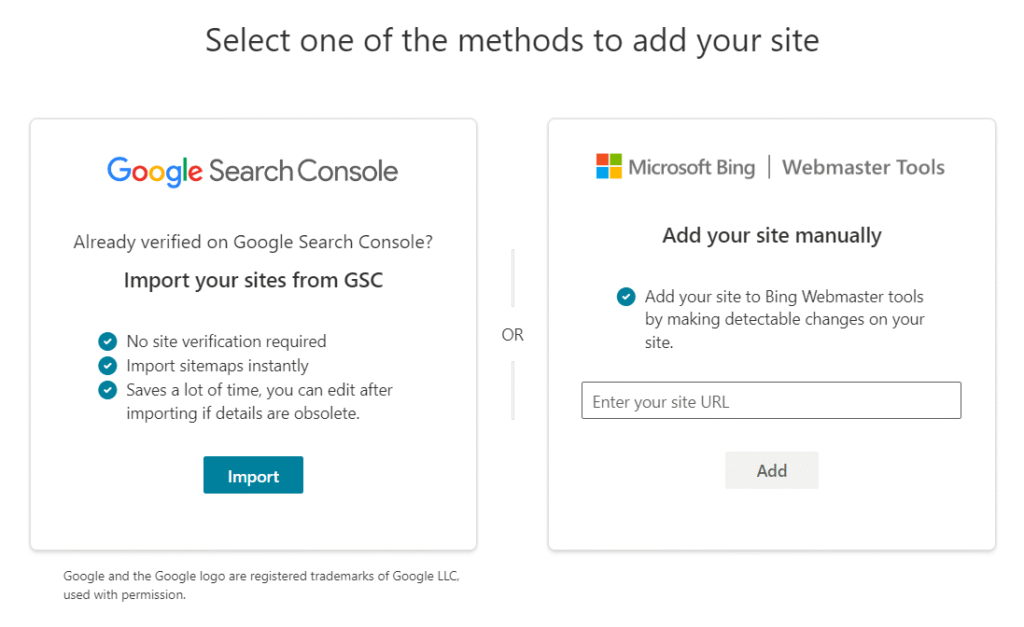
Multiple verification options will then appear once you’ve added the site:
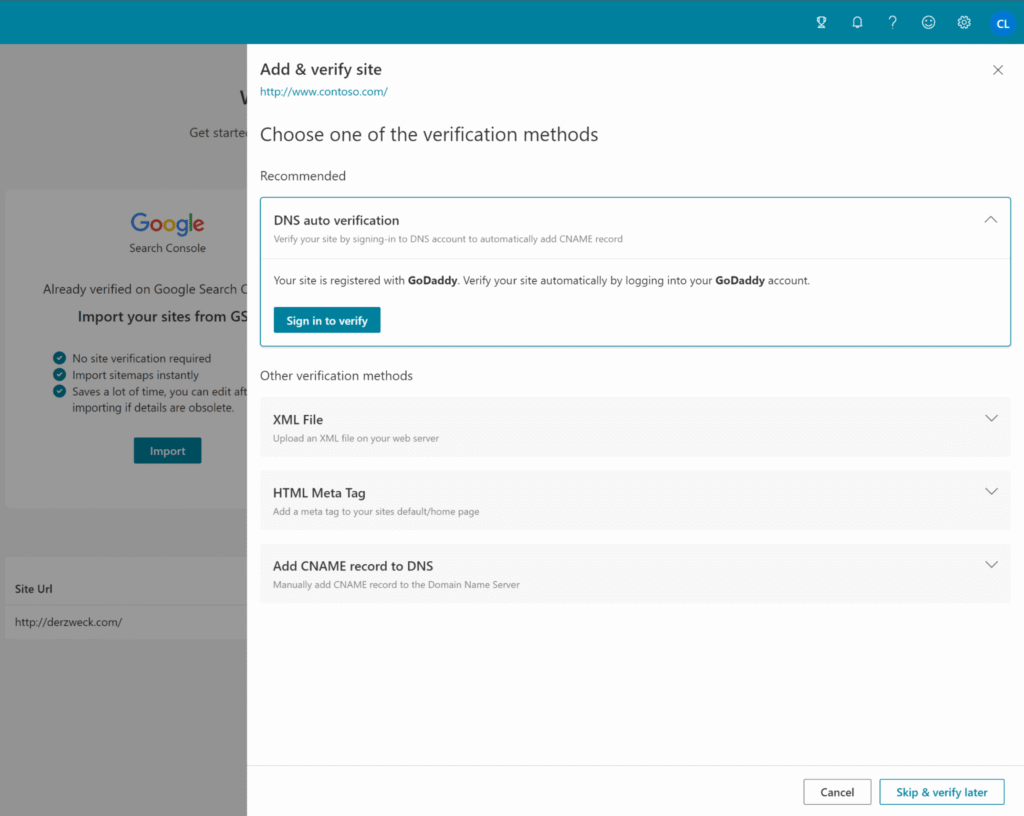
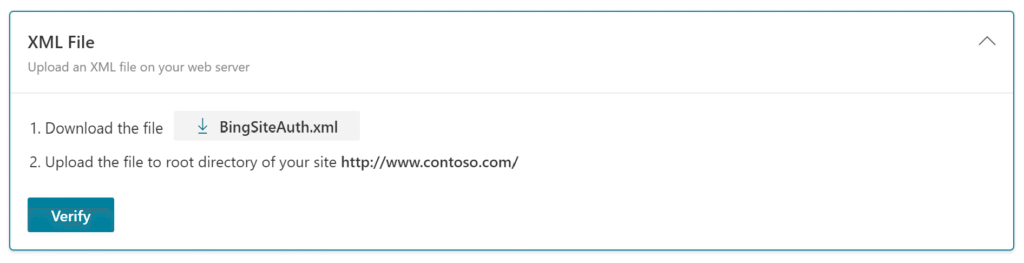
- XML File Upload – Download the verification XML file from Bing and upload it to your website’s root directory.
- HTML Meta Tag – Copy the meta tag provided by Bing and paste it inside the <head> section of your homepage.
- DNS Record Verification – Add the TXT or CNAME record to your domain DNS settings through your hosting or domain provider.
- Google Search Console Import – Import an already verified property directly from Google Search Console for faster setup.
After completing any one verification method, click Verify. Once approved, your website will be added to Bing Webmaster Tools and ready to access AI Performance reports.
Step 2: Navigate to the AI performance tab in Bing Webmaster Tools
After your website is verified, open your Bing Webmaster Tools dashboard and select your website property. From the left sidebar menu, click AI Performance to access the AI visibility reporting section and measure AI visibility across Bing-powered AI experiences.
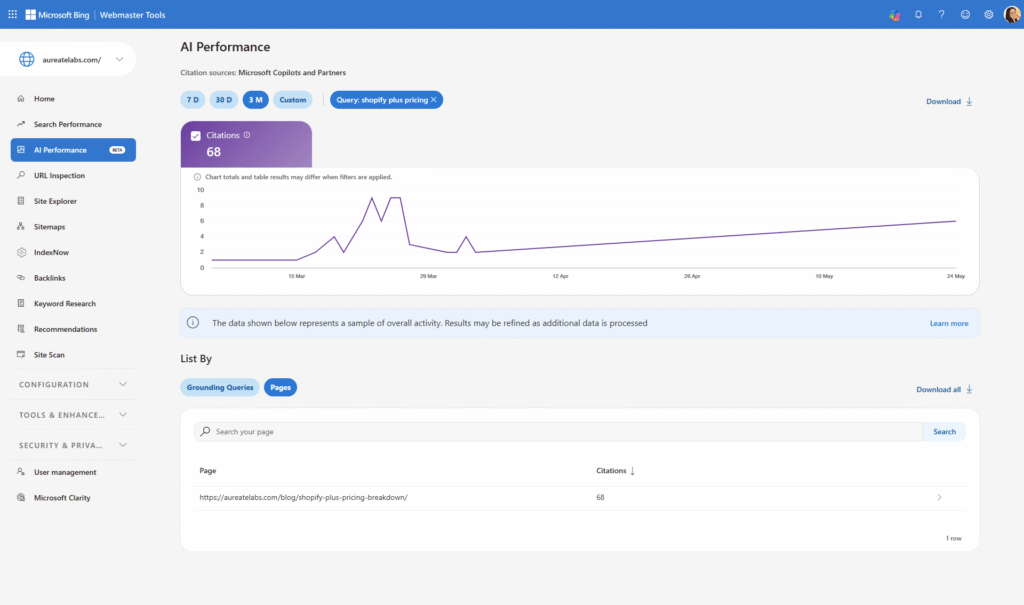
The AI Performance dashboard tracks how your content appears across Bing-powered AI experiences, including Microsoft Copilot. Rather than keyword ranking data, this report focuses on AI-generated answer visibility and content citations.
Inside the dashboard, you can track:
- Total Citations – how often AI-generated answers reference your content
- Grounding Queries – the prompts and queries that triggered your content
- Average Cited Pages – how many pages from your website Bing AI cites on average
- Citation Trends – visibility changes over time
- Top Cited URLs – pages most frequently referenced by Bing AI systems
You can filter by date range: 7 days, 30 days, 3 months, or a custom range within available historical data.
 Pro Tip: Ever wondered how often a brand actually gets named when someone asks an AI assistant about its category? The free AI visibility checker reveals how a brand currently appears across the major AI platforms in minutes.
Step 3: Review Total Citations and Avg. Cited Pages
At the top of the AI Performance dashboard, Bing shows two primary metrics: Total Citations and Avg. Cited Pages. These provide a quick overview of how often your content appears in Bing-powered AI answers.
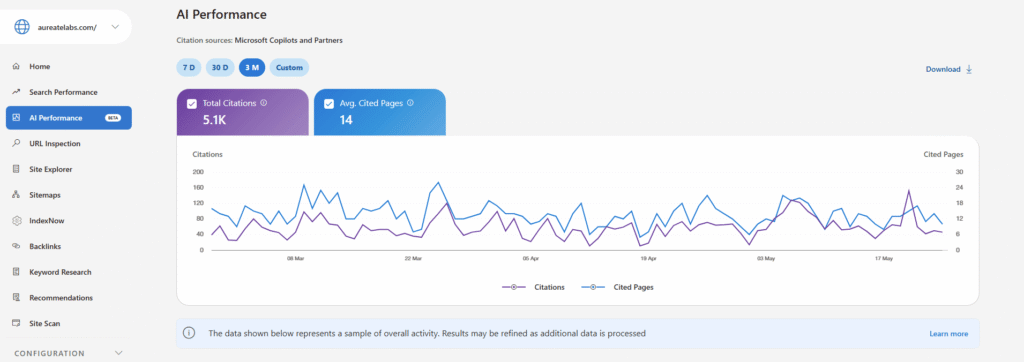
- Total Citations shows the number of times your content was referenced in AI-generated responses across Microsoft Copilot and other Bing AI experiences.
- Avg. Cited Pages shows how many unique pages from your website are being cited on average.
This section is useful for understanding:
- Whether your content appears in AI-generated answers
- Which topics are getting more LLM visibility
- How broadly Bing AI systems are referencing your website content
You can also compare these metrics across different date ranges to monitor changes in AI citation activity over time.
Step 4: Analyze the AI Citation Trend Graph
Below the summary metrics, Bing shows an AI citation trend graph that visualizes how your content is being cited over time across Bing-powered AI experiences.

The graph lets you monitor changes in citation activity, increases or drops in AI visibility, and trends across different date ranges. Hover over specific dates to see total citations for that day, average cited pages, and visibility fluctuations over time.
This section is useful for spotting:
- Content that started getting AI citations after a publish or update
- Visibility spikes after publishing or updating content
- Overall AI citation growth trends across your website.
Step 5: Explore the “Grounding Queries” Report
Under the AI citation graph, open the Grounding Queries tab to see the actual queries and prompts that triggered your content in Bing AI responses.
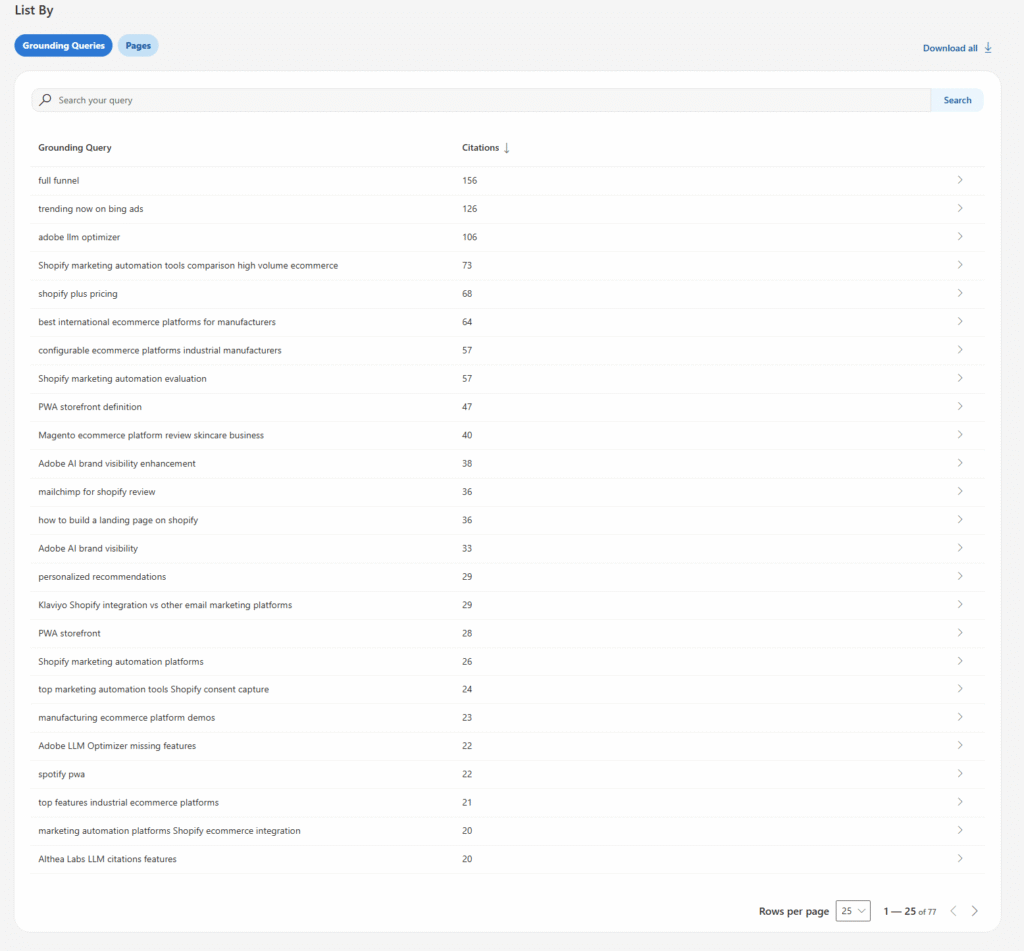
Important: these are not the full user prompts. They’re short phrases that the AI system uses internally to find and retrieve content when building its answer. A single user question may generate multiple grounding phrases, and a single grounding phrase can be associated with multiple pages on your site.
This report shows:
- The queries your content appeared for
- The total citations generated by each query
- The average number of cited pages connected to those queries
For example, you might see phrases like “shopify plus pricing,” “marketing automation platforms,” or “full funnel.” Each one shows how Bing AI is associating your content with different conversational search intents.
Step 6: View the exact URLs cited for that AI query
Click on any grounding query to open a query-level report, then switch to the Pages tab to see the exact URLs Bing AI systems cited for that specific query.
This section shows:
- The pages that AI-generated answers reference
- Citation count for each URL
- Which content performs best for that topic
For example, if you open the query “shopify plus pricing,” Bing may show the exact pricing or comparison pages that were cited in AI responses.

Use this report to identify pages getting the most AI citations, content formats Bing AI prefers, high-performing informational or comparison pages, and opportunities to expand related content topics.
Pro Tip: Once the cited pages start coming into focus, the next question is usually which tools surface this kind of data across every AI platform? The roundup of the Top 10 AI visibility tools in 2026 breaks down how the leading platforms compare.What the Bing AI Performance Report Tells You
The Bing AI Performance report shows how your website content appears inside Bing-powered AI experiences like Microsoft Copilot. It helps you track how often your content is cited in AI-generated answers, which conversational queries trigger your pages, and which URLs Bing AI systems reference the most. The report also shows citation trends over time, making it easier to monitor which topics and pages are generating the most AI visibility across Bing’s AI ecosystem.
Inside the report, you can track:
- Total Citations – how often your content was referenced in AI answers
- Grounding Queries – the prompts and conversational queries that triggered your content
- Avg. Cited Pages – how many unique pages from your site are being cited
- Citation Trends – visibility changes over time
- Top Cited URLs – pages that Bing AI systems reference most frequently
Understand Visibility Beyond Bing Webmaster Tools
While Bing Webmaster Tools gives you useful insights into AI citations, grounding queries, and cited pages, the data is limited to Bing’s own AI ecosystem. As AI search expands across different platforms and assistants, many website owners also want to understand how their content appears across AI-generated answers, conversational search experiences, citation-based retrieval systems, and multiple AI discovery surfaces beyond Bing alone.
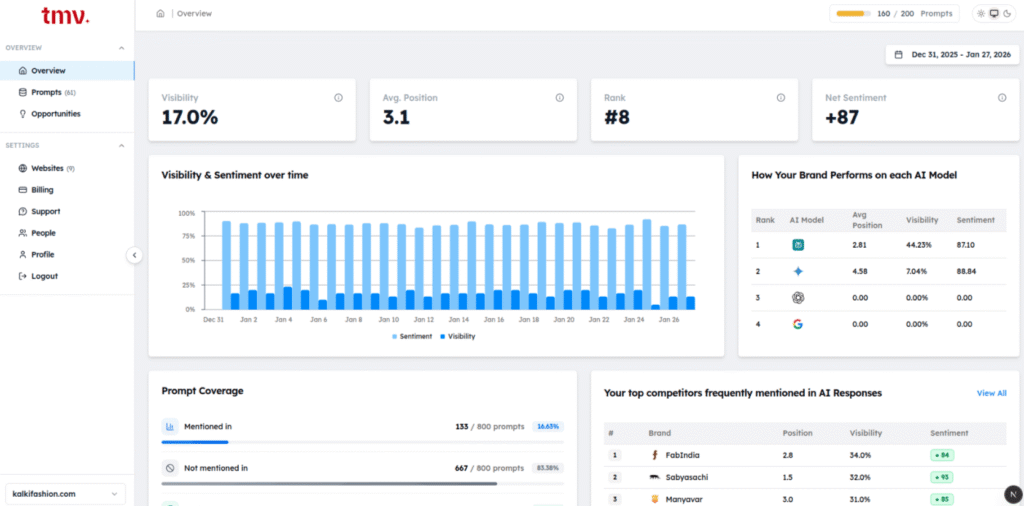
This is where broader AI visibility monitoring tools start becoming useful. Platforms like Track My Visibility help monitor how brands appear across AI search environments beyond traditional search analytics.
With tools like Track My Visibility, you can monitor:
- AI mentions and citations across different AI platforms
- Which pages and topics generate the most AI visibility
- Brand presence inside AI-generated answers
- Visibility trends over time
- Share of voice across AI search experiences
- How your competitors appear in AI responses
Used alongside Bing Webmaster Tools, this kind of monitoring can help provide a more complete view of overall AI search visibility.
Final Words
Bing Webmaster Tools is the easiest way to monitor how your content appears across Bing-powered AI experiences and Microsoft Copilot. From AI citations and grounding queries to cited pages and visibility trends, the AI Performance report gives a clearer view of how Bing AI systems are retrieving and referencing your content.
But as AI search continues expanding beyond a single platform, visibility tracking is also becoming broader than traditional webmaster tools. Monitoring how your brand appears across different AI-generated answers, assistants, and discovery experiences can help you better understand which topics, pages, and content formats are actually driving AI visibility over time.
If you want to explore that beyond Bing’s ecosystem, platforms like Track My Visibility can help you monitor AI mentions, citations, and visibility trends across multiple AI search experiences.
Start with a 7-day free trial to see how your brand currently appears across major AI platforms.
FAQs
Yes, Bing Webmaster Tools is completely free for website owners and marketers.
It shows AI citations, grounding queries, cited pages, and how your content appears across Bing-powered AI experiences.
Yes, your website must be verified in Bing Webmaster Tools before AI Performance reports become available.
Grounding queries are the search prompts and conversational queries that triggered your content in AI-generated answers.
Yes, the Pages report shows the exact URLs Bing AI systems referenced for specific queries.
The report updates regularly, though visibility and citation data may not appear instantly for newly verified websites.
Yes, the AI Performance report is limited to Bing-powered AI experiences and Microsoft Copilot visibility.
Platforms like Track My Visibility help monitor AI mentions, citations, and brand visibility across multiple AI search and conversational platforms.