


If you’re trying to figure out whether your brand shows up in AI search tools, you’re not alone.
58% of consumers now use AI tools to research products, and that number is climbing. But with new AI search platforms launching constantly, choosing between Track My Visibility vs Surfer AI Tracker isn’t simple.
One costs $50/month and focuses on simplicity. The other starts at nearly $182/month and comes with a full suite of tools.
So, which one actually makes sense for your business?
In this blog, we will cover:
- Features, pricing, and platform coverage for both AI brand visibility tools
- Which AI search visibility tool works best for startups, agencies, or enterprise brands
- Real limitations you need to know about these AI visibility tools
- A decision framework based on your budget and workflow
Let’s get started!
Key Takeaways
- AI visibility is now essential, with 58% of consumers using AI tools for product research.
- Surfer and Track My Visibility track major AI platforms, but differ in features and pricing.
- AI mentions don’t guarantee traffic; ongoing monitoring and action are required to see results.
What Is Track My Visibility?
The Track My Visibility tool was launched by Aureate Labs. The goal was to make AI search tracking affordable for teams that were getting priced out by enterprise platforms. The start is $50 per month, which is a fraction of what most competitors charge.
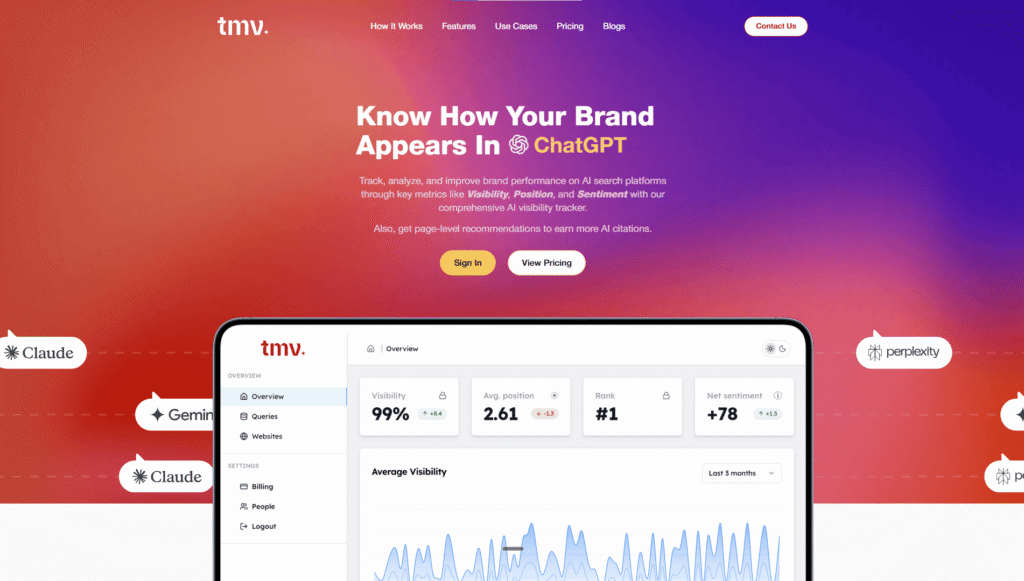
The tool is best for: Small to mid-sized businesses, content creators, and agencies managing multiple clients.
This brand visibility tool tracks the 4 major platforms, including ChatGPT, Google AI Overview, Gemini, and Perplexity. They focus on the engines that actually drive traffic, so you’re monitoring the platforms your customers are using.
Before diving into the features, it is important to understand how brands measure their visibility in AI content in the first place.
 Pro Tip: Want to see your starting point before comparing tools? Run the free AI visibility checker first. It gives you an instant read on how your brand currently appears in AI-generated answers, with no account needed. Helpful context before you decide between a $50/month tool and a $182/month one.
 Key Features of the AI Visibility Tracking Tool: Track My Visibility
1. The AI-Ready Score: This is the best feature of this brand visibility tool. As each page of your website gets an AI ranking score, this will help you understand if your pages are ready for citations. The score tells you which content is already trusted by large language models (LLMs), which is the foundation of any strategy to rank in AI search.
2. URL-Level Citation Tracking: This will help you see which pages of your website get cited. And how often your pages appear in multiple AI search tools. This will help you spot the best-performing content and the URLs that need changes.
3. Persona-Based Prompt Generation: This feature can speed up your testing process. You can run custom prompts, and you can also create persona-driven queries to check if AI search tools cite your brand. It will also tell which AI model is relying on your competitors’ content.
4. Cross-Model Comparison: Every AI search tool behaves differently based on its training. This AI visibility tool lets you compare performance side by side. If you’re performing great on Perplexity but nowhere to be found on Gemini, you’ll know exactly where to focus your effort.
5. Competitor Benchmarking: It will help you compare your brand’s LLM visibility and cited URLs with your competitors.
Pro Tip: AI visibility tools track performance but don’t optimize your content. To structure your content for AI citations, follow proven AEO strategies in how to optimize content for AI answers. Once implemented, these tools will show meaningful improvements in your citation rates.How Does the AI Brand Visibility Tool Track My Visibility Works?
The Track My Visibility mechanics are simpler than most AI workflow platforms. Here’s what happens behind the scenes:
Prompt execution runs on a daily basis. You can set up queries (either manually or through their persona generator), and the system runs them across selected AI engines every 24 hours.
Platform rotation spreads queries evenly throughout the day to avoid rate limits and maintain consistent data quality. Different AI tools get queried at different times.
Citation extraction also happens automatically. When AI search engines mention a source, the system captures the URL, position, and context. You see whether you’re cited as the primary source or buried in a “for more information” list.
Source verification cross-references citations against your tracked URLs. If a competitor gets cited instead of you, that shows up as a content gap.
The dashboard focuses on trends by providing you with information. Such as AI visibility percentage across different AI tools, citation count changes week-over-week, target audience query performance, and competitor positioning on your tracked topics.
Track My Visibility Pros and Cons
Pros
1. AI-Ready Score: This gives you a specific metric to focus efforts. Instead of optimizing everything, you work on pages that actually have citation potential. This alone saves hours of guessing.
2. Lower Entry Cost: At $50/month makes it accessible for small teams testing an AI SEO tool for the first time. You’re not committing $2,000+ annually before knowing if this matters for your business. If you want, you can also try this AI visibility tool for free for 7 days.
3. URL-level Optimization Recommendations: This will tell you exactly what’s missing. “Add more data points,” “Improve factual density,” “Strengthen authority signals.” Vague? Sometimes. But more helpful than “your visibility decreased 5%.”
4. Persona-based Prompt Generation: This AI SEO tool cuts setup time significantly. Rather than brainstorming 100 queries, you pick personas and get relevant suggestions immediately. You can also add more prompts manually if you want to.
5. Unlimited Team Members: You can access unlimited team members across all plans, which means there are no surprise per-seat charges. As a result, your entire content creation team can access the platform without budget negotiations.
6. Transparent Pricing: There are no hidden fees. What you see on the pricing page is what you pay. No “contact sales” mysteries.
7. Simple Setup: The easy setup gets you tracking in under an hour. Connect your domain, add competitor URLs, generate or import prompts, and you’re done.
Cons
1. Newer Platform: It’s a new AI visibility platform, so they are still implementing new things. They are adding new features and new AI search tools.
2. Limited Integration Options: API is in development, so connecting to other tools requires manual exports for now.
3. Smaller Language Support: If we compare it with the competitors’ AI brand visibility tool. This is primarily English-focused, which limits its usefulness for global brands.
4. Less Mature Analytics Suite: It offers fewer advanced reporting features. You get the basics, but power users might want more filtering and segmentation.
Pricing and Accessibility of the AI Visibility Tracking Tool
Trial: Free for 7 days
- 25 tracked prompts
- 1 website
- Unlimited team members
- Competitor Analysis
- AI Visibility Dashboard
- 3 AI platforms (ChatGPT, Perplexity, Google AI Overviews)
Discover Plan: $50/month
- 25 prompts per month
- 3 AI platforms tracked (ChatGPT, Perplexity, Google AI Overviews)
- Unlimited users
- Basic Insights
- Share of Voice tracking
- Competitor analysis
- Free 250-Point AEO & GEO Checklist
Grow Plan: $400/month
- Up to 300 prompts per month
- 4 AI platforms (ChatGPT, Perplexity, Google AI Overviews, Gemini)
- Unlimited websites
- Unlimited team members
- Detailed Actionable Insights
- Cross-model comparison
- Priority support
- Free 250-Point AEO & GEO Checklist
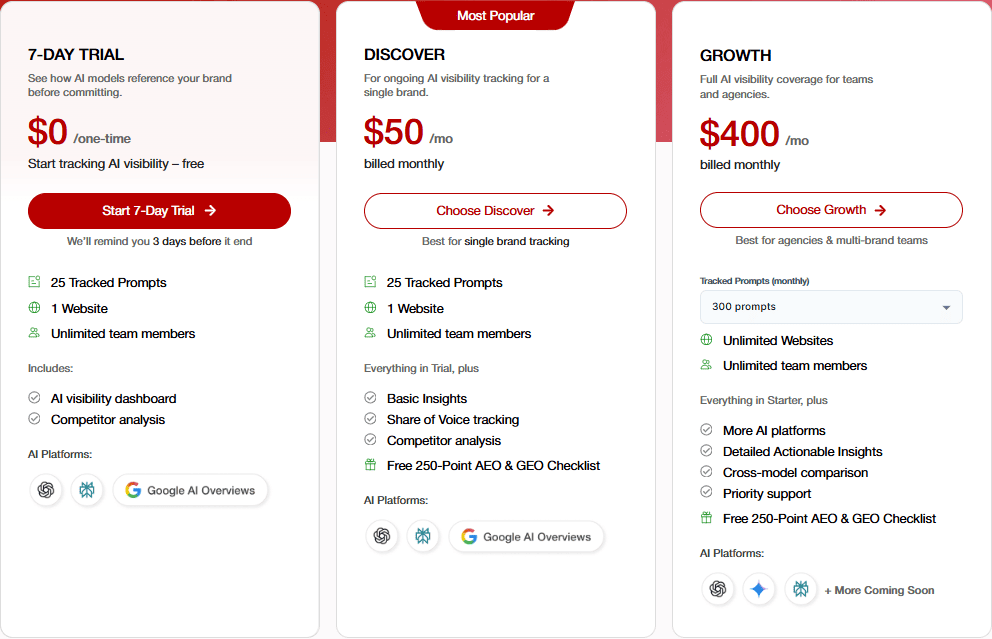
They offer an annual discount with 2 months free when you choose yearly billing on any plan.
Note: Pricing may change over time, so it’s best to check their official page for the most up-to-date information.
What Is a Surfer AI Tracker?
Surfer AI Tracker tool was launched in July 2025 as an add-on to the existing Surfer SEO platform. If you’re already paying for Surfer’s content editor, keyword research, and rank tracker tools, adding AI visibility monitoring seemed like a logical next step.
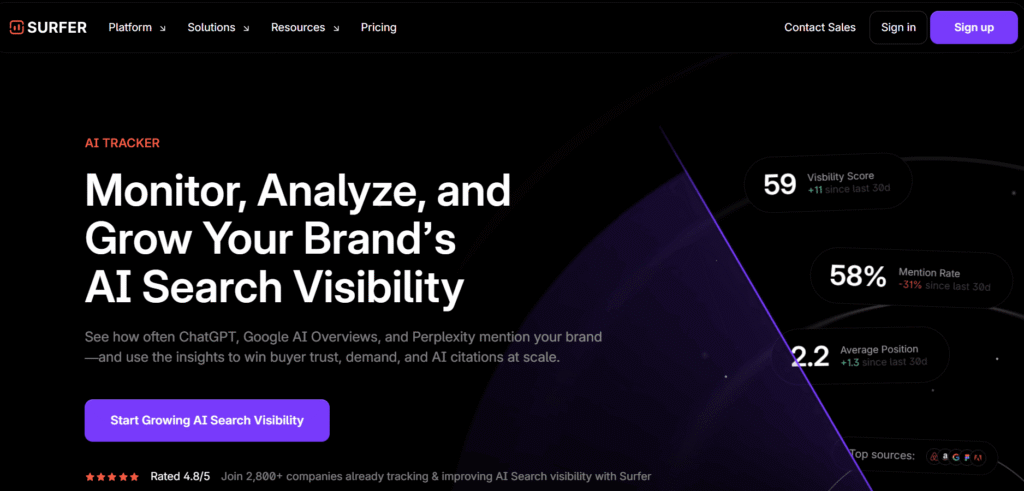
The team at Surfer built its reputation on data quality and actionable SEO content recommendations. As a result, building on this foundation, they applied the same approach to AI search visibility, with a particular focus on screenshot verification and detailed source attribution.
Meanwhile, their main target audience is marketing teams already invested in the Surfer ecosystem, as they want AI workflows built into their existing processes.
Key Features of Surfer AI Tracker Brand AI Visibility Tool
1. Brand and Keyword Tracking: It monitors both your company name and topic-specific queries. You see, when AI engines mention your brand versus when they cite your content for general knowledge queries.
2. Prompt-level Insights: This AI visibility tracking tool shows performance for each query you’re tracking. Some prompts consistently get you cited; others never do. This tells you which questions matter.
3. Source Transparency and Citation Mapping: It breaks down where citations come from. If ChatGPT cites you, you see the exact paragraph and context.
4. Visual Trend Charts: It makes it easy to spot changes over time. Instead of comparing numbers, you see graphs showing citation frequency across AI models.
5. Prompt Customization: This AI visibility tool lets you write queries manually. Or you can also use its suggested prompts with volume indicators (how often users ask similar questions).
6. Weekly vs. Daily Updates: You will get flexibility. Daily tracking burns through credits faster but catches changes immediately. Weekly conserves credits for broader monitoring.
7. Sentiment Tracking: Categorizes brand mentions as positive, neutral, or negative. Useful for PR teams watching brand perception.
8. Mentions + Brands Feature: It separates branded queries from informational ones, helping you understand whether you’re known for your name or your expertise.
9. Tracking Owned Content: This shows the performance of specific pages you’re actively promoting. You can track whether your latest blog post has received AI search citations yet.
How Does the AI Search Visibility Tool Surfer AI Tracker Work?
The mechanics behind the tracker are straightforward and designed to provide a clear view of your AI presence. To begin with, here is how the system handles the data behind the scenes:
Scheduled Prompt Execution on a daily or weekly basis. This helps you configure which AI platforms the system should query and how often. The tracker then runs these prompts automatically to see how different models respond to your target topics.
Instead of just scraping text, the system captures actual screenshots of the large language models (LLM) responses. This provides you with a visual proof of exactly what a user sees. It ensures you aren’t just trusting a background algorithm to interpret the results; you can verify the real answer yourself.
The AI search visibility tracking tool automatically identifies brand mentions and sources within the AI’s response. It then maps these citations to specific URLs. This let you see if you are being cited as a primary authority or mentioned further down in a list of sources.
The system also runs sentiment analysis on every brand mention to categorize the tone of the response. It highlights content gaps by comparing your presence to your competitors. If a rival is being cited for a query where you are missing, the tool flags this as a priority topic for you to cover.
The dashboard integrates directly into the Surfer interface, allowing you to easily access a high-level view of your performance. From there, you can monitor your visibility percentage by query, as well as track your specific position in AI responses. Additionally, you can use the Looker Studio integration for custom reporting, giving you even deeper insights into your data.
For a more proactive approach, the InsertLinks connection identifies specific opportunities to buy citations where you aren’t yet appearing organically.
Surfer AI Tracker Pros and Cons
Pros
1. Integrated Ecosystem Approach: It works smoothly if you already use Surfer SEO tools. This way, your keyword research, content creation, and AI visibility tracking can happen in one platform.
2. Real LLM Answer Previews: It provides you with screenshots to remove guesswork. So that you see exactly what ChatGPT said, not a parsed summary.
3. Sentiment Tracking: It helps monitor brand visibility beyond simple mentions. So you know whether AI answers portray you in a positive light.
4. Fan-out Query Analysis: It discovers related search terms you hadn’t considered. You can start by typing a single query and see which related questions drive citations.
5. Owned Content Filter: It makes it easy to track specific pages without sifting through everything.
6. Advanced Reporting: You can do advanced reporting via Looker Studio. It gives power users the flexibility they need.
7. Established Platform: Surfer is already well-known in the SEO community, with a proven track record backing the tool.
8. Regular Updates: With the help of its new features, like daily tracking and sentiment, you can see active development.
Cons
1. Higher Entry Cost: Surfer’s Pro plan (which includes 50 AI Tracker prompts) costs $182/month billed yearly. If you only need AI visibility tracking and don’t use Surfer’s content tools, you’re paying for features you won’t use. Teams that only want AI visibility tracking may find the total cost hard to justify compared to standalone alternatives.
2. Credit-Based System: The AI SEO tool operates on a prompt-based model that can be used up quickly, especially if you enable daily tracking for multiple prompts. Prompt limits are tied to your plan tier, and upgrading for more prompts adds cost.
3. Ecosystem Lock-in: If you don’t need Surfer’s Content Editor or SERP Analyzer, you’re essentially paying for a large platform just to access one feature. For teams only looking for AI visibility tracking, the “forced” integration reduces the overall value.
4. Onboarding Time: Because the platform is so feature-rich, there is a steeper learning curve than with simpler, single-purpose trackers. New users should expect to spend some time learning how to navigate the various dashboards and settings.
Pricing and Accessibility of Surfer AI Tracker
Standard Plan:
- 25 tracked AI prompts
- Access to Content Editor, SERP Analyzer
- Basic AI visibility tracking
Pro Plan: $182/month (billed yearly)
- 50 tracked AI prompts, refreshed daily
- 1-click Content Optimization
- 1-click Internal Linking
- Plagiarism Checker
- 5 Brand Workspaces
- Content Ideas and Coverage Gap Analysis
Peace of Mind Plan: $299/month (billed yearly)
- 100 tracked AI prompts, refreshed daily
- Unlimited documents
- Unlimited Brand Workspaces
- Advanced SERP Analysis
- Personalized Onboarding
- Dedicated Success Manager
- API Access
Enterprise Plan: Custom Pricing
- Custom prompt limits
- Dedicated Customer Success Manager
- SSO and white-label reporting
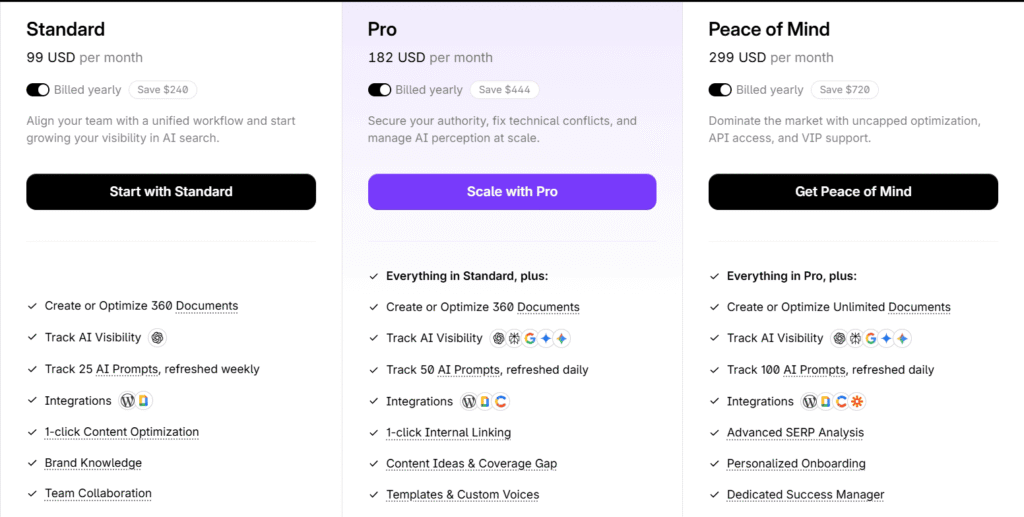
Surfer offers a 7-day money-back guarantee. This allows you to test the full suite of tools, including the Content Editor and AI tracking features, risk-free, to see if the data quality justifies the investment for your team.
Track My Visibility vs Surfer AI Tracker: Head-to-Head Feature Comparison
Let’s compare Track My Visibility vs Surfer AI Tracker side-by-side across factors that are actually important.
| Feature | Track My Visibility | Surfer AI Tracker | Winner |
| Starting Price | $50/month | $182/month (Pro plan, billed yearly) | Track My Visibility |
| AI Platforms Tracked | ChatGPT, Google AI Overview, Gemini, Perplexity | ChatGPT, Google AI Overviews, Google AI Mode, Perplexity | Tie |
| Prompts Per Month (Base Plan) | 25 prompts | 25 prompts (Standard), 50 prompts (Pro) | Depends on plan |
| Primary Strength | Affordability + AI-Ready Score | Integration with Surfer ecosystem | Depends on needs |
| Unique Feature | AI-Ready Score prioritization | Real LLM screenshot previews | Tie (both useful) |
| Reporting & Analytics | Basic to advanced by tier | Advanced with Looker Studio | Surfer AI Tracker |
| Actionable Recommendations | URL-level optimization guidance | General monitoring-focused | Track My Visibility |
| Multi-Language Support | Limited (primarily English) | Limited (follows Surfer SEO) | Tie |
| Team Members Included | Unlimited (all plans) | Based on Surfer subscription tier | Track My Visibility |
| Integration Options | API in development | Surfer ecosystem + API | Surfer AI Tracker |
| Customer Support | Email (all), Priority email (higher tiers) | Email (all), Chat (Scale+), Phone (Enterprise) | Surfer AI Tracker |
| Best For | Startups, small businesses, and agencies on budget | Existing Surfer users, larger teams | Depends on context |
| Trial Available | 7-Day Trial | No, 7-day money-back guarantee | Track My Visibility |
The comparison shows clear trade-offs. Track My Visibility AI SEO tool wins on price and accessibility. Surfer AI Tracker AI search visibility tool wins on advanced features and integration depth.
Limitations of AI Visibility Tracking Tools
Both tools share fundamental limitations worth understanding before you spend anything.
- Synthetic Prompts vs. Real User Queries: These AI search visibility tools test AI search engines with prompts you create or that they generate. However, that’s not the same as measuring actual user behavior. Instead, you’re making educated guesses about what people ask.
- Cannot Guarantee Actual Traffic Volume: Getting cited in AI answers doesn’t automatically drive traffic to your site. In fact, many users take the answer without clicking through to sources. As a result, traffic analytics from traditional search engines work differently from citation counts.
- Platform Algorithm Changes Affect Results: ChatGPT’s citation logic changes regularly. A page getting cited today might disappear tomorrow because OpenAI adjusted its ranking factors. You’re tracking a moving target.
- Human Review Still Needed for Strategy: These brands’ AI search visibility tools provide data. You still need to interpret it, decide which queries matter for your business, and develop content creation strategies. No tool automates strategic thinking.
Risks of Over-reliance
Tools provide data, not the complete strategy. So don’t mistake visibility metrics for business outcomes. A 50% increase in AI visibility might correlate with zero revenue increase if you’re tracking the wrong queries.
You will still need context and expertise. Understanding your target audience, market dynamics, and competitive positioning matters more than dashboard numbers.
You will need regular monitoring and adjustment. A set-it-and-forget-it approach won’t work here because AI tools change, competitor content improves, and new topics emerge.
Future of Brands AI Search Visibility Tools
The AI search visibility market is still pretty new, but things are moving fast. A user pointed out something worth noting: even when SEO rankings stay the same, clicks can drop by around 50% once AI answers appear in results. With 58% of Google searches now ending without a single click, tracking where your brand appears in AI answers isn’t just useful; it’s becoming a more relevant metric.
Why is my website traffic dropping even though my SEO rankings haven’t changed?
by u/allthecomms777 in LLMO_SaaS
Rand Fishkin mentioned that Google is answering over 60% of searches without a click. Between AI‑generated overviews, featured snippets, and its own ecosystem products, Google is keeping more users inside its walls. That means fewer clicks, fewer referrals, and a new race to be cited by LLMs, not just to rank on the results page.
AI engines care about depth, accuracy, and original data, so the lightweight content that used to work in traditional SEO doesn’t cut it anymore. Now you need quality, field-tested insights. This actually helps authoritative publishers, since AI models are under pressure to be more accurate and transparent about their sources.
The brands doing well aren’t just monitoring their AI visibility anymore. They’re actively optimizing for it. Current tools like Surfer AI Tracker and Track My Visibility give you good data, but the industry is moving toward workflows that don’t just track performance but also tell you exactly what to fix and can automate some of those updates.
We’re also seeing consolidation. The big SEO players like Semrush, Ahrefs, and SE Ranking have already added AI visibility tracking as a core feature, not just a side option.
Over the next year and a half or so, expect smaller companies to get acquired as the market matures and brands want one platform that handles both traditional search rankings and AI visibility together.
Track My Visibility vs Surfer AI Tracker: Actual Performance Analysis
Let’s examine how Track My Visibility vs Surfer AI Tracker performs in practice across specific criteria.
1. Platform Coverage & Accuracy
When it comes to coverage, both AI SEO tools give you a view of where your brand shows up, but they take different paths.
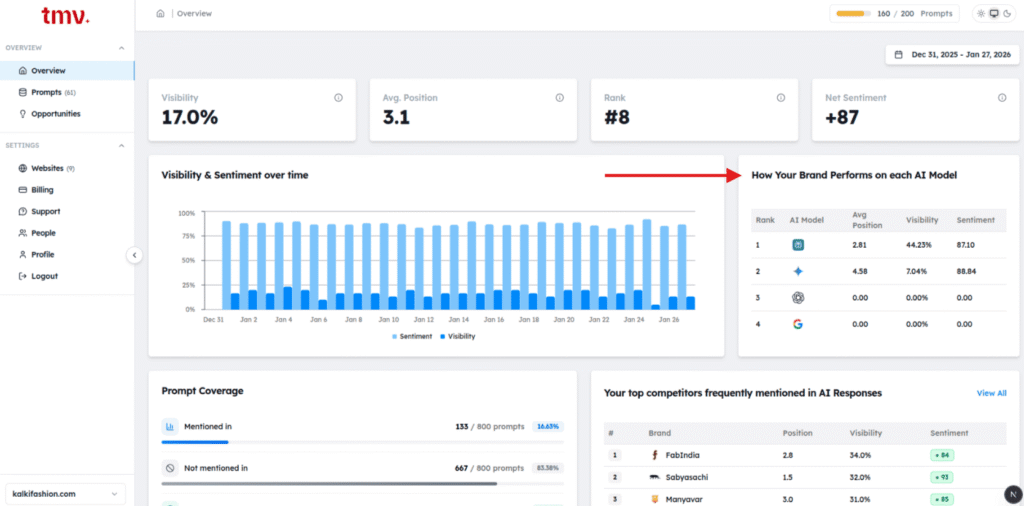
Track My Visibility keeps things focused. It tracks the four platforms that drive most AI traffic: ChatGPT, Gemini, Perplexity, and Google AI Overviews. The platform list is shorter, but you get detailed cross-model comparisons so you can see how answers change between engines.
It works well if you’d rather go deep on the platforms instead of tracking every new AI tool that launches.
Surfer AI Tracker covers ChatGPT, Google AI Overviews, Google Gemini, Google AI mode, and Perplexity. You can also check your AI search visibility by choosing a particular model.
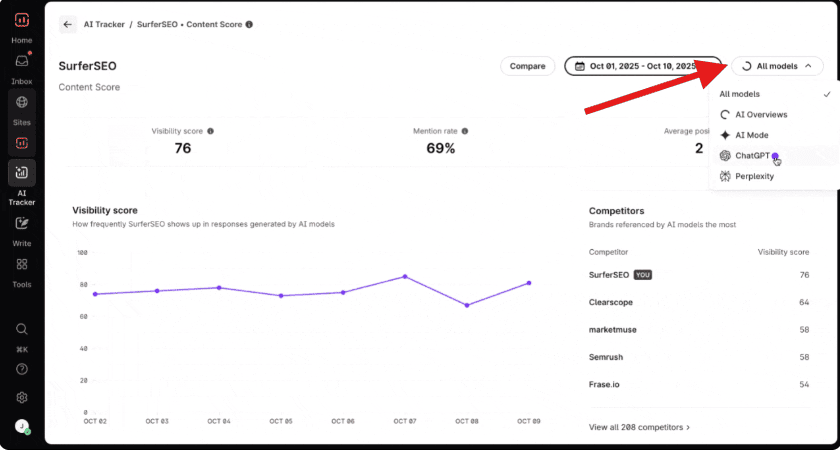
Its Real LLM answer previews with screenshots verify that the extraction worked correctly. You can also manually review whether the tool accurately captured citations. And its daily or weekly scheduling gives flexibility based on the credit budget.
2. Ease of Use & Setup
Let’s see how to use and set up these AI search analytics tools.
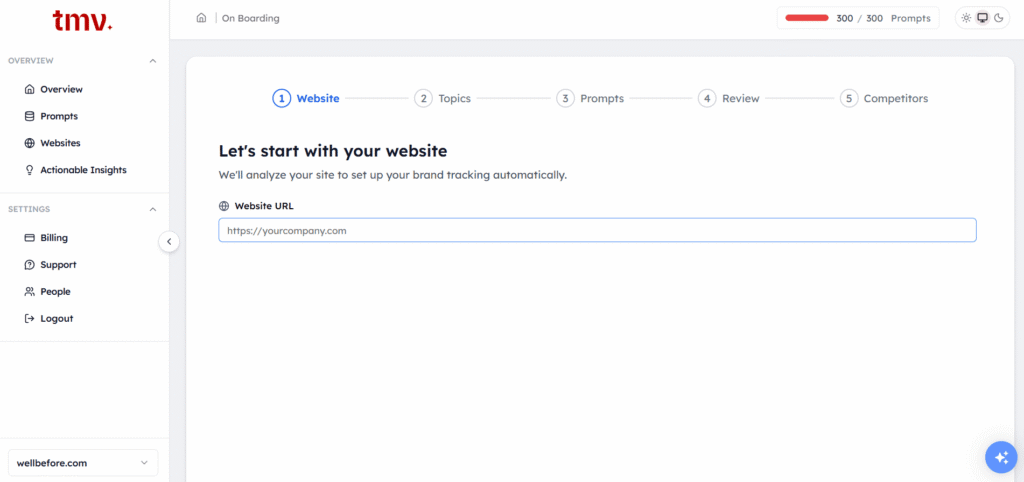
The Track My Visibility tool keeps onboarding very simple. The first step is to create your account and select the plan. After that, you just need to enter the name of your website.
Then, you’ll have to follow a 5-step process, where the website will provide you with a few topics that you can select or deselect yourself. After that, the tool will provide you with prompts, and if you want, you can add more prompts later.
Then, it will recommend you reviews, with what to change. You can also monitor your brand’s performance on the dashboard. This platform generally updates its data every 24 hrs.
To set up Surfer AI Tracker, you first need to be a Surfer SEO user, as the tracker is built into the core platform. Once you have your subscription, the onboarding begins within the familiar Surfer interface, where you select the AI Tracker from your dashboard and configure your tracking based on the number of prompts in your plan.
The process involves a three-step workflow where you first input your brand name and industry-specific topics. The system then generates a list of suggested prompts with volume indicators, which you can review, deselect, or approve to begin monitoring.
Because this tool is integrated with the Content Editor and Topical Map, you can immediately transition from tracking a visibility gap to creating a new, optimized article. The platform automatically refreshes its data every 24 hours, therefore providing daily updates on your brand mentions and citation changes across major AI models.
3. Reporting & Analytics Depth
Track My Visibility gives you a full set of metrics. For example, you can see how often specific models are cited. Additionally, you can check your “AI-Ready Score” to understand your chances of getting mentioned. As a result, this helps you figure out your content gap and shows exactly where your competitors are leading.
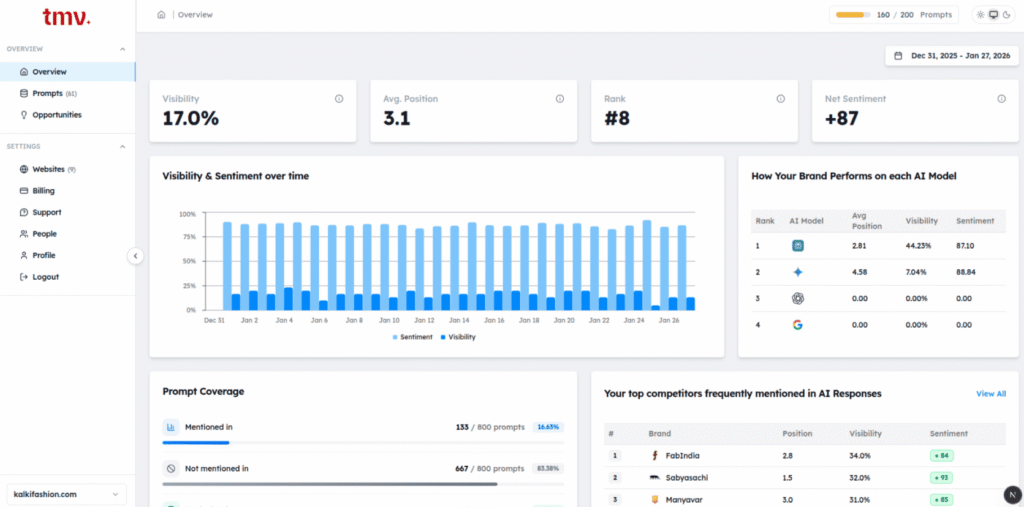
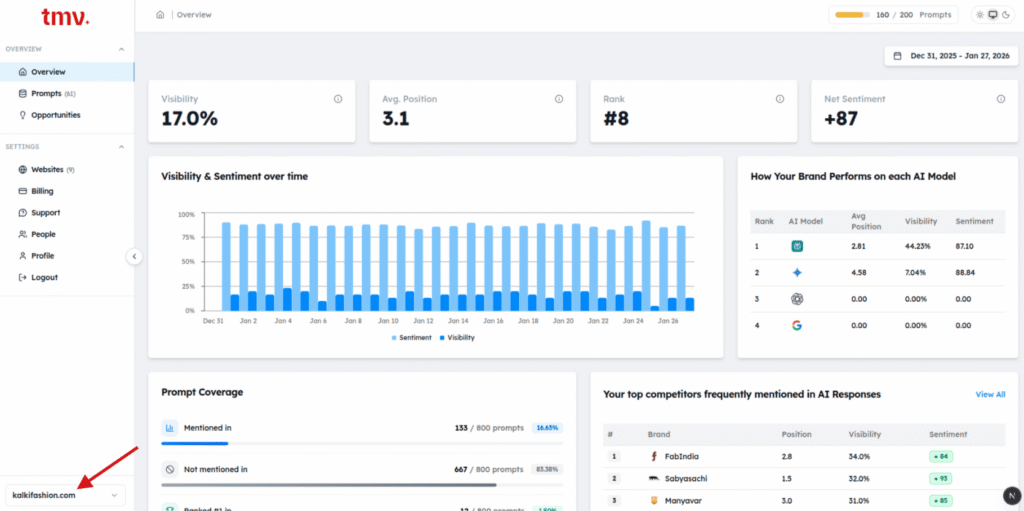
The dashboard keeps things simple: you see your most-cited URLs and how you compare to competitors. It updates daily, but it won’t bury you in data. If you just need a reliable pulse on your AI presence without the noise, this is a solid option.
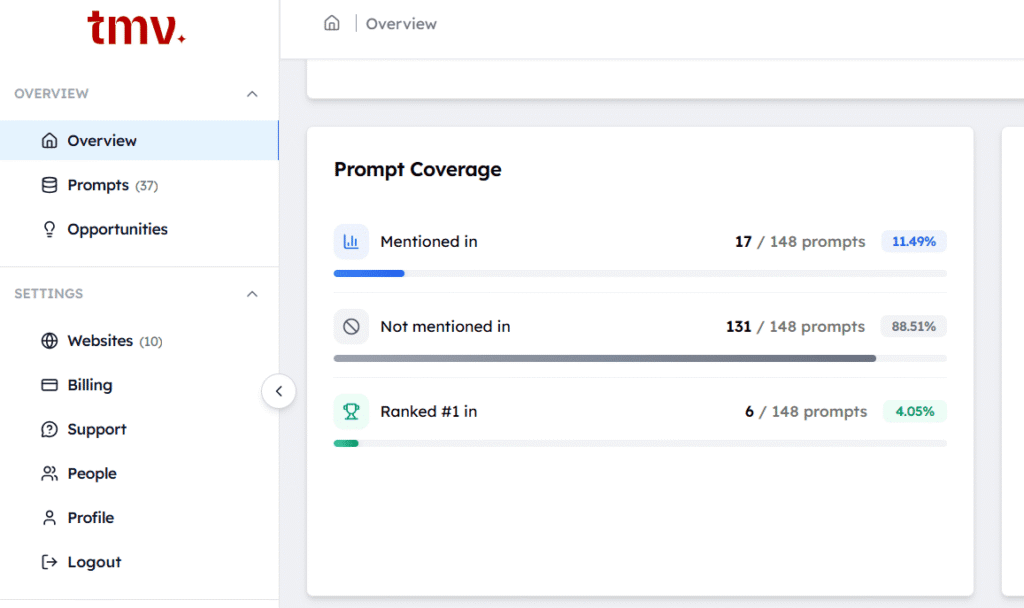
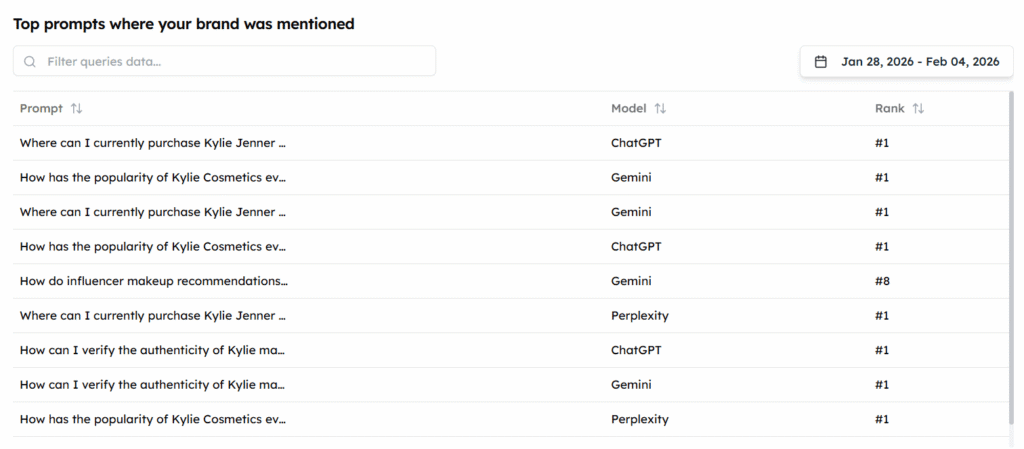
It also shows a full prompt coverage breakdown, including how many prompts your brand was mentioned in, how many it was absent from, and how many times it ranked #1.
Surfer AI Tracker takes advantage of its existing SEO tools by tracking your visibility percentage, including where you appear in AI responses and how you’re being talked about across ChatGPT, Perplexity, and Google’s AI search.
Additionally, it offers more than the standard dashboard. You can connect it to Looker Studio for custom reports and use a “fan-out” query tool to find related search terms you might have overlooked.
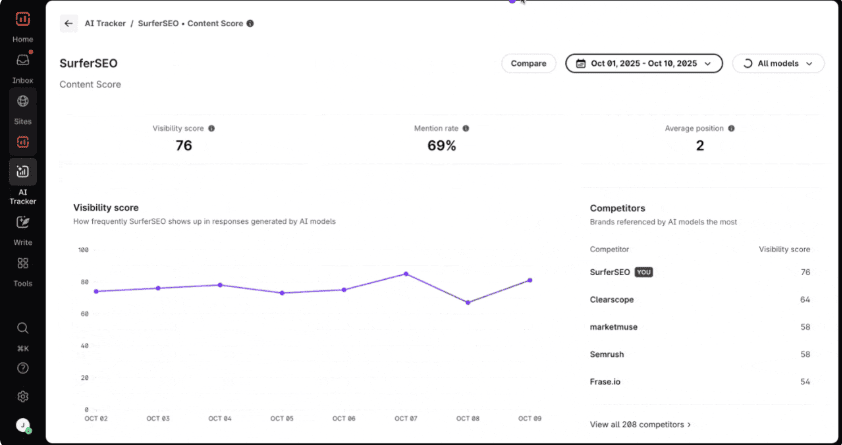
One of the better updates in 2026 is source grouping, which shows you which platforms AI models cite most often, such as Reddit or niche industry blogs. Once you know that, you can focus your outreach or ad spend on those specific sites.
4. Actionable Insights & Recommendations
Track My Visibility tool is for people who want clean data without all the extra stuff that comes with a full content platform. In other words, you put in your domain and the prompts you’re targeting, and it gives you an “AI-Ready Score” for each URL. From there, that score becomes your starting point, since it shows you how a machine interprets your page.
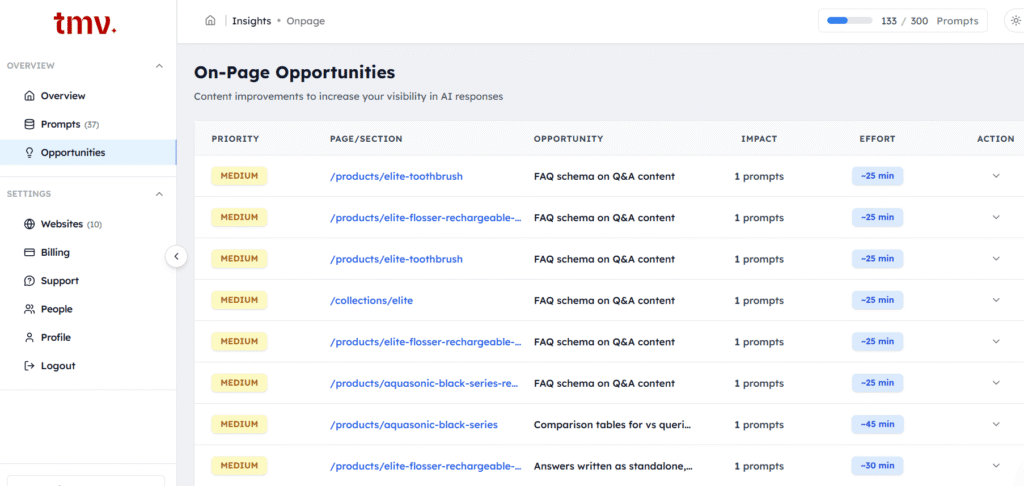
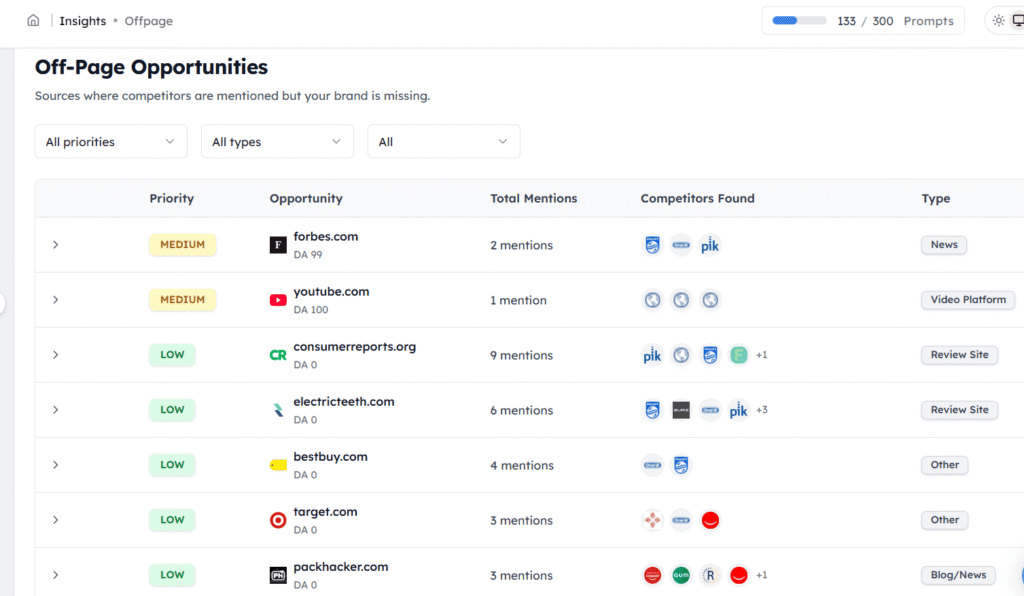
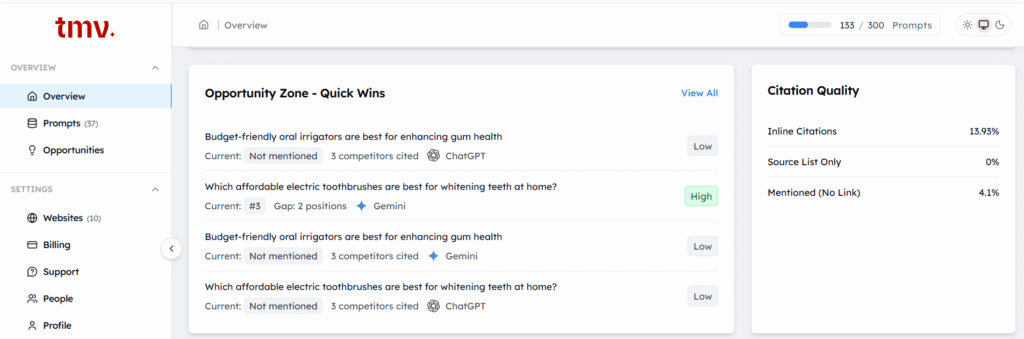
After that, you get a daily list of what to fix first, plus recommendations for each page. Additionally, it’s really good at spotting technical problems like missing schema or weak authority signals.
Next, the Opportunity Zone shows you exactly which prompts to prioritize, with High or Low urgency labels, which AI platform has the gap, and how many competitors are already being cited there.
Furthermore, it also breaks down citation quality, showing whether your brand is getting inline citations, source list mentions, or name drops without a link. As a result, each type carries a different weight in terms of how AI models perceive your authority.
Meanwhile, Surfer AI Tracker shows you what’s holding your content back from appearing in AI search results. Specifically, it spots the gaps in your content, keeps tabs on when competitors get mentioned instead of you, and tells you exactly what to change.
Ultimately, the goal is to get your brand cited more often when people search using multiple AI search tools like ChatGPT, Gemini, or Perplexity.
5. Competitor Tracking Capabilities
When it comes to tracking your competition, both AI search visibility tools show you what’s happening, but they do so in different ways.
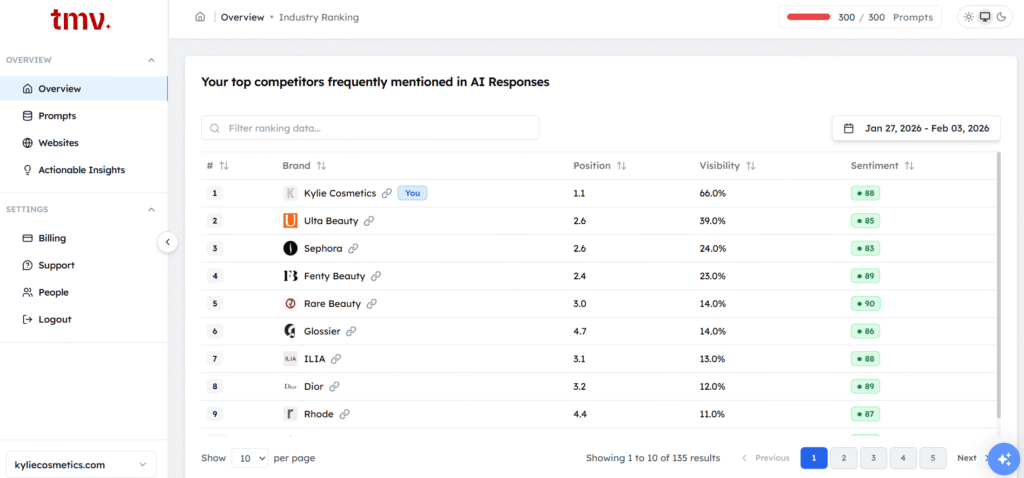
Track My Visibility AI brand visibility tool keeps things simple. You plug in your brand and a few competitors, and you’re basically done. Right away, you get a side-by-side view of how you’re performing.
It shows your Share of Voice and lets you see how your citations compare across different AI models. It’s built to give you the core data quickly without much setup hassle.
Surfer AI Tracker works differently because it’s built around content. You still get visibility comparisons and position tracking, but it adds something called “fan-out” competitive insights. This looks at the sub-queries and related questions that AI models generate behind the scenes, and as a result, helps you spot where competitors are building semantic connections you might have overlooked.
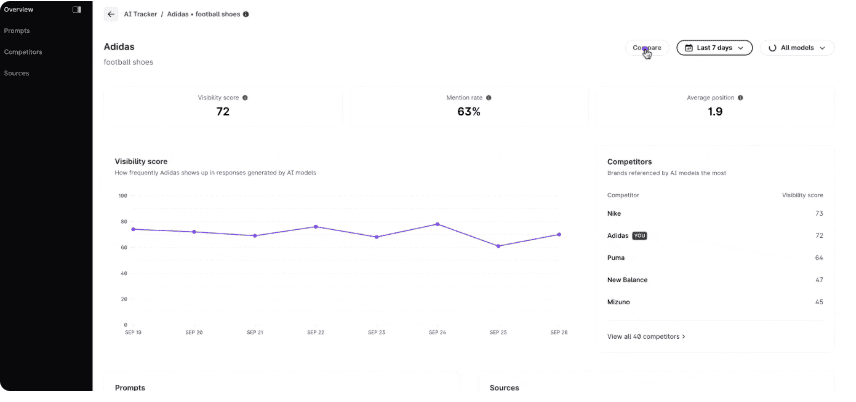
It includes the “Mentions + Brands” feature. You can group data by domain to see which platforms, Reddit, niche blogs, whatever, the AI trusts most for your competitors. That gives you a pretty clear picture of where to put your digital PR and link-building work.
6. Team Collaboration & Integration
Both the AI SEO tools handle team collaboration pretty differently.
Track My Visibility gives you unlimited seats on every plan and lets you export data as PDFs or CSVs. Right now, dashboard access works through simple login sharing, though they’re building out a proper API for teams that need custom integrations.
Surfer AI Tracker limits team access based on your subscription level. You can export to CSV or PDF, and there’s a Looker Studio connector for more sophisticated visualizations. API access is available on the Peace of Mind plan and above.
7. Data Accuracy & Reliability
Track My Visibility is all about transparency. It uses a documented methodology for daily prompt execution, so you can see exactly how citations get extracted across multiple models as it happens. The downside? It’s newer, which means it doesn’t have the deep historical data or long-term validation that some established brands want.
Surfer AI Tracker takes a different route. It’s known for high-quality data and what they call a “visual-first” approach. Instead of pulling from API data, which can be off by up to 25% compared to what users actually see, Surfer scrapes real LLM responses and gives you actual screenshots. This removes any guesswork about extraction and double-checks URL attribution.
When Surfer says you were cited, you get visual proof. It also gives you the option of daily or weekly updates. But the real strength is how it cross-references citations against its massive database of search signals to make sure everything checks out.
8. Customer Support & Resources
When it comes to support and community, these two AI visibility platforms work differently.
Track My Visibility provides email support across all plans. What makes it different is the founder’s hands-on involvement with the product team. As a result, you’re often getting answers from the people who actually built the platform, which is why smaller teams and agencies find this especially valuable. Meanwhile, the documentation is growing as the platform matures, and the user community is expanding quickly.
Surfer AI Tracker runs on a much larger, more mature infrastructure. You get email and chat support, but also access to a deep knowledge base, structured training through Surfer Academy, and a global community of over 20,000 members.
If you like learning from peer examples and ready-made case studies, Surfer has an extensive library of resources and weekly live workshops that give you a much more comprehensive safety net.
Which Brand AI Search Visibility Tool Should You Choose?
Choosing the right AI SEO tool for tracking your brand in AI search really comes down to your budget and how much you rely on the broader Surfer ecosystem. Ultimately, here is a direct, conversational breakdown of how to decide between the two in 2026.
Choose Track My Visibility If You
- Budget is your primary concern: You can’t justify spending $180+ per month just to see where your brand shows up. With plans starting as low as $50/month, it is a much lower financial hurdle.
- Need a low-risk starting point: You are testing brand AI visibility for the first time. Their entry-tier plans are perfect for validating if this data actually moves the needle for you before you commit to a major subscription.
- Want specific “To-Do” lists: You prefer an AI-Ready Score that tells you exactly which pages to fix, rather than just seeing a dashboard of general trends.
- Want source-level citation clarity: The Sources tab shows whether AI is citing your pages, competitor sites, or third-party domains, so you know exactly where to focus.
- Are a smaller agency: You are managing several small clients where costs need to stay lean. The affordable scaling and unlimited team members make it a practical choice for a growing agency.
- Focus on the US market: You don’t currently need deep multi-language support and are happy with a tool that excels in English-language AI tracking.
- Prefer specialized tools: You aren’t interested in “all-in-one” platforms. You want a standalone tool that does one thing well without being locked into a larger software suite.
Choose Surfer AI Tracker If You
- Are already a “Surfer Power User”: You use Surfer daily for keyword research and content writing. The ability to track AI search visibility in the same tab where you optimize your blog posts is worth the extra cost.
- Have the budget for a premium suite: You’re comfortable with $182 to $299+ per month to have everything under one roof.
- Need to see “The Proof”: You want an actual screenshot verification of what multiple chatbots like ChatGPT or Gemini said about you. For example, this is incredibly helpful for executive reporting or proving a point to a stakeholder.
- Want deep data: You need comprehensive citation analysis, sentiment tracking (positive vs. negative mentions), and “fan-out” query insights to find related search terms you haven’t thought of yet.
- Are scaling content fast: You are tracking 50 to 100+ prompts monthly and need the high-volume credit pools that an established platform like Surfer provides.
- Value reliability over price: You prefer an established company with a proven track record. You’d rather pay more for a tool that is updated constantly and integrates with Looker Studio for advanced reporting.
Conclusion
The Track My Visibility vs Surfer AI Tracker choice depends on your budget and existing tools.
Track My Visibility works well as an affordable standalone option at $50/month. In particular, it offers strong optimization recommendations and the unique AI-Ready Score, making it ideal for small teams testing AI search visibility without large budget commitments.
Surfer AI Tracker fits teams already using Surfer SEO. In particular, at $182/month minimum, it delivers integrated workflows and comprehensive citation analysis. Additionally, for existing Surfer users, the $95/month add-on provides workflow value that further justifies the cost.
The price difference matters. As a result, Track My Visibility is the clear choice for startups and budget-conscious agencies. On the other hand, Surfer AI Tracker makes sense when you’re already invested in the Surfer ecosystem.
Neither tool is perfect. Both face limitations in language support and emerging platform coverage. AI search engines change constantly, which means any visibility tool is partially reactive.
Your best choice in the Surfer AI Tracker vs Track My Visibility debate comes down to budget, team size, and whether you need optimization help or just monitoring.
Frequently Asked Questions
Surfer AI Tracker works better if you’re already using Surfer SEO and want integrated workflows with advanced analytics. Track My Visibility is better for smaller teams or agencies that need an affordable, standalone tool with strong optimization guidance. Neither is universally better; it comes down to budget and whether you value deep monitoring or actionable recommendations.
Track My Visibility wins on price and accessibility, especially if you’re testing AI visibility on a tight budget. It offers a free tier to get started and provides optimization recommendations that Surfer doesn’t focus on as heavily. Surfer AI Tracker has more comprehensive citation analysis and better integration if you’re already invested in their ecosystem.
No AI tracker tool is perfectly accurate because they rely on synthetic prompts rather than real user queries. The most accurate approach is using two AI search tools alongside Google Search Console to cross-reference your overall visibility trends.
You’ll need a dedicated AI visibility tool like Track My Visibility or Surfer AI Tracker, as traditional tools like Google Search Console don’t cover AI engines. These platforms monitor how often your brand appears in responses from ChatGPT, Perplexity, Gemini, and others.
Track My Visibility is better for small businesses because of its lower price point and free plan option. Starting at $50/month versus Surfer’s $182/month minimum makes it accessible for tighter budgets.
Resources: