Redirect Chain Checker
Enter any URL to see where it redirects, spot unnecessary redirect chains, and find broken or looping redirects that could affect crawling and user experience.
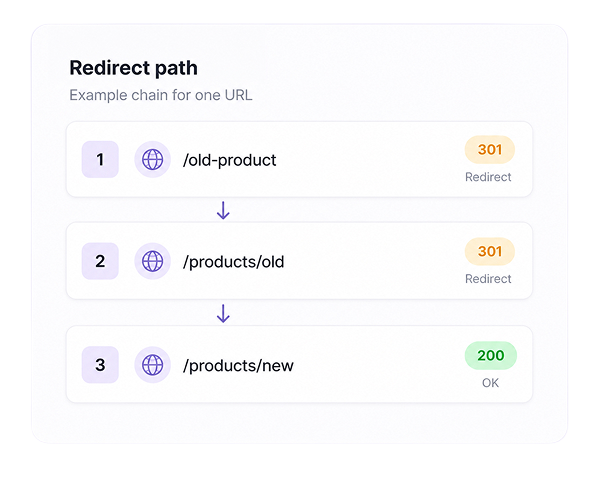
Following the redirect path
Redirect results
0| # | URL | Status Code | Redirects | Description | Final URL |
|---|
You know where your redirects lead. Now see if your brand appears in AI answers.
- Free
- No account required
- Up to 30 URLs per run
What is a Redirect Chain Checker?
A redirect chain checker follows every step a URL takes before reaching the final page. It shows the HTTP status code at each stage, such as 200, 301, 302, or 404, along with the final URL.
It can help you find long redirect chains, broken redirects, and redirect loops. Fixing these issues can make your website faster and easier for both users and search engines to access.
How Does the Redirect Chain Checker Work?
Enter up to 30 URLs and click Check Redirects. The tool scans each URL and follows it until it reaches the final destination.
For every URL, you’ll see the HTTP status code, whether a redirect is present, the number of redirect steps, and the final URL. This makes it easy to find unnecessary redirects, broken links, and URLs that are not leading to the correct page.
Status Code Check
Checks each submitted URL and clearly displays its HTTP status code, such as 200, 301, 302, or 404.
Redirect Path Tracking
Follows every redirect step and shows how many times the URL redirects before reaching the final page.
Final URL Result
Displays the final destination of each URL so you can confirm that visitors and search engines reach the correct page.
How to Read Your Redirect Results
Shorten redirect chains to a single hop
Replace 302s that should be permanent 301s
Catch 404s and broken destinations early
Consolidate duplicate redirect targets
Preserve link equity on migrated pages
Clear redirect loops before they hurt crawling
How Redirect Checks Improve Your Search Presence
Redirects help users and search engines reach pages that have moved. But when one URL passes through several redirects, it creates extra delays and makes your site harder to crawl efficiently.
The Redirect Chain Checker traces every step between the original URL and its final destination. It displays status codes such as 200, 301, 302, and 404, helping you find long chains, redirect loops, temporary redirects, and broken endpoints.
Use these insights to remove unnecessary hops, update internal links, and guide visitors and search engines directly to the correct page.
From Clean Redirects to Better AI Visibility
The Redirect Chain Checker helps you fix technical issues that may prevent users and crawlers from reaching the correct page. But a clean redirect path does not show whether that page is actually appearing in AI-generated answers.
Track My Visibility shows where your brand is mentioned, cited, and recommended across platforms such as ChatGPT, Gemini, Claude, and Perplexity. Fix your redirect issues first, then track whether the right pages are gaining visibility across AI search.
Start tracking your AI visibility today
Clean redirects get you found. Measuring AI brand visibility keeps you cited.
Got Doubts?
Quick answers to the most common questions about redirects and AI visibility.
What is a redirect chain?
A redirect chain happens when one URL redirects to another URL, which then redirects again before reaching the final page. Too many steps can slow down access and make crawling less efficient.
What HTTP status codes does the tool check?
The tool displays common HTTP status codes such as 200, 301, 302, and 404. These codes show whether a page loads correctly, redirects elsewhere, or leads to a broken destination.
What is the difference between a 301 and 302 redirect?
A 301 redirect tells search engines that a URL has moved permanently. A 302 redirect is temporary and should be used only when the original URL will be used again.
How do I fix a bad redirect?
Point the original URL straight to the final destination in a single 301 redirect, replace temporary 302s that should be permanent, and remove any hops that no longer serve a purpose.
How does a Redirect Chain Checker work with Track My Visibility?
The Redirect Chain Checker fixes URL issues, while Track My Visibility measures whether the right pages appear in AI answers.
Should I replace all 302 redirects with 301 redirects?
No. A 302 is suitable for a temporary change. Use a 301 when the move is permanent and the old URL will not return.