



If you’ve been hearing about llms.txt lately, you’re probably wondering whether adding it to your website can help AI systems better access, understand, and surface your content. With AI search rapidly evolving, brands, publishers, and SEO teams are all trying to figure out how to stay visible in AI search results and citations. That’s exactly why llms.txt is getting attention. But there’s also a lot of confusion around what it actually does, whether AI platforms even support it, and if it has any real impact.
What follows is a breakdown of what llms.txt is, how it works, how to create one, and where it fits into your AI search optimization strategy right now.
TL;DR
- llms.txt is a proposed Markdown-based file that helps AI systems discover and understand important website content.
- Unlike robots.txt, it does not block crawlers; it guides LLMs toward key resources like docs, FAQs, and canonical pages.
- Creating llms.txt is simple: organize important links, save the file in your root directory, and keep it updated.
- llms.txt is still experimental and does not guarantee AI citations or rankings on its own.
- Strong content quality, technical SEO, and AI visibility monitoring tools like Track My Visibility still matter most for AI search presence.
What is llms.txt?
LLMs.txt is a plain text file placed on a website that contains links and instructions for AI systems and LLMs. It typically includes important resources like documentation, FAQs, knowledge bases, sitemaps, or canonical pages that site owners want AI tools to prioritize and understand more easily. Unlike robots.txt, it does not block crawlers; rather, it helps guide AI retrieval systems toward the most useful content.
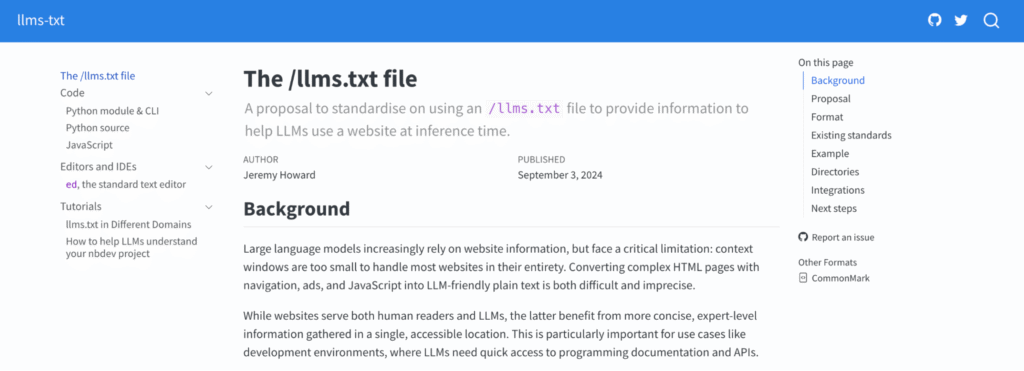
llms.txt: Directory or guide pointing AI systems to important resources
llms-full.txt: Larger consolidated file containing full content or expanded documentation
The concept was proposed by Jeremy Howard, co-founder of fast.ai and Answer.AI, in September 2024. His premise: if there is a standard way to tell traditional crawlers what to do (robots.txt), there should be a standard way to tell AI engines what to understand. The result is a plain Markdown file hosted at your site root that provides language models with a structured overview of your most relevant content.
The goal is to make AI content discovery more organized, efficient, and retrieval-friendly.
What Problem Is llms.txt Trying To Solve?
Modern websites are often difficult for AI systems to process efficiently. Pages contain navigation menus, JavaScript, ads, popups, tracking scripts, and large amounts of secondary content that can make important information harder to identify and retrieve accurately.
At the same time, LLMs retrieve and process content in smaller chunks rather than reading a website like a human. That plays a major role in how LLMs choose content for answers and citations, making clean structure and clear resource discovery far more important. Most websites also lack a simple machine-readable file that highlights their most valuable pages. llms.txt solves this by giving AI systems a cleaner, more organized path to important content and resources.
 Pro Tip: Most brands can’t see which pages AI platforms pull from, or whether they surface at all. The free AI visibility checker reveals exactly where a brand stands across ChatGPT, Claude, Gemini, and Perplexity.
How Does llms.txt Differ From Robots.txt?
While both files are placed at the root of a website, they serve very different purposes. Robots.txt is designed to control crawler access, while llms.txt is intended to guide AI systems toward the most useful and relevant content on a site.
| Feature | llms.txt | robots.txt |
| Main purpose | Help AI systems discover important content | Control crawler access and permissions |
| Designed for | LLMs and AI retrieval systems | Search engine crawlers |
| Function | Content guidance and prioritization | Crawl management |
| Blocks crawlers? | No | Yes |
| Highlights key resources | Yes | No |
| Common use cases | Documentation, FAQs, canonical resources | Prevent indexing or crawling of pages |
| Role in AI search | Helps improve AI-readable structure | Mainly controls access rules |
If you haven’t created one already, consider creating one with the robots.txt file generator, which can help define how search engines and other crawlers interact with your website.
How llms.txt Files Are Structured
According to the proposed standard, llms.txt files use Markdown format. Markdown is a lightweight plain text formatting language commonly used for documentation, README files, and developer resources because it is both human-readable and easily parseable by AI systems.
A typical llms.txt file contains structured links to important website resources along with a short description that helps AI tools understand what each page contains. Website owners can organize content using headings, bullet points, hyperlinks, blockquotes, and code blocks.
Some commonly used Markdown elements include:
- # for main headings
- ## and ### for subsections
- – or * for bullet lists
- [Text](URL) for hyperlinks
- > for highlighted descriptions or notes
- : for adding context beside links
- Triple backticks for code examples
The structure can remain simple for smaller websites or become more detailed for larger documentation-heavy platforms. Since AI systems prefer optimized content that parses Markdown effectively, adding clear organization and descriptions may help provide better retrieval context.
Example of an llm.txt File
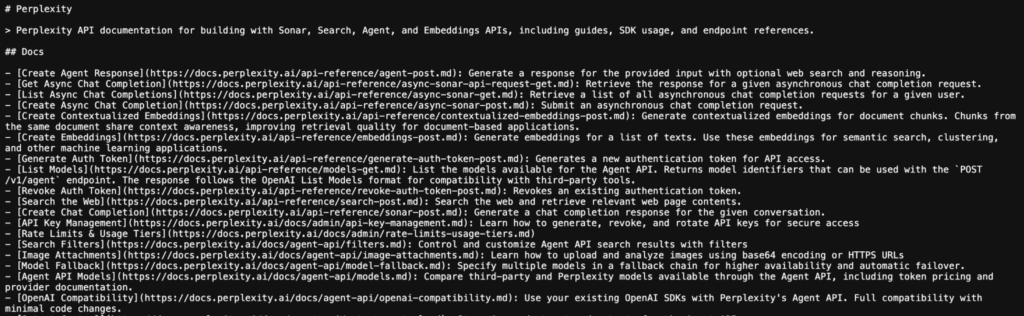
Explore the companies leading the adoption of the llms.txt standard in the llm.txt directory.
How to Create and Implement llms.txt
Creating an llms.txt file is relatively simple. The process mainly involves identifying your most valuable AI-readable content, organizing it in a structured Markdown format, and placing the file in your website’s root directory so AI systems can discover it easily.
Below is a step-by-step breakdown of how to create and implement llms.txt on your website.
Step 1: Identify Important AI-Readable Resources
Start by identifying the pages and resources you want AI systems to prioritize and understand. These should be high-value, trustworthy, and content-rich pages that best represent your website.
This can include:
- Documentation and API references
- FAQs and help center pages
- Product or feature pages
- Research articles, guides, and educational content
- Canonical resources you want AI systems to reference most often
Step 2: Create a Plain Text llms.txt File
→ With Text editor
Once you’ve identified your resources, create a new plain text file named llms.txt. Use any simple text editor: Notepad (Windows), TextEdit (Mac in plain text mode), VS Code, or Sublime Text. Save it with the .txt extension and write it using basic Markdown formatting.
Inside the file, add organized links to your key pages along with short descriptions explaining what each page contains. Keep the structure focused rather than listing every URL on your site.
→ With LLM.txt Generator
Instead of creating the file manually, you can use the free LLMs.txt Generator to generate a properly formatted llms.txt file in minutes. Simply enter your website URL, review the generated content, and download the file to upload to your site’s root directory. It helps save time while ensuring your llms.txt follows a clean, structured format.
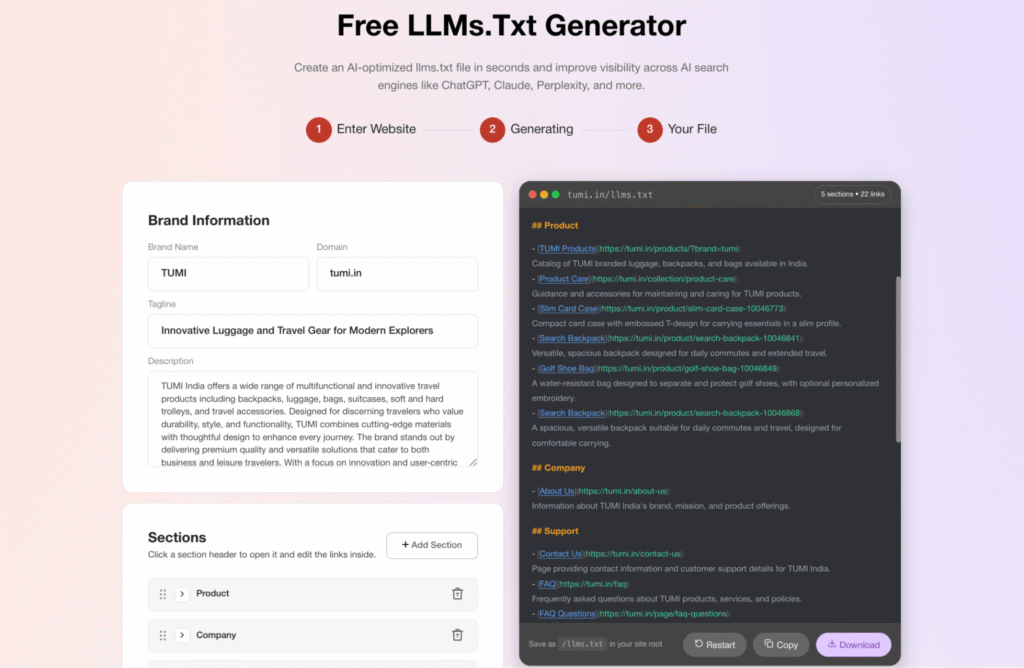
Step 3: Add the File to Your Root Directory
After creating the file, upload llms.txt to your website’s root directory. This is the main top-level folder where files like robots.txt and sitemap.xml are stored.
Once uploaded, the file should be publicly accessible at: https://yourdomain.com/llms.txt
If you use platforms like WordPress, Shopify, Webflow, or custom hosting, you can upload the file through your hosting dashboard, file manager, or SEO plugin tools. After publishing, open the URL in your browser to confirm the file is accessible publicly.
Step 4: Keep the File Updated
Your llms.txt file should evolve along with your website. As you publish new documentation, product pages, guides, or important resources, update the file so AI systems can continue discovering your most relevant content.
Remove outdated links, replace deprecated resources, and keep descriptions accurate. A clean and well-maintained llms.txt file is more useful than a large, outdated one filled with unnecessary URLs.
Step 5: Support It With Strong Technical SEO
While llms.txt may help organize content for AI systems, it does not replace strong technical SEO. AI retrieval systems still rely heavily on crawlable pages, clean site structure, semantic relevance, and content quality.
Make sure your website also has:
- Clear internal linking
- Fast-loading pages
- Proper heading structure
- Structured data and schema markup for AI
- XML sitemaps
- High-quality, well-organized content
Does llms.txt Actually Work? Current Adoption and Limitations
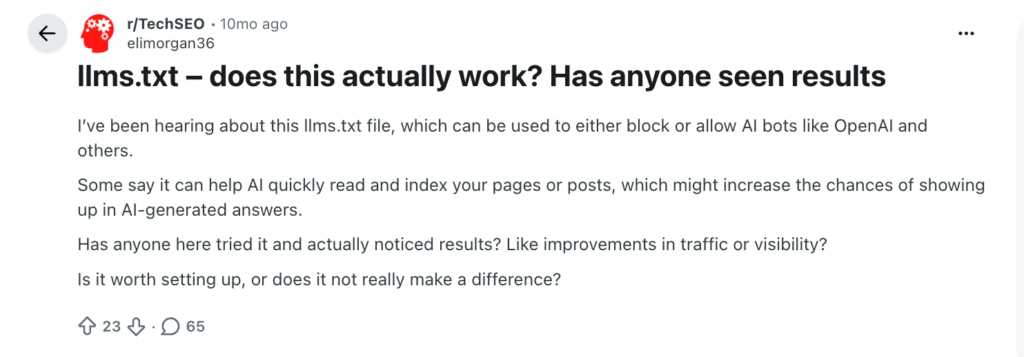
Even within the SEO community, there’s ongoing debate around whether llms.txt currently has any measurable impact, with many professionals on Reddit and Tech SEO forums reporting little to no visible change in AI visibility after implementation.
Right now, llms.txt is still an emerging standard and not something universally supported across all AI platforms. While interest around it has grown quickly, most major LLM providers have not clearly explained how much weight they give to llms.txt during retrieval or citation generation.
Some AI-focused tools, developer platforms, and documentation systems have started experimenting with it, but there’s currently no strong evidence that simply adding llms.txt will improve AI rankings or LLM citations on its own. AI systems still rely far more on content quality, semantic clarity, authority, crawlability, and freshness.
At this stage, llms.txt works best as a supplemental AI discoverability layer rather than a standalone optimization tactic. It may help organize important resources for AI systems, but strong technical SEO and high-quality content still matter most.
Common Misconceptions About llms.txt
As llms.txt gains attention, a lot of confusion and misinformation has started circulating around what it actually does. Here are some of the most common misconceptions:
- “llms.txt guarantees AI citations.”
Adding llms.txt does not guarantee that AI systems will cite or prioritize your content. - “It replaces traditional SEO.”
llms.txt is not a replacement for technical SEO, content optimization, or authority building. - “It can fully block AI training.”
llms.txt is mainly designed for content guidance, not strict AI data training control or enforcement. - “Only enterprise brands need it.”
Smaller websites, SaaS companies, publishers, and niche creators can also use it to organize important resources. - “Adding llms.txt automatically improves rankings.”
AI visibility still depends heavily on content quality, structure, trust, and relevance. - “AI systems only rely on llms.txt for retrieval.”
LLMs use multiple retrieval signals, including crawlable content, semantic relevance, and external authority signals. - “robots.txt and llms.txt do the same thing.”
robots.txt controls crawler access, while llms.txt helps guide AI systems toward important content.
Final Take
llms.txt reflects the growing shift toward AI-first content discovery. It offers a simple and low-risk way to guide AI systems toward the most important resources on your website. But while it may help improve content organization for AI retrieval, visibility in AI search still depends far more on content quality, authority, semantic relevance, crawlability, and trust signals.
As AI search continues evolving, structured AI-readable website signals will likely become more important. That’s why businesses should start auditing their websites for AI discoverability and improving retrieval-friendly content structure now.
Tools like Track My Visibility can help you monitor how your brand appears across AI platforms like ChatGPT, Claude, Gemini, and Perplexity. It lets you track AI citations, analyze visibility trends, monitor competitors, and identify which pages AI systems reference most often.
If you want to understand and improve your AI search presence, you can start with a 7-day free trial.
FAQs
A lightweight file that helps AI systems identify important resources and better understand website structure.
It is typically added to the root directory of a website, such as yourdomain.com/llms.txt.
Not directly. Citations still depend heavily on content quality, relevance, authority, and retrieval accessibility.
No. It is currently an emerging proposal and not universally standardized or adopted.
Support is still evolving across platforms and AI crawlers, with no universal implementation standard yet.
No. robots.txt manages crawler permissions, while llms.txt focuses on AI content guidance and discoverability.
Yes. Even smaller brands and publishers can benefit from clearer AI-readable content organization.
You can monitor AI visibility, citations, and discoverability trends using platforms like Track My Visibility alongside technical SEO audits.