


When someone asks ChatGPT, “best cruelty-free lipstick brands,” they get a direct answer and not a list of 10 blue links. If your brand is not in that answer, that buyer moves on. They never reach Google. They never reach your website.
AI search is not a future trend. It is where your customers are right now. Unlike traditional SEO, AI search works differently from conventional ranking, and if your brand is not appearing in those answers, you are losing high-intent buyers before they ever reach Google. AI traffic is up 527%, and most brands still have no idea whether they appear in those answers (Search Engine Land).
Track My Visibility closes that gap directly. Giving you a direct way to connect AI visibility data to your brand strategy. This guide walks you through how to use Track My Visibility, from setup to reading your dashboard and turning data into action.
This guide is best for brands that want to know where their brand stands in AI-generated answers and not just on Google.
In this blog, we’ll also cover:
- What is Track My Visibility
- How to complete the 5-step setup process
- How to read the Overview dashboard and key metrics
- How to find competitor gaps and quick wins
- How different teams can use the data
TL;DR
- Track My Visibility is an AI visibility tracking tool that shows how your brand appears across ChatGPT, Gemini, Google AI Overviews, and Perplexity.
- Setup takes five steps: add your website, select topics, generate prompts, review, and add competitors.
- The Overview dashboard tracks four metrics: Visibility %, Avg Position, Rank, and Net Sentiment.
- The Opportunities section gives you Off-Page, On-Page, and Technical fixes ranked by impact.
- Plans start with a 7-day free trial, with no large commitment needed to get started.
What Is Track My Visibility?
To understand how to use Track My Visibility, start with what it actually does. Track My Visibility (TMV) is an AI brand search visibility tool that shows exactly where your brand’s presence stands inside AI-generated answers. It is the most direct way to track your AI search presence across the platforms your customers are already using.
It runs your prompts across major AI platforms such as ChatGPT, Google AI Overviews, Gemini, and Perplexity, and reports back with data you can actually use.
The tool tracks four key metrics: Visibility%, Average Position, Rank, and Net Sentiment. Every result is powered by cloro.dev, which means the data is always fresh and accurate.
It is built for SEO teams, PR managers, marketing agencies, and eCommerce brands. And most teams need it. In a recent survey, only 27% of marketers said they consistently track whether their brand shows up in AI-generated answers. Another 36% check in occasionally, and 25% are not tracking it at all (Page One Power).
 Pro Tip: Not sure where your brand stands right now? Before comparing tools, run a free check. The AI visibility checker gives you a quick snapshot of how your brand appears across AI platforms, no signup required.
How to Use Track My Visibility: The 5-Step Setup
The setup is very simple. There are five steps, and the AI visibility tool guides you through each one.
Step 1: Add Your Website
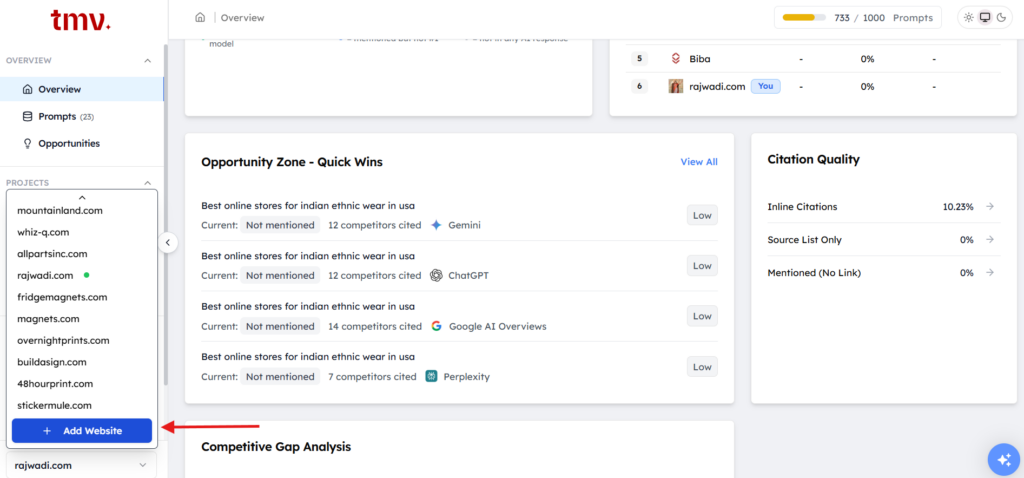
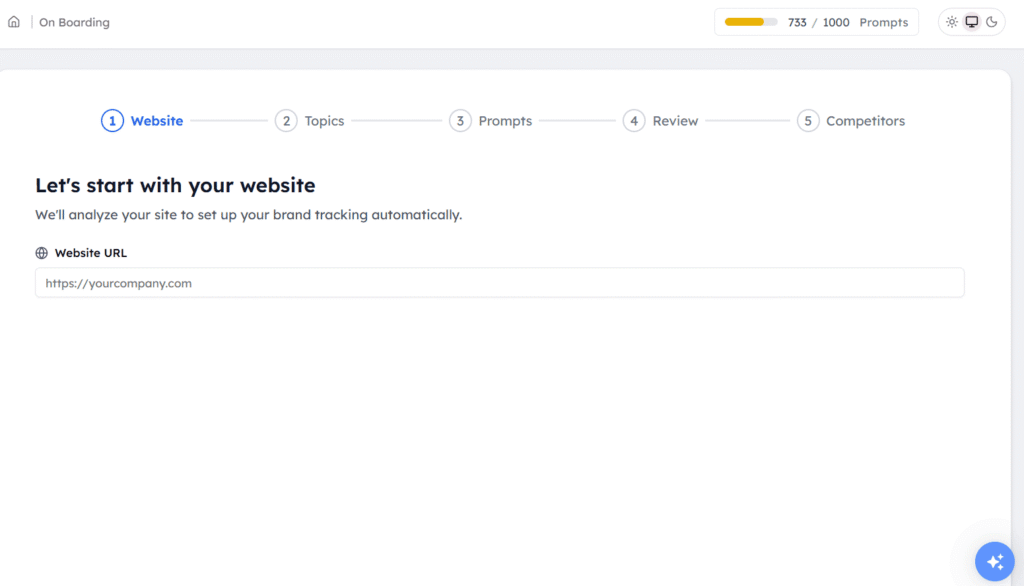
If you are new to this tool, you can start with the 7-day free trial. You simply need to enter your website URL, and TMV will analyze your site to set up your brand visibility tracking automatically.
Step 2: Select Your Topics
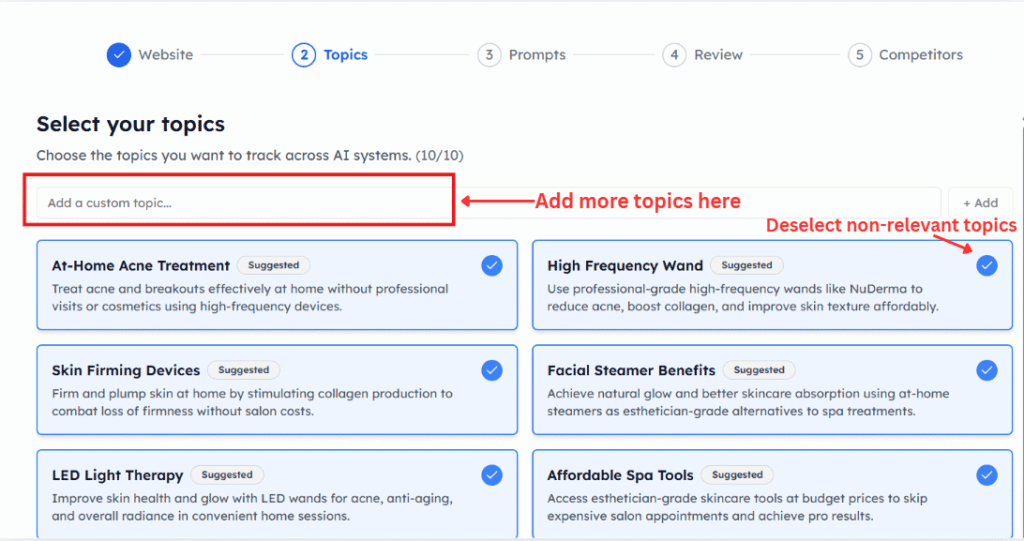
TMV uses your website to suggest relevant topics your brand should be tracked for. Review and confirm the ones that match your products, services, or category. This step defines the context that directly influences the quality of AI generated prompts in the next step.
Step 3: Set Up Your Prompts
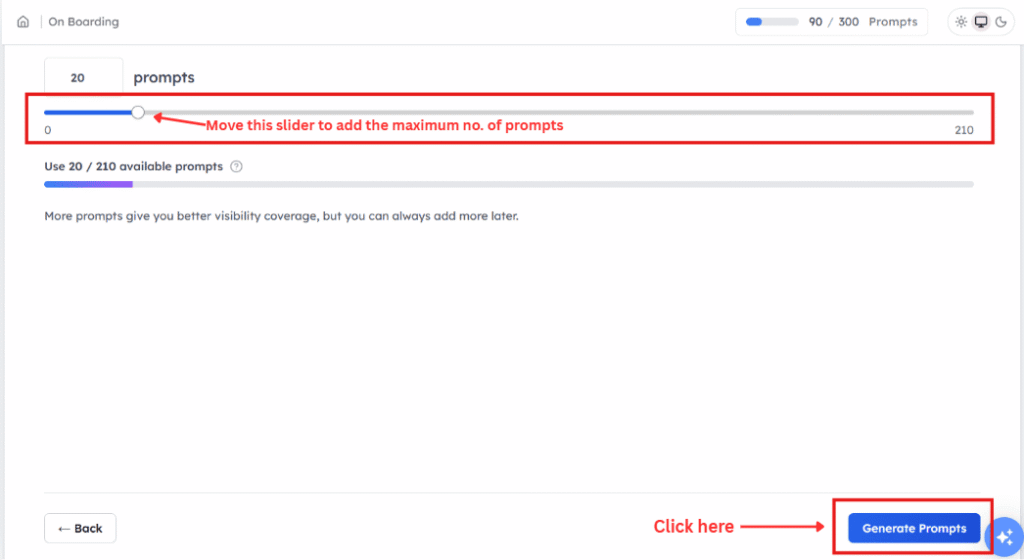
Prompts represent the questions real customers ask AI tools about your brand or category. TMV auto-generates prompts based on your website and topics, requiring no manual work. But, if you want, you can also add custom prompts for specific products or comparisons you want to track AI visibility for.
Not sure what makes a good prompt? This guide on how AI citation tracking works explains what questions are worth tracking and why. The AI tracking tool, TMV, supports up to 1,000 prompts depending on your plan.
Step 4: Review
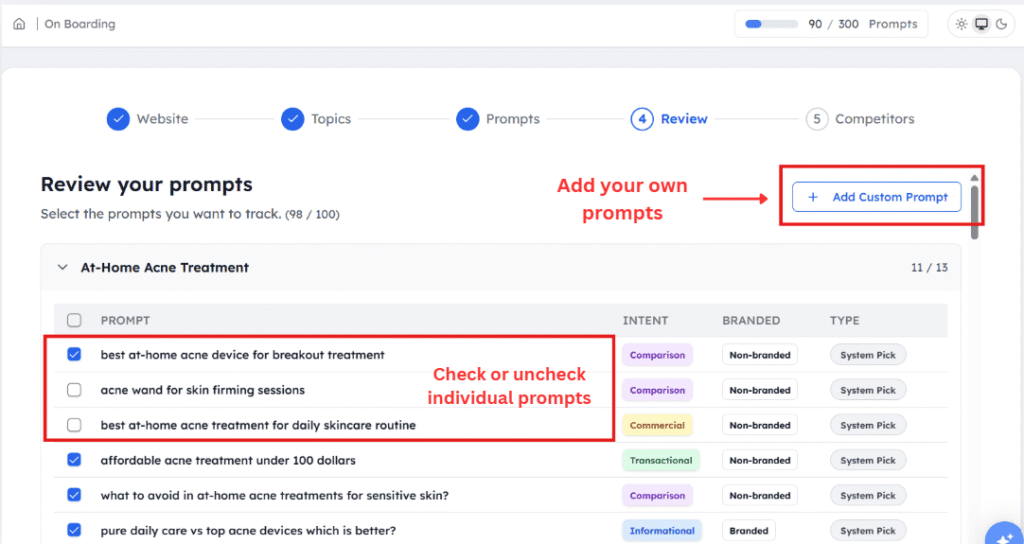
Before going live, review all generated prompts. Remove anything irrelevant and add gaps you spot. This is your last check before the AI search visibility tool starts running your prompts every 24 hours.
Step 5: Add Your Competitors
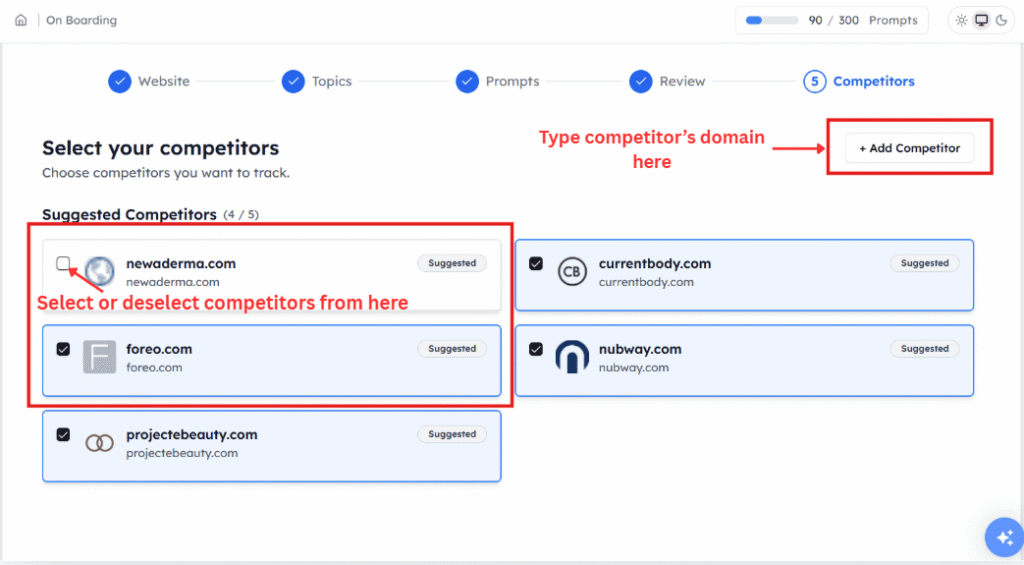
Add 3 to 5 competitor brand domains to benchmark against. Use the AI Suggestions button to get recommendations automatically.
After Setup: Let TMV Run
Once setup is complete, here is how to use Track My Visibility on a daily basis. After setup, prompts execute daily across all supported AI platforms based on your chosen plan. If you are on trial, you’ll be able to track your website on ChatGPT and Perplexity.
If you are using the Discover plan, you’ll be able to track your brand on ChatGPT, Perplexity, and Google AI Overviews. And if you have chosen a growth plan, then your brand will be tracked on 4 different AI models, such as ChatGPT, Google AI Overviews, Perplexity, and Google Gemini.
Once live, the tool tracks visibility across all chosen prompts automatically.
A countdown to the next run is visible in your dashboard. Data is powered by cloro.dev for reliability and accuracy. The dashboard updates every 24 hours, so your metrics always reflect the latest AI responses across all supported platforms.
What Does the Overview Dashboard Tell You?
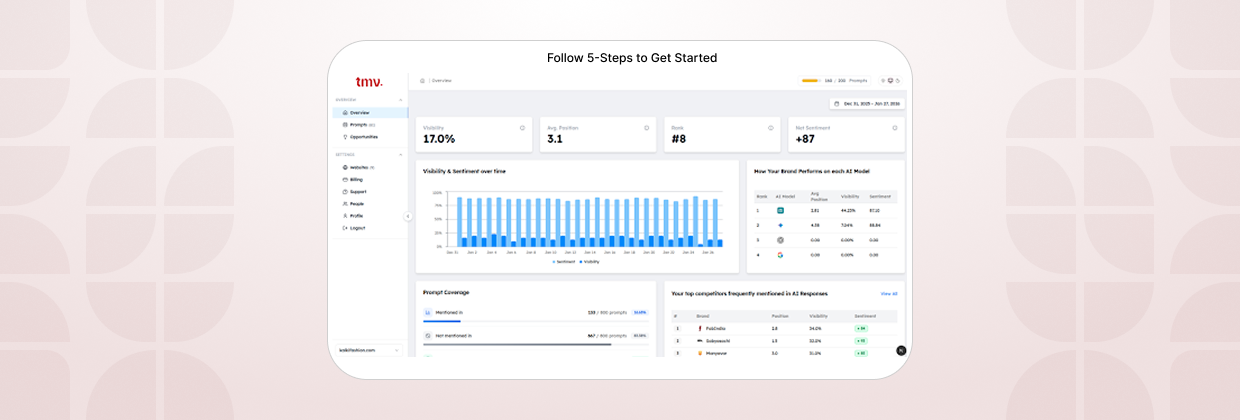
Learning how to use Track My Visibility starts with the Overview dashboard, the first thing you see after logging in. It gives you a complete read on your brand’s AI search visibility at a glance.
1. The Four Core Metric Cards
- Visibility %: It shows the percentage of tracked prompts where your brand appears in AI responses.
- Avg Position: It shows your brand’s average rank position across all AI search tools where you appear.
- Rank: This helps you understand your brand’s overall position compared to all tracked brands.
- Net Sentiment: It shows a combined score showing whether the AI search platform describes your brand positively or negatively.
2. Visibility and Sentiment Over Time

This line graph tracks how both metrics trend across your selected date range. Use it to monitor visibility trends and spot the impact of content updates, PR campaigns, or shifts in competitor activity.
3. How your Brand Performs on Each AI Model
This table breaks down rank, average position, visibility%, and Sentiment per AI model. Each AI platform has different training data, retrieval behavior, and citation preferences. ChatGPT alone accounts for over 73% of the AI chatbot market as of early 2026, which makes it the single most important platform to appear on (First Page Sage).
For a focused look at one of these platforms, see how to track AI Overviews specifically.
OpenAI CEO Sam Altman recently admitted, “he can’t remember the last time he used Google search.”
A strong overall score can still hide weak spots, which is why seeing your performance broken down across AI platforms individually matters more than looking at averages.
Understanding how ChatGPT generates answers helps explain why your brand might appear consistently on Perplexity but not at all in ChatGPT responses.
4. AI Visibility Summary Panel
This panel gives you an instant read on brand visibility across all tracked prompts:
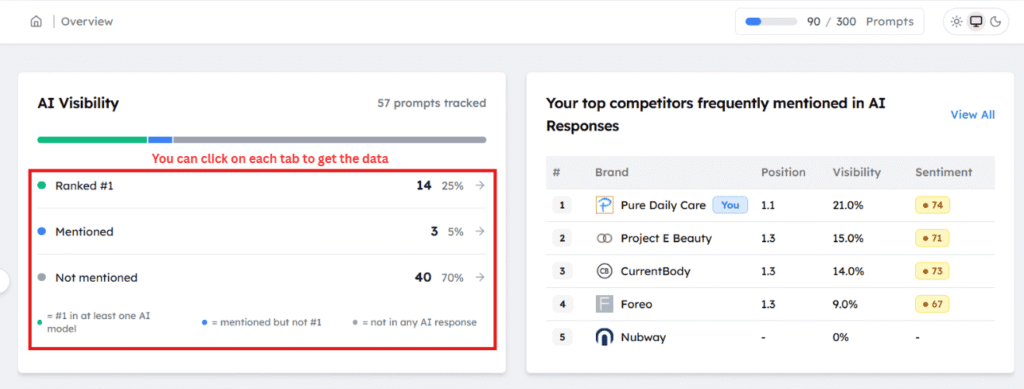
- Green dot: Ranked #1 in at least one AI model
- Blue dot: Mentioned but not ranked #1
- Grey dot: Not appearing in any AI response
Together, these indicators give you a clear AI visibility score across all tracked prompts.
5. Top Competitors on the Overview Dashboard
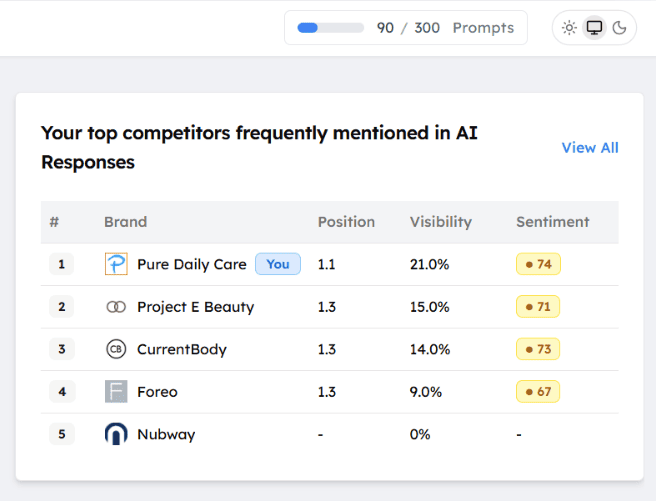
Directly below the AI visibility panel, the dashboard shows which competitor brands are most frequently mentioned in AI answers. You can see each competitor’s position, visibility %, and sentiment at a glance, before even going into the full Competitors section.
How Do You Read and Use the Prompts Section?
The prompts section is where you manage everything you are tracking and monitor performance at the individual query level.
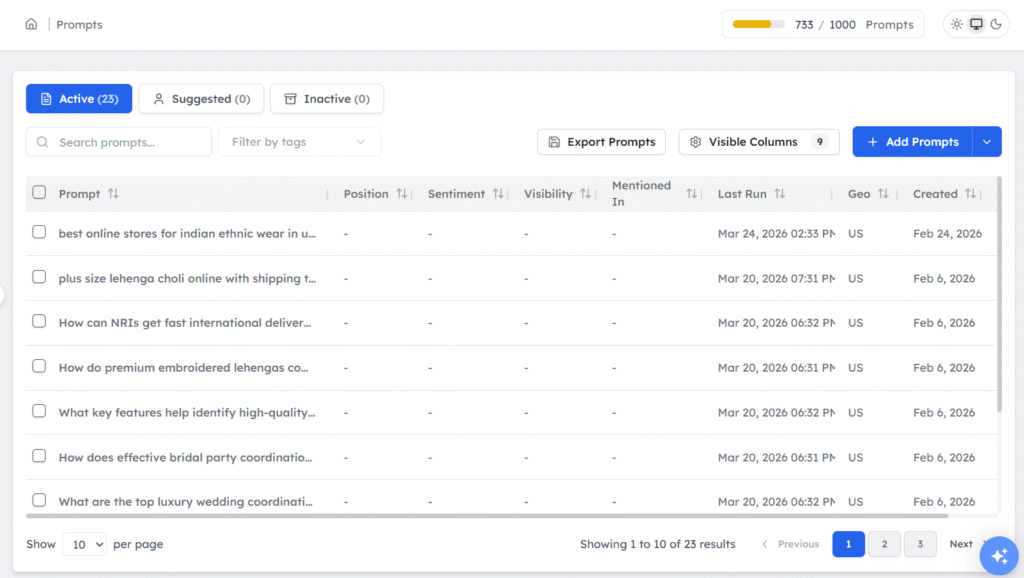
There are three tabs: Active (prompts currently running), Suggested (prompt ideas TMV has surfaced that you have not activated yet), and Inactive (prompts you have paused). The suggested tab is worth checking regularly as it surfaces new AI search opportunities you may not have thought to track.
Key columns include Prompt, Position, Sentiment score, Visibility %, Mentioned In, Last Run, Geo, and Created. A dash (–) in Position or Visibility means your brand had no AI mentions for that prompt.
You can use the export prompts button to share visibility data with clients or stakeholders. You can also sort it by Visibility % or Position to quickly find your strongest and weakest performing queries.
How do you Track and Benchmark Competitors?
A user on Reddit asked whether marketers are still manually checking prompts across ChatGPT, Gemini, Perplexity, and AI Overviews, or whether they have found better ways to track it, and whether any of those mentions are actually translating into traffic or leads.
That question is exactly what the Competitors section in TMV is built to answer.
How are you tracking brand mentions inside AI answers like ChatGPT or Gemini?
by u/sapindia1976 in aeo
Tracking brand mentions in AI search gives you the baseline you need, and the competitors section in Track My Visibility (TMV) makes it actionable.
The overview dashboard shows which competitors are most frequently mentioned in AI-generated responses. The full competitors section lets you manage which brands you are tracking, and it lets you add, edit, or remove them at any time.
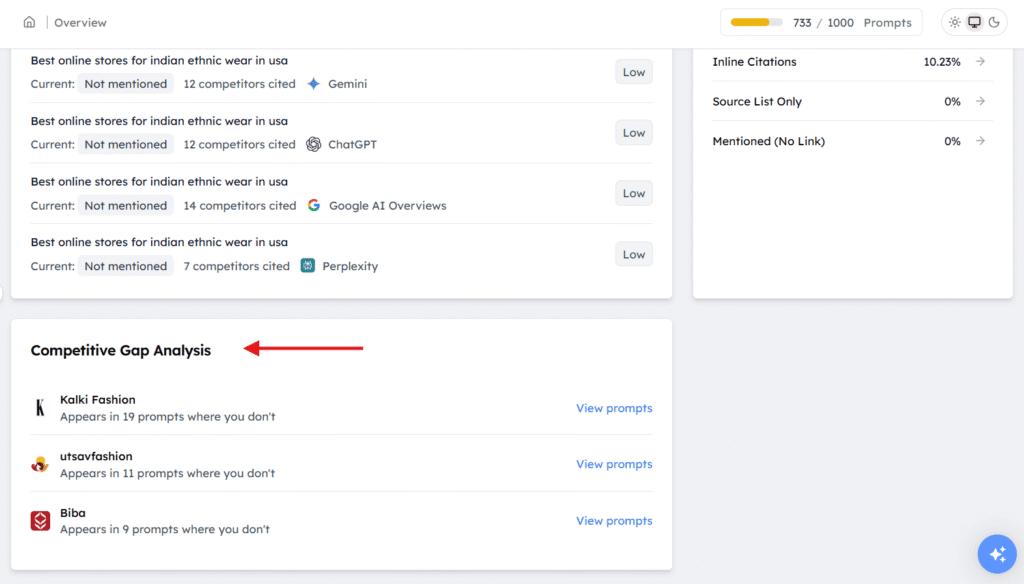
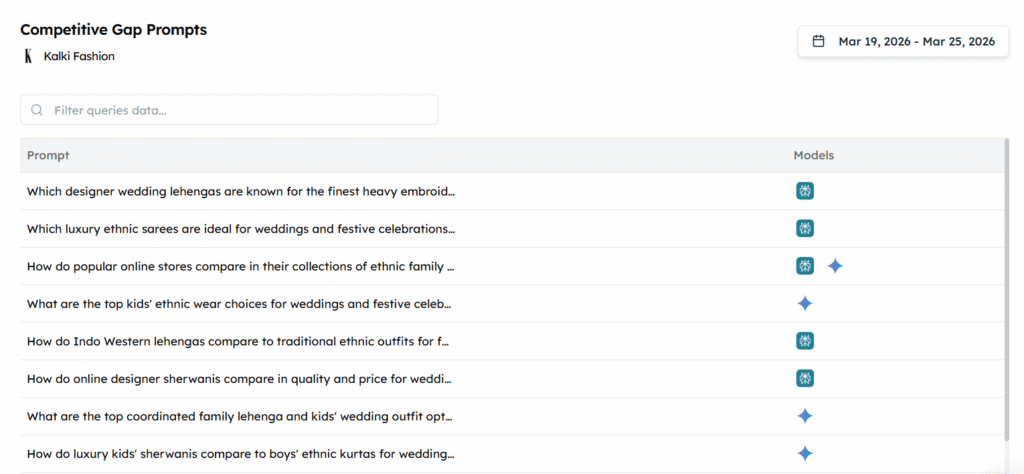
Competitive gap analysis is where you can compare visibility head-to-head with your competitors, seeing exactly which prompts they win and you do not. Click “view prompts” next to any competitor to see the exact queries they win. Those become your highest-priority content targets.
Where Do You Find Actionable Insights in Track My Visibility?
The opportunities section is the most action-oriented part of the AI search visibility tracking tool. This is where AI visibility monitoring turns into a clear task list.
1. Quick Wins
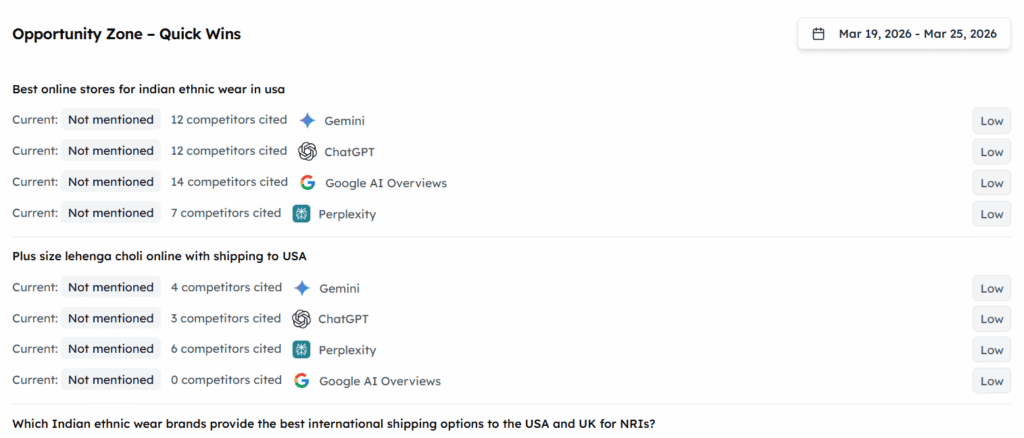
This section shows the prompts where you are currently not mentioned, but competitors are. Each quick win shows the prompt, your current status, how many competitors are cited, and which AI assistant it is on.
2. Three Action Categories
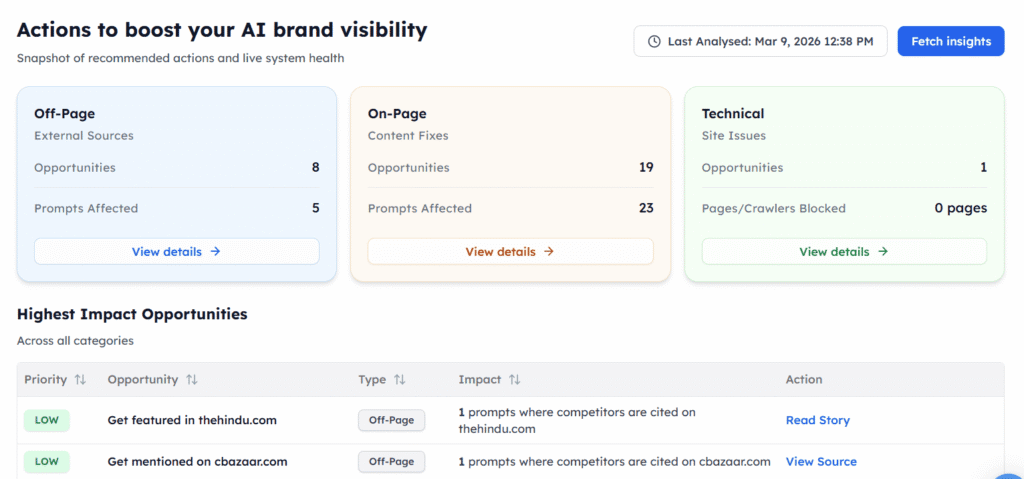
- Off-Page (External Sources): It tells where your competitors are mentioned and shows the opportunity where your brand can be mentioned.
- On-Page (Content Fixes): This shows you content optimization opportunities to increase your brand’s AI visibility in AI responses. If you have any queries related to content fixes, then you can go through our blog on how to optimize content for AI answers. This covers the exact content signals that make pages more likely to be cited.
- Technical (Site Issues): This section flags whether your site is AI friendly, including whether AI crawlers can access your pages and other technical issues that affect how AI platforms read your content.
Highest Impact Opportunities Table: This prioritized list shows priority level, opportunity, type, impact, and a direct action link.
Use the fetch insights button to manually trigger a fresh analysis at any time. The dashboard also shows when the opportunities section was last analyzed, so you always know how current the data is.
3. Citation Quality Panel
Getting mentioned in an AI response is good. Getting your actual page cited as a source is better. The Citation Quality panel tells you exactly how AI platforms cite your brand, whether that is an inline link, a source list entry, or just a name drop with no link at all.
There are three ways AI can reference your brand:
- Inline Citations: Direct page links inside the response are the strongest signal; they show AI trusts your content enough to send readers to it. It means AI trusts your content enough to send readers to it.
- Source List Only: your page appears in a list of sources at the bottom of the response, but is not referenced within the answer itself. You are credited, but less prominently.
- Mentioned No Link: AI talks about your brand but does not link to any of your pages at all.
A high visibility percentage with low inline citations means AI knows your brand but is not citing your pages. That is a content structure or technical issue worth investigating.
What Can the Sources Tab Tell You About AI Citations?
Measuring your visibility in AI content starts with understanding where citations are actually coming from, and the Sources tab shows you exactly that.
The source usage chart shows day-by-day citation rate per domain for your top 5 cited sources. The source types donut chart breaks all citations into three categories: your site, competitor site, and other site. The majority of citations in most categories come from third-party sites, which tells you which external platforms AI trusts most in your space.
There are also three drill-down views:
- Prompt view ties each citation back to the specific prompt it came from.
- Domain view groups citations by domain so you can see which sites AI references most.
- URL view shows the exact pages being cited, useful for identifying which of your URLs are earning AI trust.
How Can Different Teams Use Track My Visibility?
Each team will focus on different aspects of AI search performance. Here is how different roles can get the most out of TMV. No matter which plan you choose, you’ll get unlimited team members, which makes it practical for agencies or larger marketing teams working across multiple accounts.
| Team | Primary Features to Use | Key Metric to Focus On |
| SEO Teams | Prompts table, Sources tab, On-Page opportunities, Citation Quality | Visibility %, Avg Position, Inline Citation rate |
| PR & Communications | Net Sentiment, per-prompt sentiment scores, Sources tab | Sentiment score, brand narrative consistency |
| Marketing Agencies | Competitor benchmarking, Gap Analysis, Export Prompts | Share of voice vs competitors, Quick Wins |
| eCommerce Brands | Quick Wins, Off-Page opportunities, per-model performance | Not mentioned prompts, competitor gap queries |
Conclusion
When someone asks ChatGPT for a recommendation in your category, they get an answer and move on. Often, they never visit a website. No second chance. That’s the reality AI search has created, and most brands are still flying blind in it.
Track My Visibility changes that. Set up your prompts, let the tool run daily across ChatGPT, Gemini, Google AI Overviews, and Perplexity, and use the dashboard to see exactly where you stand and where competitors are quietly winning. Once you understand how to use Track My Visibility, the gaps become obvious, and so do the fixes.
The businesses that figure out AI visibility now will gain an edge over competitors. AI search behavior is still forming, which means there’s still time to shape how these platforms talk about you. Ready to see where your brand actually stands?Start tracking your brand presence today with a 7-day free trial, and find out which prompts your competitors are already winning.
FAQs
Understanding how to use Track My Visibility starts here: add your brand domain and a set of prompts. TMV runs those prompts daily across ChatGPT, Google AI Overviews, Gemini, and Perplexity using cloro.dev, then reports on whether your brand was mentioned, where you ranked, and how it was described.
Visibility % is the share of tracked prompts where your brand appears. Rank is your position relative to all tracked brands. You can have 50% visibility but still rank lower than a competitor who appears more often or in stronger positions.
Yes. The Competitors section lets you add competitor domains to benchmark against. Growth plan users can track unlimited websites, making it well-suited for agencies managing multiple clients.
Track My Visibility (TMV) is powered by cloro.dev, which ensures prompt results are always fresh and accurate. Prompts run on a 24-hour cadence and reflect real AI responses, not cached or estimated data.
Yes. You get a free 7-day trial with 25 tracked prompts. It is built for eCommerce brands, agencies, and SEO teams of all sizes. You can get meaningful insights from day one with just a handful of well-chosen prompts.
A mention is when AI names your brand in a response. A citation is when AI directly links to one of your web pages as a source. Both are tracked in Track My Visibility. Citations are the stronger signal; they indicate AI trusts your content enough to reference it directly.
Resources:
- AI traffic is up 527%. SEO is being rewritten.
- Our Study Shows Brands Are Flying Blind in AI Search And Many Don’t Even Know It
- ChatGPT Usage Statistics: March 2026 – First Page Sage
- I talked to Sam Altman about the GPT-5 launch fiasco | The Verge