


Image alt text is a short text alternative added to an image’s HTML. It helps people using screen readers understand the image’s information or function, and it can also help search engines understand the image and its context.
If Track My Visibility identifies an Image Alt Text opportunity, review the flagged image and check whether its alt attribute matches the image’s purpose on the page.
In this guide, you’ll learn which images need alt text, what to write for common image types, when to leave it empty, and how to fix the images TMV has flagged.
TL;DR
- Write alt text based on what the image communicates or does on the page.
- Keep it clear, concise, and relevant to the surrounding content.
- Use descriptive alt text for meaningful images and purpose-based text for buttons or linked images.
- Use alt=”” for purely decorative images that add no useful information.
- Avoid keyword stuffing, unnecessary details, and repeating nearby text.
- For charts, infographics, and other complex images, summarize the key point in the alt text and provide important details elsewhere on the page.
- A flagged image does not always need a descriptive alt attribute.
Image Alt Text Decision Tree
Before writing alt text, first decide what role the image plays on the page.
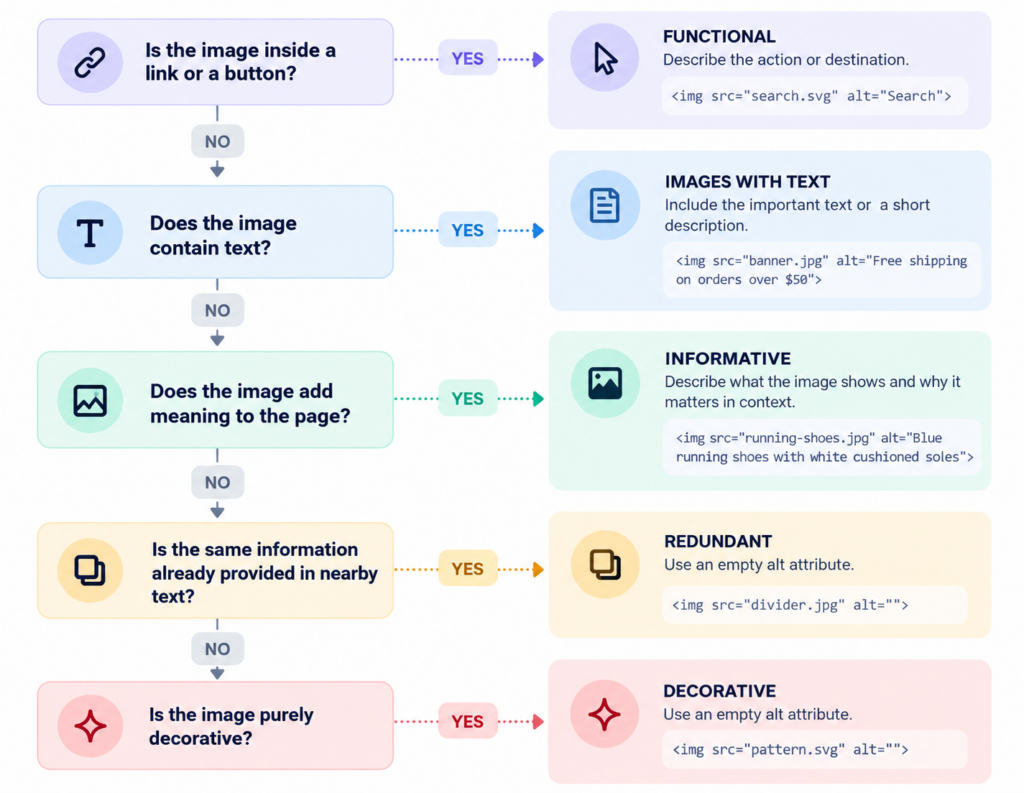
Use descriptive alt text for informative images, describe the action for functional images, and use alt=”” for purely decorative images.
The goal is to match the alt text to what the image communicates or does, not simply describe everything visible in it.
What Should You Write in Image Alt Text?
Good alt text should communicate the information a user needs from an image without describing every visual detail. What you write depends on the image itself, its purpose, and the context in which it appears.
1. Use a Simple Alt Text Formula
For most informative images, a useful starting point is:
Subject + meaningful detail + context, when needed
For example:
Too vague:
Running shoes
Better:
Blue running shoes with white cushioned soles
For a product image, you may also include the product name when it helps identify what is shown:
AeroFlex blue running shoes with white cushioned soles
Treat this as a guide rather than a fixed template. Not every image needs every element.
2. Include Only Meaningful Details
Describe details that help users understand why the image is relevant. You usually do not need to mention every color, object, background element, or visual characteristic.
For example, if an image in a coffee-brewing guide shows someone pouring water over coffee grounds:
Avoid:
Person wearing a white shirt standing in a bright kitchen holding a silver kettle
Better:
Hot water being poured over ground coffee in a pour-over brewer
The second version focuses on the information that matters to the page.
3. Write for the Image’s Context
The same image can need different alt text depending on where it appears.
For example, a photo of a woman wearing a backpack could use:
On a product page:
Atlas black travel backpack worn over both shoulders
In an article about backpack fit:
Backpack positioned high on the back with both shoulder straps adjusted
Both descriptions may be accurate, but each focuses on what the image contributes to that particular page.
4. Keep the Alt text Concise and Natural
Alt text should be easy to understand when read aloud. There is no fixed universal character limit for alt text. Keep it as concise as possible while still communicating the image’s useful information or purpose.
At the same time, avoid unnecessary wording, keyword repetition, and phrases such as “image of” or “picture of” when they add no value.
Avoid:
Image of best blue running shoes, women’s running shoes, comfortable running shoes
Better:
Women’s blue running shoes with cushioned white soles
For complex images such as charts or infographics, use the alt text to summarize the main point and provide detailed information elsewhere on the page.
Image Alt Text for Different Image Types
Different images serve different purposes, so the alt text should reflect the information or function each image provides.
| Image Type | What to Include in Alt Text | Example |
| Product Images | Product name/type and meaningful visible details | Atlas black leather backpack with two front zip pockets |
| Product Detail Images | The specific feature or detail being shown | Close-up of the backpack’s padded laptop compartment |
| Lifestyle Product Photos | How or where the product is being used, when relevant | Atlas backpack worn while cycling through the city |
| Category & Collection Images | What the collection represents without listing every product | Collection of women’s trail running shoes in multiple colors |
| Logos | Organization name, or the link destination if the logo is functional | Track My Visibility or Track My Visibility home |
| Icons, Buttons & Functional Images | The action or destination rather than the icon’s appearance | Search, Download PDF, or Open menu |
| Promotional Banners | The generous offer or message, if it is not already available nearby | 20% off all running shoes |
| Screenshots | What the screenshot demonstrates or the relevant interface element | Search Console performance report with the Date filter highlighted |
| Charts, Graphs & Infographics | A concise summary of the main takeaway | Line chart showing organic traffic increasing from January through June |
| Images Containing Text | Include important text that is not already provided in nearby page content | Free shipping on orders over $50 |
| Size Charts | What measurements or conversions the chart provides | Women’s shoe size conversion chart for US, UK, and EU sizes |
| Team & Event Photos | Relevant people, activity, or event context | Track My Visibility team presenting at the 2026 marketing conference |
For complex charts, infographics, size guides, or other images containing a lot of information, keep the alt text concise and provide the full details in accessible page content nearby.
When Should You Use Empty Alt Text?
Use Empty alt text (alt=””) when the image adds no information that users need to understand the page, action, or link.
1. Decorative Images
Background textures, abstract shapes, and stock photos used purely for mood. If removing the image wouldn’t change what a user understands, it’s decorative.
2. Images That Repeat Nearby Information
If nearby text or a caption already provides the same meaningful information as the image, alt=”” can be used to avoid unnecessary repetition.
3. Images Beside Equivalent Text Links
If an image and nearby text are part of the same link and the text already explains the destination, use alt=”” for the image to avoid repeating the same link information.
4. Decorative Icons and Dividers
Checkmark bullets, horizontal dividers, and icons placed next to text that already says the same thing, like a phone icon beside a phone number.
How to Write Alt Text for Complex Images
For complex images, use short alt text to identify the image and summarize its key point, then provide the important details in nearby text, a table, or another accessible description.
1. Charts and Graphs
Summarize the main trend or finding rather than listing every data point.
Example:
Line chart showing organic traffic increasing from January through June
If exact values are important, include them in nearby text or an accessible table.
2. Infographics
Describe what the infographic explains and make the important information available elsewhere on the page.
Example:
Infographic showing the five stages of the ecommerce checkout process
Avoid copying the entire infographic into the alt text.
3. Maps and Diagrams
Focus on what the map or diagram is intended to communicate.
Example:
Diagram showing traffic moving from search results to a product page and then checkout
For maps, describe the relevant location, route, or relationship rather than every visible label.
4. Screenshots and Tutorials
Describe the part of the interface or action the reader needs to notice.
Example:
Search Console performance report with the Date filter highlighted
If the screenshot is part of a tutorial, the surrounding instructions should explain the full step.
5. Images With Important Text
If important information appears only inside an image, include the essential message in the alt text and, when possible, also provide it as normal page text.
Example:
Free shipping on orders over $50
If the image contains a large amount of important text, summarize its purpose in the alt text and provide the full information as accessible text nearby.
Fix Alt Text Based on What the Image Does
Good alt text communicates the image’s information or function based on how it is used on the page, rather than simply describing everything visible. Meaningful images need clear descriptions, functional images should explain the action they perform, and decorative images can use an empty alt=”” attribute.
If Track My Visibility flags an image alt text opportunity, review how the image is used, add the appropriate alt text, publish the change, and confirm the correct alt attribute appears in the rendered HTML. Once the fix is complete, tick the checklist box in the opportunity module to mark it as resolved.
FAQ
There is no official Google character limit for alt text. Keep it as short as possible while preserving the image’s useful meaning and context. If a description becomes lengthy, summarize it and provide fuller details nearby.
Not every image needs a descriptive text description, but every image element must include an alt attribute in its HTML code.
No. An empty alt attribute (alt=””) is appropriate for decorative or redundant images that do not add meaningful information. It also allows screen readers to ignore those images.
Yes, alt text should contain relevant keywords when it naturally describes the image and fits the page context. Do not add keywords just for SEO or repeat them unnecessarily.
Use different alt text when each product image communicates a different meaningful detail, such as color, angle, material, fit, feature, or use. If an image adds no information beyond nearby content or another image, alt=”” may be appropriate.