


I really envy the time when SEO meant keyword research. It was cool: identify a bunch of keywords, build your article around them, start ranking, and monitor them using any SEO tool or even Google Search Console.
But the thing is everyone interacts with AI differently, which makes it difficult to figure out which prompts are actually worth tracking. Plus, unlike keyword research, there’s no specific search volume to guide you.
The pricing of AI visibility tools doesn’t make it any easier either. You might get to track 50-odd prompts on a beginner-tier plan for $50 to $100.
Because if you’re paying to track them, the last thing you want is to spend that budget tracking questions nobody actually cares about.
I’ve faced these things, and I know exactly what prompts you should be tracking, based on the data we have, of course.
I’ll show exactly how we do it for our brand. (No sugarcoating, I promise)
Key takeaways
- Start with business topics and prompt clusters to build an AI visibility strategy that reflects your products, audience, and goals.
- Expand topics into real customer questions using natural language, informational, comparison, commercial, and purchase-intent prompts for complete buyer journey coverage.
- Prioritize quality over quantity by tracking a focused set of high-intent prompts instead of hundreds of generic queries.
- Benchmark competitors alongside your prompts to uncover competitor visibility gaps, content opportunities, and AI recommendation trends.
- Continuously refine your prompt portfolio using AI visibility data, citations, and evolving customer search behavior.
Why Tracking the Right AI Visibility Prompt Matters
While working with one of our clients, I noticed something off. Their visibility percentage looked great, but most of it came from generic prompts any brand in their category would rank for. The number was accurate but still misleading, and that’s what tracking the right prompts actually protects you from.
What I came to realize after seeing this happen enough times is that:
- You’ll spend money tracking prompts that add little value.
- You’ll measure visibility for questions that were never bringing you conversions.
- Your insights will end up misleading, because none of it is tied to real business value.
- You’ll miss the high-intent questions you actually needed to show up for.
- And while you’re busy optimizing for the wrong things, your competitors will quietly take the gaps you left open.
Okay, that’s a lot!
So, how do you figure out which prompts are actually worth tracking?
Finding the Right Prompts (It’s Simpler Than It Sounds)
You don’t need a rulebook for this. This isn’t another framework you need to memorize or a system you have to get perfectly right on the first try. Once you know what to look for, choosing the right prompts becomes easier by the time you apply them consistently.
Let’s see.
Step 1: Start With Your Brand Basics
Before you touch a single prompt, get clear on what you actually want AI to evaluate. Your brand name and any variations people use, your products, your audience, the markets and languages you care about, and the categories you want to be known for.
AI answers change by market, by language, and sometimes even by what your brand is casually called for. If you skip this step, the visibility data you collect later might not reflect the market you’re actually trying to reach.
A simple spreadsheet works fine to start. Just keep it consistent as your prompt list grows, since that’s usually where things get messy.
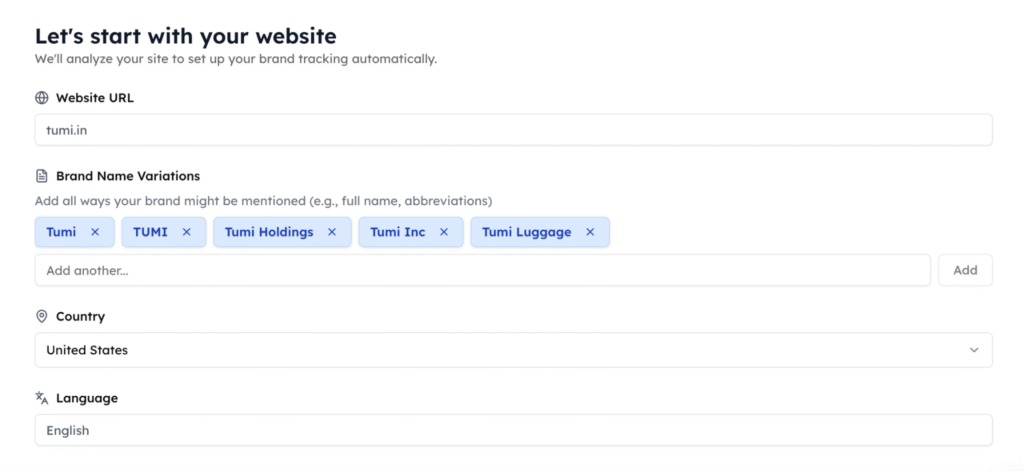
 Pro Tip: If you’re using Track My Visibility, add your domain and brand variations during setup, and everything downstream builds off it. And if you just want a quick check first, the free AI Visibility Checker shows you whether AI platforms already recognize your brand.
Step 2: Identify the Topics You Want to Be Visible For
For the next, note down the actual topics and conversations where you want your brand to show up.
Ask yourself what you sell, what problems you solve, which use cases matter most to your customers, and which industries or audiences you actually serve. (I know it feels tiresome, but please hang in there!)
A project management tool, for instance, might want visibility for things like remote team collaboration, sprint planning, or being seen as an alternative to Asana.
Your website, product pages, old SEO research, sales calls, and customer questions are all useful starting points. Most of this already exists across your team; it just hasn’t been pulled together into topics yet.
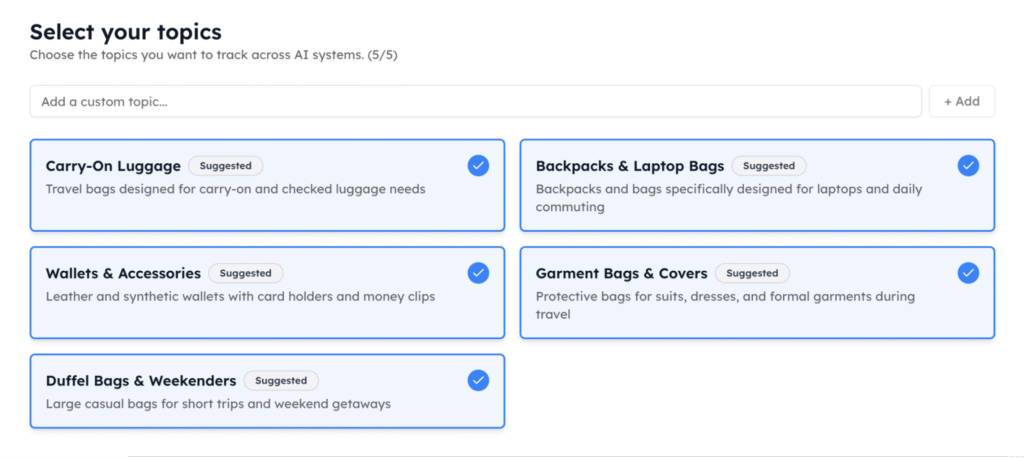
With Track My Visibility, you can scan your domain and get relevant topic cluster suggestions, so that you don’t have to start from a blank page.
Step 3: Turn Those Topics Into Real Customer Prompts
Now take those topics and turn them into the actual questions your customers might ask to the AI platforms. Add real context wherever it fits: industry, team size, budget, use case, geography, whatever a real buyer would naturally mention while asking.
You can also ask a topic to an LLM and get 100+ variations back in seconds. That’s useful, but you’ll still need to go through them one by one and decide which ones are actually worth tracking, since not every variation reflects how people really ask.
Instead of doing this manually, a query fan-out tool can expand a topic into these variations for you, giving you an organized list to work from rather than dozens of queries to sort through yourself.
Step 4: Make Sure Your Prompts Match Your Business Goals
To achieve my goal, “I’ll track down every question my client has asked”. No, please don’t.
Don’t track every question a client could possibly ask; match your prompts to what you’re actually trying to achieve.
- Building awareness? Prioritize non-branded categories and problem prompts.
- Winning comparison-stage buyers? Track competitor and alternative prompts.
- Entering a new market? Add prompts around that geography or audience.
Take “best AI visibility tools”; it tells you about category-level discovery. Compare that to “Track My Visibility vs Profound,” which tells you where you stand once someone’s already comparing you to others. Different goals, different prompts, and your tracking should follow whichever one you’re actually targeting.
If all of this, finding topics, generating prompts, sorting them by intent, sounds like a lot of manual back and forth, our prompt generator is built to shortcut it. Just enter your domain, and it pulls out real prompts already organized by intent, so you can have a list that actually aligns with your business goals.
Step 5: Review and Prioritize Your Prompts
This is probably the most important step if you’re paying for AI visibility tracking (obviously), and it starts with a simple fact: having a long list of prompts doesn’t mean you should track all of them.
Before you commit to anything, check each prompt against these five things:
- Business relevance → Does it relate to what you actually sell?
- Customer relevance → Is this something your customers would ask?
- Buying intent → Could this question influence a purchase?
- Competitive relevance → Does visibility here matter against competitors?
- Business value → Would being recommended actually matter to you?
Run this check honestly, and you’ll usually find a chunk of your list doesn’t hold up. Say you generated 50 prompts, but your plan only covers 25. Track all 50 without reviewing, and you’re either paying for an upgrade you didn’t need or letting the system decide which 25 for you.
Review first, and you might find only 20 actually pass the check above, which means you land under budget while tracking prompts that were worth tracking in the first place.
That’s the whole point of this step. Cut the duplicates, the overly broad questions, and anything that technically fits but wouldn’t get any visibility. It’s a focused portfolio that represents the conversations you actually care about, sized exactly to what you were already paying for.
Step 6: Track the Competitors Appearing in Those Conversations
Chances are you’re already doing a version of this (I did as well !!) .
Keeping a sheet, noting down which competitor shows up when you run a prompt, maybe screenshotting responses to compare later. It’s useful, but it mostly tells you who’s ahead, not what’s putting them there.
Your AI visibility doesn’t exist on its own; the same prompt deciding whether you show up is also deciding which competitor gets shown in your place. So alongside your own brand, add your direct competitors and category leaders, then run them against the exact same prompts.
When AI cites a page while recommending a competitor over you, that page is usually doing the real work. Trace it back, and you’ll often find a comparison article or review site that’s earned its way into the answer, and now you know exactly what to build.
The Track My Visibility dashboard shows this out directly: competitor gap analysis, top domains, plus the exact prompt sources where you appear and where your competitors are getting cited instead of you.
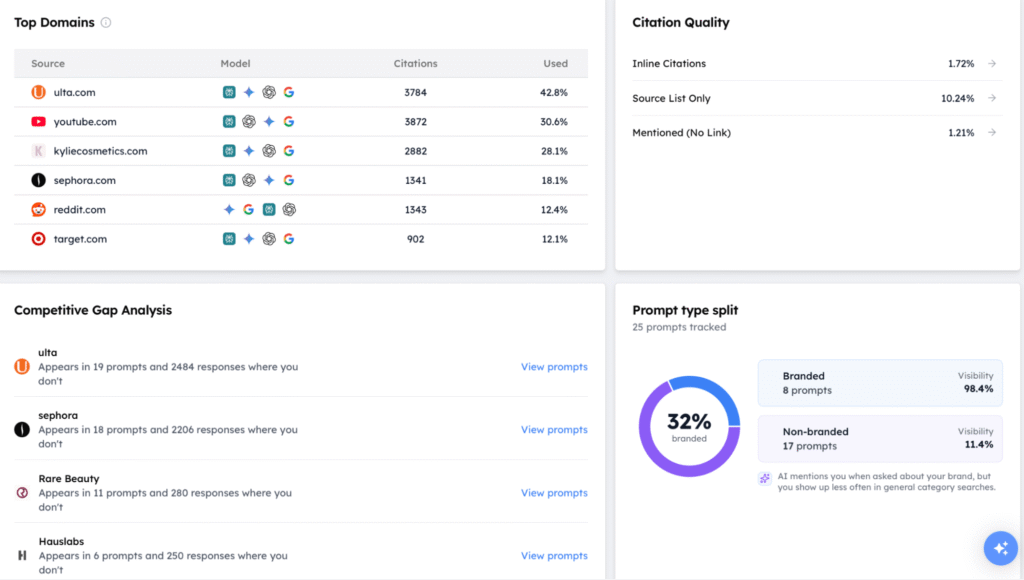 TMV insight: In our trackdown reports, we observed that branded prompts consistently delivered higher visibility than non-branded prompts. This indicates non-branded prompts have the biggest opportunity to improve your brand awareness and increase organic AI recommendations for high-intent buyer searches.
Step 7: Track and Refine Your Prompt Set
Finally, you’ve built the list, checked it against your goals, and cut what didn’t belong. That’s the setup, and it’s really just the beginning of an AI visibility tracking.
A prompt set isn’t a fixed asset you finish and leave behind. It needs to evolve the same way your business does: new products, shifting competitors, customers asking different things than they were a few months ago.
Watch for topics where you’re consistently invisible, prompts competitors keep appearing in, questions you missed, and prompts that have stopped giving you anything worth acting on. Once you spot these, you know exactly where to focus next, strengthen the gaps, retire what’s not working, and let the list keep pace with where your business is actually heading.
This is where the loop either gets easier or gets abandoned. Doing this by hand means rerunning prompts, comparing old sheets, and hoping nothing important slipped through.
With Track My Visibility, that same check takes a glance at one dashboard, with competitor visibility and sentiment updated right next to yours. Less time spent maintaining the list, more time spent on what it’s actually telling you.
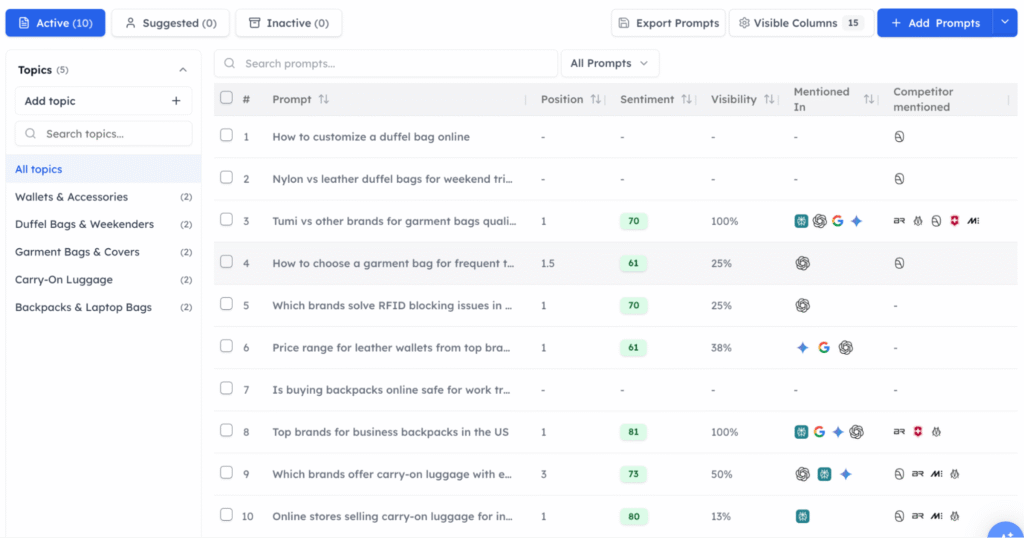
My TLR (Track, Learn and Refine) Loop for Prompt Tracking
After working across enough projects and clients, I started noticing a few clear patterns, and more importantly, understanding what to actually do about them. That’s how the TLR loop came together, a process that came out of what I’ve worked on (works for you as well !!).
| What to track | What it tells (learning) | How to refine |
| Position, visibility, and sentiment per prompt | Which topics you’re consistently invisible in | Add or strengthen prompts around those topics |
| Competitors appearing in the same responses | Which high-intent prompts they keep winning | Study what’s working for them and close the gap |
| Sources AI cites in each answer | Which pages are actually driving those citations | Build or improve content around those sources |
| Performance of each prompt over time | Which prompts have gone stale or stopped moving | Drop them and free up room for new ones |
| Prompt coverage across your topics | Where the gaps in coverage actually are | Add new prompts to close those gaps |
| Visibility by market or geography | Where you’re strong and where you’re barely showing up | Prioritize the markets that matter most to you |
| New questions customers are starting to ask | Topics you haven’t started tracking yet | Turn them into new prompts before competitors do |
| Business value tied to each prompt | Which prompts are worth the budget and which aren’t | Cut low-value prompts, double down on high-value ones |
| Intent behind each prompt | How your visibility shifts across informational, comparison, and decision stages | Rebalance your list to cover the full buyer journey |
A Few Things I’d Tell Before Starting This
When I started, I made a lot of mistakes, and honestly, it cost me more than just money. Time, effort, resources, all of it added up. A few things I picked up along the way made a real difference, and those are what I want to share here.
→ Tracked over 200 prompts in the first month. Start with a focused 20 to 30 instead, and only expand once each one earns its place.
→ Treated Google Search Console queries as AI prompts. Pull questions from sales calls, support tickets, and how customers actually phrase things to AI, not from search data built for a different engine entirely.
→ No follow-up on prompts that actually worked. When something performs well, dig into why, then build more prompts around that same pattern.
→ Prompts with no tie to business goals. Tag each one to what you’re actually trying to achieve, so every prompt earns its spot for a reason.
→ Paying for more prompts than needed. Review the list against real value before adding coverage, instead of tracking widely just to feel safe.
→ Running three or four separate tools for different platforms. Consolidate onto one dashboard that covers multiple AI platforms, so you’re working from one clear picture instead of scattered ones.
Final Thoughts
I hope this guide gives you a clearer sense of how to choose the right prompts, and that it helps you build real AI visibility from here.
At Track My Visibility, we help you track prompts, benchmark competitors, and stay on top of your AI visibility, all from one dashboard, so you can spend your time acting on the data instead of maintaining it.
If you’re still not sure where to start, try a 7-day free trial, no pressure, just a place to begin.
See you soon, and good luck with your AI visibility.
FAQs
Start with 20–50 high-intent prompts covering your core topics, then expand as your business and tracking needs grow.
SEO keywords are short search terms, while AI visibility prompts are conversational questions people naturally ask AI assistants.
Yes. Branded prompts measure existing brand awareness, while non-branded prompts show how customers discover you during research.
Review your prompt portfolio monthly or whenever you launch new products, campaigns, or enter new markets.
Yes. AI prompt generation and query expansion tools can quickly create relevant prompt variations based on your business or topics.
If your prompts reflect real customer questions, buying intent, and core business topics, you’re tracking the ones that matter most.