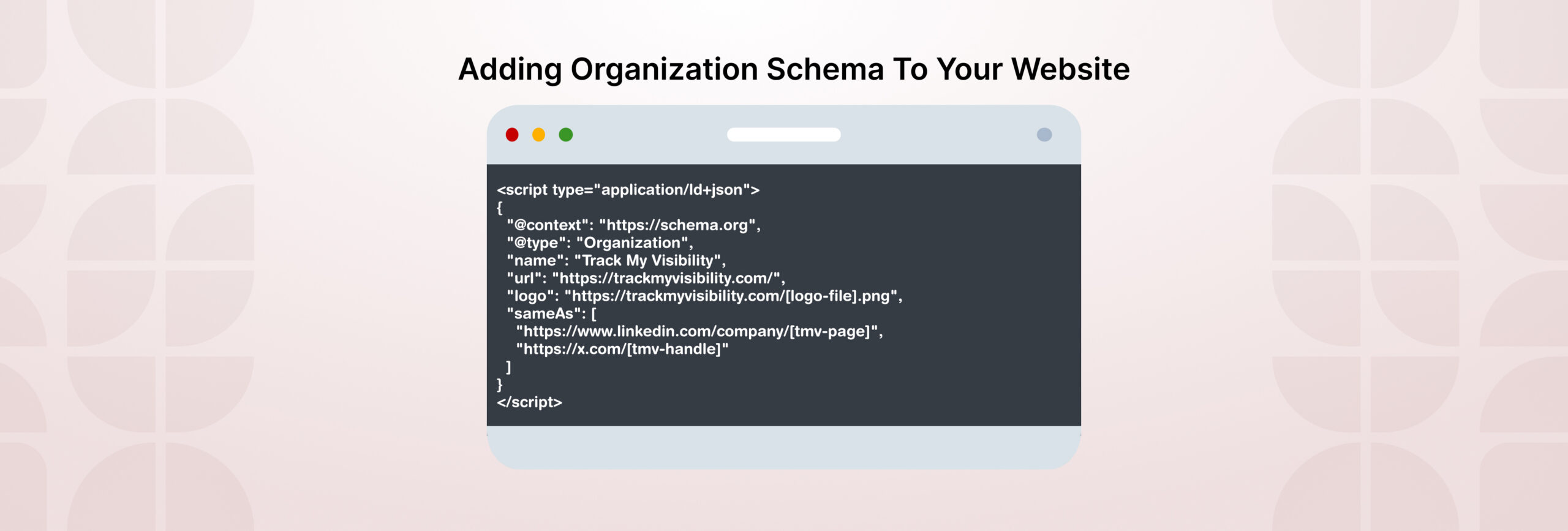



Organization schema helps search engines identify your organization name, logo, social profiles and contact details.
If Track My Visibility shows an opportunity to add Organization Schema, review the page to check whether the schema is missing, incomplete, or inconsistent. It does not always mean something is broken. Your website theme, CMS, or SEO plugin may already be generating schema behind the scenes.
In this guide, you’ll learn how to check your existing Organization schema, choose the right template, add it correctly, and verify that search engines can read it.
TL;DR
- Check whether your website already has Organization schema before adding anything new.
- Check for duplicate Organization markup and remove or correct it if the information conflicts or is inconsistent.
- Add accurate business details such as name, logo, URL, and official profiles.
- Choose the schema type that best matches your business, such as Organization, OnlineStore, or LocalBusiness.
- Make sure schema information matches the details visible on your website.
- Validate the markup using Google’s Rich Results Test and Schema Markup Validator.
- Re-scan your website in Track My Visibility to confirm the Organization Schema opportunity is resolved.
How Organization Schema Works
Organization schema can be added as JSON-LD code inside a webpage’s HTML. JSON-LD is a commonly used format for implementing structured data.
A basic implementation looks like this:
| <script type=”application/ld+json”> { “@context”: “https://schema.org”, “@type”: “Organization”, “name”: “Example Company”, “url”: “https://www.example.com”, “logo”: “https://www.example.com/logo.png” } </script> |
In this example:
- @context tells parsers that the markup uses the Schema.org vocabulary.
- @type identifies the described entity as an Organization.
- name, url, and logo provide core information about the organization.
You can add other relevant properties, such as sameAs for official social-media profiles, description, email, telephone, address, and contactPoint. Google recommends including the properties that genuinely apply to the organization rather than trying to add every available Schema.org property.
Google recommends placing Organization structured data on the homepage or on a single page that describes the organization, such as the About page. You do not need to add it to every page.
The key is to use complete, accurate information that reflects the organization and is consistent with what users can verify on your website.
Why Are You Seeing an Organization Schema Opportunity?
If Track My Visibility has identified an Organization Schema opportunity, it means your website’s structured data needs a closer review. This does not always mean the implementation is broken. In many cases, the schema may be missing important information, contain inconsistencies, or already exist but need improvement.
Common reasons you may need to review your Organization schema include:
- No Organization schema found on the site
- Relevant organization details may be missing, such as the logo, URL, or official profiles.
- Invalid JSON-LD syntax that search engines can’t read
- Multiple Organization entries with conflicting information
- Schema details that don’t match what’s shown on the website
Treat this as a review opportunity, not an automatic error. Your CMS, theme, or SEO plugin may already be generating valid schema. In that case, you may only need to confirm it’s accurate or fill in a few missing details.
So the first step is to check what exists before adding anything new.
Check What Your Site Already Has
Before adding Organization schema, check whether your website already includes it. If multiple schema blocks describe the same organization, make sure the information is consistent and not conflicting.
Follow these steps:
Step 1: Open your website homepage.
Step 2: Right-click anywhere on the page and select View Page Source.
Step 3: Press Ctrl+F on Windows or Cmd+F on Mac and search for application/ld+json.
Step 4: Look for schema containing: “@type”: “Organization” or a more specific related type such as OnlineStore or LocalBusiness.
Step 5: Run the page through Google’s Rich Results Test to check what structured data Google can detect.
| What You Find | What It Means |
| No Organization markup | Consider adding one if your website represents a business or organization |
| One accurate Organization block | Your existing setup may already be sufficient |
| Multiple Organization blocks | Check whether they describe the same organization and make sure the information is consistent |
| Markup with errors | Fix the existing syntax before adding new schema |
Remember, missing Organization schema does not mean your website cannot rank. Schema helps search engines understand your business information, but it is not a direct ranking factor. The goal is to provide accurate and consistent information that search engines can interpret correctly.
Choose the Right Schema Type
After checking what your website already has, the next step is to choose the schema type that best describes your business. In particular, Google recommends using the most specific Organization subtype that accurately matches your business.
Common options include:
| Business Type | Schema Type |
| General company, agency, SaaS business, or B2B organization | Organization |
| Ecommerce retailer selling products online | OnlineStore |
| Business with a physical location, such as a restaurant, clinic, or store | LocalBusiness subtype |
Choose the type that accurately represents your business. Do not add a more specific schema type only because it exists. The information should match your actual business model and the content visible on your website.
Organization Schema Templates
Once you know which schema type fits your business, you can then add the appropriate JSON-LD markup to your website. Next, replace the bracketed values with your own information, remove any fields that do not apply, and finally, make sure every detail matches the information visible on your website.
Template 1: Basic Organization Schema
Use this template for general company websites that need to provide essential business information.
| <script type=”application/ld+json”> { “@context”: “https://schema.org”, “@type”: “Organization”, “name”: “[Company Name]”, “url”: “[Website URL]”, “logo”: “[Logo URL]”, “sameAs”: [ “[Official Social Profile URL]”, “[Official Social Profile URL]” ] } </script> |
Template 2: Complete Business Organization Schema
Use this version when you want to provide additional details about your business, such as contact information and a description.
| <script type=”application/ld+json”> { “@context”: “https://schema.org”, “@type”: “Organization”, “name”: “[Company Name]”, “alternateName”: “[Alternative Business Name]”, “url”: “[Website URL]”, “logo”: “[Logo URL]”, “description”: “[Business Description]”, “email”: “[Business Email]”, “telephone”: “[Phone Number]”, “address”: { “@type”: “PostalAddress”, “streetAddress”: “[Street Address]”, “addressLocality”: “[City]”, “addressRegion”: “[State]”, “postalCode”: “[Postal Code]”, “addressCountry”: “[2-letter country code]” }, “sameAs”: [ “[Official Social Profile URL]” ], “foundingDate”: “[YYYY-MM-DD]” } </script> |
Only include information that is publicly available and accurate. If your business does not display an address, phone number, or founding date publicly, remove those fields.
Template 3: Online Store Schema
For ecommerce websites, use OnlineStore when the website represents a retailer selling products online.
| <script type=”application/ld+json”> { “@context”: “https://schema.org”, “@type”: “OnlineStore”, “name”: “[Store Name]”, “url”: “[Website URL]”, “logo”: “[Logo URL]”, “description”: “[Store Description]”, “sameAs”: [ “[Official Social Profile URL]” ] } </script> |
Remember that Organization or OnlineStore schema describes the business itself. Ecommerce websites may also use product and offer structured data for individual products. Shipping and return policies can be added at the organization level or, where needed, at the product/offer level.
Template 4: Local Business Schema
For businesses with physical locations, use an appropriate LocalBusiness subtype with location-specific information.
| <script type=”application/ld+json”> { “@context”: “https://schema.org”, “@type”: “LocalBusiness Subtype”, “name”: “[Business Name]”, “url”: “[Website URL]”, “logo”: “[Logo URL]”, “telephone”: “[Phone Number]”, “address”: { “@type”: “PostalAddress”, “streetAddress”: “[Street Address]”, “addressLocality”: “[City]”, “addressRegion”: “[State]”, “postalCode”: “[Postal Code]”, “addressCountry”: “[2-letter country code]” }, “openingHoursSpecification”: [ { “@type”: “OpeningHoursSpecification”, “dayOfWeek”: [“[Day 1]”, “[Day 2]”] “opens”: “[HH:MM]” “closes”: “[HH:MM]” } ] } </script> |
Important Field Notes
- name: Use the official business name shown on your website.
- logo: Use a crawlable, high-quality logo that clearly represents your organization.
- sameAs: Add URLs that clearly identify the same organization, such as official social profiles or trusted reference pages.
- telephone: Include the country code when applicable.
Before publishing, make sure your JSON-LD is valid. Avoid comments, trailing commas, and formatting issues that can prevent search engines from reading the markup correctly. Always test the final implementation using Google’s Rich Results Test before deploying it.
How to Add Organization Schema on Different Platforms
After creating your Organization schema, the next step is adding it to your website correctly. Before adding custom schema, check whether your platform, theme, or SEO plugin already generates it. If multiple implementations describe the same organization, make sure the information is consistent and not conflicting.
Adding Schema To HTML
Add the JSON-LD script inside the <head> section of the homepage or the page that represents your organization.
Adding Schema To WordPress
First, check whether your SEO plugin already generates Organization schema. Popular WordPress SEO plugins commonly add structured data automatically. Check your plugin settings before adding custom schema.
If the existing markup is incomplete or incorrect, update it through the plugin settings. Use a custom code method only when necessary.
Adding Schema To Shopify
Check your theme and installed apps before adding custom schema. Many Shopify themes already include Organization or ecommerce-related structured data.
If you need to add it manually, place the JSON-LD code in your theme files and limit it to the relevant pages.
Adding Schema To Wix, Webflow, and Squarespace
Use the platform’s custom code or header injection settings to add JSON-LD markup. Add it only where required and avoid creating duplicate schema blocks.
Adding Schema To Next.js
Render the JSON-LD in the page output where possible, and test the final rendered page to confirm that search engines can detect the structured data.
Adding Schema To Magento / Adobe Commerce
Check existing extensions and theme templates before adding custom schema. Many ecommerce setups already generate structured data through extensions or customizations.
Google Tag Manager can also be used to add JSON-LD structured data. Whichever method you use, test the implementation to confirm that Google can detect the markup.
How to Verify Your Organization Schema Fix Worked
After adding or updating your Organization schema, verify that search engines can read the markup correctly. Once the markup is live, run this checklist:
1. Check the page source
Open your homepage and view the page source. Search for:
application/ld+json
Confirm that the Organization schema is present, accurate, and does not contain conflicting duplicate information.
2. Test with Google’s Rich Results Test
Run your page URL through Google’s Rich Results Test to check whether Google can detect and process the structured data.
Fix any critical errors found by the test and validate the page again after making changes..
3. Validate schema syntax
You can also use Schema Markup Validator to check whether your markup follows schema.org standards.
Keep in mind that schema validation only checks whether the markup structure is correct. It does not guarantee rankings or search appearances.
4. Request Indexing in Google Search Console
Use URL Inspection in Google Search Console to review the indexed version of your page and request a recrawl after making changes.
Google needs to crawl the updated page before it can process the new information. Updates such as logo changes or organization details may take time to appear and are not guaranteed.
Once everything is verified, re-scan your website in TMV to confirm whether the Organization Schema opportunity has been resolved.
Common Organization Schema Mistakes to Avoid
Even small schema issues can create confusion for search engines. Before publishing your Organization markup, check for these common mistakes.
Mistake 1: Adding multiple Organization schema blocks
This often happens when a website has schema generated by a theme, SEO plugin, and custom code at the same time. Multiple blocks with different business details can create conflicting signals.
If multiple Organization schema blocks exist, make sure they describe the organization consistently and remove unnecessary or conflicting duplicates.
Mistake 2: Using invalid JSON-LD
JSON-LD must follow valid JSON syntax. Common errors include:
- trailing commas
- comments inside the code
- smart quotes copied from text editors
- missing brackets or quotation marks
Always validate your markup before adding it to your website.
Mistake 3: Adding details that do not match your website
The information in your schema should match the details users can see on your website.
Avoid using:
- Outdated business names
- Old addresses
- Incorrect phone numbers
- Inactive social profiles
Inconsistent information can make it harder for search engines to understand your organization.
Mistake 4: Choosing the wrong schema type
Use the schema type that accurately represents your business. For example, a business with physical locations may need a LocalBusiness subtype, while a general company website may only need Organization.
Do not choose a more specific type unless it accurately describes your business.
Mistake 5: Using an unsuitable logo
Your logo should clearly represent your organization and be accessible to search engines.
Avoid logos that are:
- Blocked from crawling
- Avoid logos that are smaller than 112×112 px, use an unsupported image format, or are not crawlable/indexable.
- Make sure the logo remains clear and recognizable on a plain white background.
A clear and consistent logo helps search engines associate the correct visual identity with your organization.
Keep Your Organization Schema Accurate and Up to Date
Organization schema is not about adding more markup to your website. It is about providing clear and consistent information that helps search engines understand your business.
Start by checking what schema already exists, choose the type that matches your organization, and add only accurate details that reflect your website. After implementation, validate the markup, check for errors or conflicting schema, and update it whenever important business information changes.
Once your Organization schema is correctly implemented and verified, re-scan your website in Track My Visibility to confirm that the opportunity has been addressed.
FAQ
Yes, schema can be useful for SEO because it helps search engines understand a page’s content and entities more clearly. It does not guarantee higher rankings, but valid structured data can make eligible content available for supported rich results and other search features.
No. Google recommends adding Organization structured data to the homepage or a single page that describes the organization, such as the About page. You do not need to add it to every page.
No. Organization schema does not guarantee that Google will create or show a Knowledge Panel. However, it can help Google understand and disambiguate your organization, and some properties such as the logo can influence information shown in Search or Knowledge Panels.
Organization schema provides structured information about your company that search engines can use to better understand your organization. However, there is no guarantee that adding it will improve visibility, citations, or inclusion in AI Overviews, ChatGPT, or other AI-generated results.
Yes, schema is still relevant because it helps search engines interpret content, products, organizations, and other entities more accurately. Its greatest value comes from supporting applicable rich-result features and matching structured data with visible, accurate page content.