



A well-structured FAQ section can turn common customer questions into self-service answers while helping search engines better understand your content.
In this guide, you will learn how to create an FAQ section that answers real customer questions, add FAQPage schema correctly, and structure your content to make it clear and useful for both users and search engines.
TL;DR
- Mine questions from support tickets, sales calls, reviews, and search data instead of guessing
- Organize by user persona and journey stage so people find relevant answers faster.
- Answer the question directly in simple language. Add supporting details only when users need more information.
- Add FAQPage schema that accurately matches the visible FAQ content.
- Track and update answers whenever your product, pricing, or policies change.
How to create an FAQ section?
Creating an effective FAQ section starts with identifying the right questions, writing helpful answers, and organizing the content so users can find information easily.
Step 1: Define the Goal of Your FAQ Section
Start by identifying the main outcome you want your FAQ section to achieve. A well-planned FAQ section can provide useful information for AI systems to reference, but we should not imply that adding FAQs directly increases AI visibility.
Your goal determines which questions you should prioritize and how to structure your answers. For example, if your goal is to reduce support requests, focus on recurring customer questions about setup, troubleshooting, shipping, or policies. If your goal is to improve search visibility, prioritize questions that reflect what your audience is actively searching for and genuinely needs to know.
Next, identify the audiences your FAQ section needs to serve. New visitors may need basic information about your products or services, while potential customers may look for pricing, comparisons, and benefits. Meanwhile, existing customers may need help with usage, setup, or troubleshooting.
Before creating your FAQ list, define:
- The primary goal of your FAQ section
- The audiences you want to support
- The type of questions that will provide the most value
Clear goals lay the foundation for an FAQ section that helps users and supports your business objectives.
Step 2: Identify and Select the Right FAQ Questions
Finding the right FAQ questions starts with understanding what your audience actually wants to know. Avoid creating FAQs based only on assumptions or keyword research. Use search data alongside real customer questions and feedback.
Collect potential questions from sources such as:
- Customer support tickets and emails
- Sales conversations and customer feedback
- Product reviews and social media discussions
- Website search data
- Google Search Console queries
- People Also Ask results and keyword research tools
For AI search-focused FAQ research, you can use an AI visibility tracking tool like Track My Visibility to analyze prompts where your brand or competitors are mentioned and identify the sources AI platforms reference. These insights can help uncover questions and content gaps worth addressing in your FAQ section.
After collecting questions, remove duplicates and prioritize them based on relevance, question frequency, search demand, customer impact, and your business goals. Focus on questions that solve common problems, address buying concerns, or provide useful information your audience is actively looking for.
For larger websites with hundreds of questions, automated clustering tools can help organize FAQs faster. However, a manual review is still important to ensure questions are grouped correctly.
A well-researched and organized FAQ structure creates a strong foundation for writing answers that are useful for users and easy for search engines to understand.
Step 3: Group and Prioritize Your FAQ Questions
After collecting a list of potential questions, organize them into meaningful groups instead of publishing them as one long list. A structured FAQ section helps users find answers faster and keeps related questions organized in a way that is easier to navigate and interpret.
You can organize questions based on:
- Type of Audience: New visitors, potential customers, and existing customers
- Customer journey stage: Awareness, consideration, decision, and post-purchase
- Topic or category: Product information, pricing, shipping, troubleshooting, policies, or account management
For example:
Before Purchase
- What does this product/service do?
- How much does it cost?
- How does it compare with alternatives?
After Purchase
- How do I get started?
- How do I use this product?
- How can I get support?
After grouping questions, prioritize them based on frequency, relevance, customer impact, search demand, and business importance. Place the questions users ask most often or those that have the greatest impact at the top of each group.
A well-organized FAQ structure improves user experience, reduces friction, and creates clearer content signals for search engines and AI systems.
Step 4: Write SEO-Friendly FAQ Answers
The purpose of writing FAQ answers is to provide clear, direct answers that help users quickly find the information they need.
Write FAQs in clear, natural language that reflects how your audience asks questions. Avoid unnecessary jargon and use terminology your customers are familiar with. This makes your FAQ more conversational, reduces confusion, and aligns with how people search.
Follow this guideline when writing FAQ answers:
- Write questions using natural wording that reflects how your customers describe their questions, problems, and needs in search queries, support conversations, and feedback.
- Start with a clear answer in the first sentence. Keep simple answers concise and add supporting details when they are useful to the user.
- For questions that need more context, provide the details users need, such as examples, steps, or links to relevant resources.
- Use bullet points, numbered steps, bold text, or expandable sections to make longer answers easier to read.
- Keep answers clear and self-contained, so AI systems can understand the information without relying on additional context.
Clear answers with specific details, examples, and context are more useful for users and easier for AI systems to identify as relevant sources.
A well-written FAQ answer should help someone understand the solution without needing to search elsewhere for basic information.
Step 5: Add Your FAQ Section to Your Website
Once your FAQ questions and answers are ready, the next step is to add them to the website in a way that makes them easy for visitors to find and use. The placement and structure of your FAQ section can influence how easily visitors find and use the information.
Follow these practices when adding your FAQ section:
- Choose the right location: Add FAQs where users are most likely to need answers. Product pages can include product-specific questions, pricing pages can address buying concerns, and a dedicated FAQ page can cover broader topics.
- Organize questions into clear categories: Group related questions under sections such as product information, pricing, shipping, policies, or support. This helps visitors find relevant answers without searching through a long list.
- Use expandable sections for longer FAQs: Accordion layouts can keep pages clean and easier to scan when you have many questions. Ensure the content remains accessible to users, search engines, and AI crawlers.
- Add search or filters for larger FAQ sections: If your FAQ page contains many questions, a search feature can help visitors quickly find specific answers.
- Optimize for mobile users: Make sure questions are easy to tap, text is readable, and the FAQ layout works properly across different devices.
A well-placed and organized FAQ section helps visitors find answers faster, reduces repetitive support requests, and creates a better user experience.
After adding your FAQ section, you can then add FAQPage structured data to provide machine-readable information about the questions and answers on the page.
What is an FAQPage schema?
FAQPage schema is structured data, commonly implemented using JSON-LD, that describes the questions and answers on a page in a machine-readable format. It is added to the page’s HTML separately from the visible FAQ content.
As of May 2026, Google no longer shows FAQ rich results in search for any sites, including the government and health domains that were previously exempt. The FAQPage schema itself remains valid, but it no longer provides a special FAQ search appearance in Google. Your structured data should accurately describe the visible FAQ content on the page.
That means you should keep FAQPage schema only when it exactly matches the on-page Q&A, use a single FAQPage block per page, and focus your effort on writing clear, self-contained answers that AI systems and crawlers can cite.
How to Add FAQPage Schema to Your Website
Adding FAQPage schema involves creating the structured data, adding it to your webpage, and checking that it works properly. Follow these steps to add the schema correctly to your website.
Step 1: Write or generate FAQPage Schema Code
Create a JSON-LD structured data block that matches the exact questions and answers visible on your webpage.
A basic FAQPage schema includes:
- FAQPage containing frequently asked questions and answers
- Question included in the FAQ
- Answer to define the response for each question
Example:
<script type="application/ld+json">
{
  "@context": "https://schema.org",
  "@type": "FAQPage",
  "mainEntity": [
    {
      "@type": "Question",
      "name": "How long does shipping take?",
      "acceptedAnswer": {
        "@type": "Answer",
        "text": "Orders are delivered within 3–5 business days."
      }
    }
  ]
}
</script>
Make sure every question and answer included in the schema is also present and visible on the webpage. Do not add FAQ content to the structured data that is not available to users on the page.
Step 2: Add the Code to Your CMS
The method depends on your website platform:
- WordPress: Use an SEO or FAQ plugin that supports FAQPage structured data, or add the JSON-LD manually through your theme or a custom code option. Check that your plugin is not already generating FAQPage markup before adding it manually.
- Shopify: Use an FAQ app that supports structured data, or add the JSON-LD script through your theme code. If your app already generates FAQPage schema, avoid adding a second version manually.
- Custom websites: Add the schema script to your webpage HTML or ask a developer to implement it.
Step 3: Validate Your Markup
After adding FAQPage schema, validate your implementation using the Schema Markup Validator to check for syntax and structured data issues. You can also use Google’s Rich Results Test to check whether the page qualifies for any supported Google rich results, but FAQPage is no longer eligible for a Google FAQ rich result.
Check for:
- Missing or invalid properties
- JSON-LD or structured data errors
- Questions or answers that do not match the visible FAQ content
Make sure every question and answer in the schema matches the FAQ content displayed on your page.
Step 4: Monitor and Update Your FAQ Content
Review your FAQ content regularly to ensure your answers remain accurate, useful, and aligned with what your audience needs.
Update your FAQ section when:
- Your products, services, pricing, or policies change: Keep information accurate and consistent with your current offerings.
- Customers ask new questions: Add recurring questions from support conversations, reviews, and customer feedback.
- Search behavior changes: Review new queries and topics users are searching for, and add relevant questions that your FAQ can genuinely answer.
- Answers become outdated: Remove old information and replace it with more relevant details.
For AI search visibility, track how your brand appears for relevant prompts across ChatGPT, Google AI Overviews, and Perplexity.
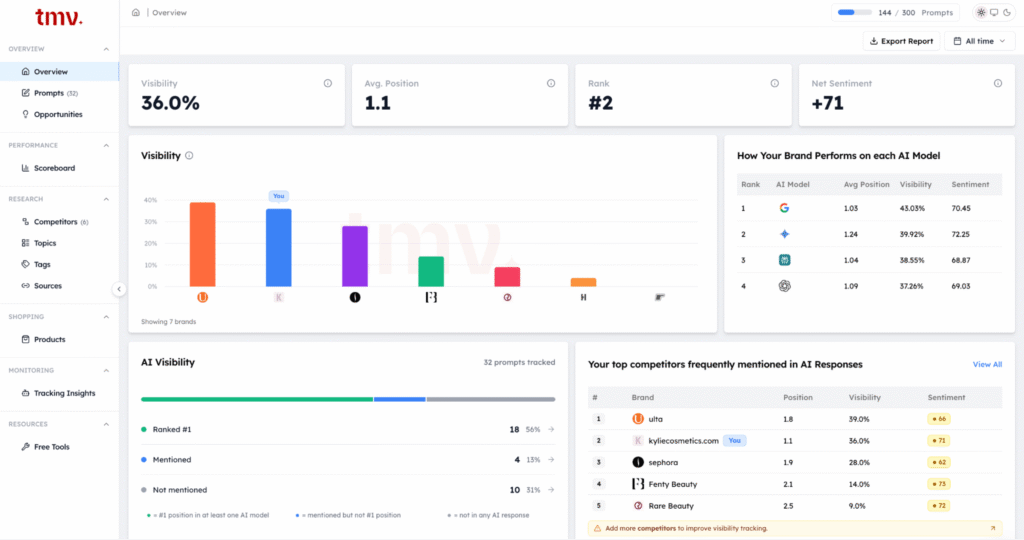
Track My Visibility can help identify prompts where your brand or competitors appear and show the sources referenced in AI-generated responses, giving you additional context for evaluating your FAQ content.
FAQ Section’s Common Mistakes And Troubleshooting
Avoid these common FAQ mistakes to create a section that is useful for users and easy for search engines to understand.
1. Overwriting the answer
Long explanations can make FAQs difficult to scan, especially when users are looking for quick answers. Start with the main answer in the first sentence, then add additional details only when needed.
2. Using technical terminology to answer
Your team may use technical terms or product-specific language that customers do not understand. Write questions and answers using natural language that reflects how your audience describes their questions, problems, and needs.
3. Ignoring Mobile Experience
A FAQ section that works well on desktop may still create problems on mobile. Test accordion sections, buttons, and navigation on real mobile devices to ensure users can easily open and read answers.
4. Keeping Outdated Information.
Old information about pricing, features, policies, or processes can reduce trust. Review and update FAQ content whenever related products, services, or policies change.
5. Adding Schema That Does Not Match Visible Content.
FAQPage schema should accurately represent the questions and answers provided on your webpage. Avoid adding extra information or rewriting answers inside the schema that users cannot see.
6. Creating Invalid Schema Markup
Incorrectly formatted JSON-LD, such as improperly escaped characters or broken code generated by your CMS, can prevent search engines from reading your schema correctly. Validate your markup and fix formatting issues before publishing.
7. Using Duplicate or Conflicting FAQPage Schema
Avoid adding duplicate or conflicting FAQPage markup to the same page. If a page contains multiple FAQ sections, make sure the structured data consistently represents all relevant questions and answers under the page’s FAQPage markup.
8. Making FAQs Difficult to Find
Even useful FAQ content will not help users if they cannot locate it. So it is important to link your FAQ section from relevant pages, navigation menus, or footers. For larger FAQ sections, consider adding search or filtering options.
9. Not Providing a Next Step
Some questions require additional help after the answer. For that, add relevant links, related resources, or support options so users know what to do next.
10. Not Measuring Performance
Publishing an FAQ section without reviewing its impact makes it difficult to know whether it is helping users. Monitor relevant search performance, support questions, and your brand’s visibility for relevant AI search prompts to identify areas where your FAQ content may need improvement.
Final Thoughts
A useful FAQ section starts with understanding what your audience wants to know. Without understanding your customers’ questions and needs, even well-written answers may fail to address the problems they actually have.
An AI visibility checker shows you which prompts are triggering mentions of your brand across AI platforms and where competitors are showing up instead of you. That data points directly to the gaps your FAQ section should be filling.
Use those insights to write FAQs that are more relevant to your users, clearly structured, and supported by accurate, useful answers.
FAQ
An FAQ section is the visible question-and-answer content users read on a webpage. FAQPage schema is structured data, usually implemented as JSON-LD, that describes those questions and answers in a machine-readable format for search engines and other systems.
Yes. While Google no longer shows FAQ rich results in search, FAQPage schema is still valid as a way to describe your FAQ content in a machine-readable format. It does not guarantee higher rankings or AI citations, but it provides useful context about your questions and answers.
There is no fixed number. Start with the questions that provide the most value to your audience. Focus on the quality and relevance of the questions and answers rather than trying to reach a specific number.
FAQ schema provides machine-readable information about your Q&A content, but AI systems may use content and structured data differently across platforms. However, schema alone cannot secure AI citations. Content accuracy, relevance, accessibility, and the overall quality of the source also matter when evaluating how content may be used in AI search.
To check your FAQPage schema, validate the JSON-LD code using Schema Markup Validator and confirm it matches the visible FAQ content. Ensure every question and answer in the schema accurately matches the FAQ content available on the page.