


If you’re just getting started, 25 high-value prompts is a practical starting point for month 1. Your goal isn’t to track every question someone could ask on an AI platform. It’s to identify the prompts that matter most to your business, measure your visibility for them, and improve the ones where you’re missing out.
I get why 300 or 400 prompts sound like the safer bet (more data has to mean more insight, right?), but in practice it mostly means a bigger bill and a dashboard full of numbers you don’t have the bandwidth to act on. There’s genuinely little point tracking hundreds of prompts if you can’t optimize for even a fraction of them.
So think of prompt tracking less like a census and more like a loop: track, find the gaps, optimize, then expand once you’ve earned the right to.
In this guide, I’ll get into why prompt count matters in the first place, what should make the cut in your first 25, and how you’ll know it’s time to add more.
Why You Don’t Need to Track Hundreds of Prompts
AI visibility varies by prompt, search intent, and AI model. The same brand can appear prominently in AI-generated answers for one query and be absent from another, even when the questions are closely related.
A 2026 Semrush study analyzed 50,000+ brands across 1,094 ChatGPT categories. Each category included five related prompts. Only 15.2% of categories had a clear brand owner, meaning one brand appeared in at least four of five prompts.
That makes prompt count important when measuring AI brand visibility. If you track only a few prompts, unusual results can have too much influence on your data. This can create a misleading view of your overall visibility.
However, more prompts don’t automatically mean more accurate tracking. What matters is whether your prompts provide sufficient and relevant coverage of your products or services. Strong AI visibility tracking accuracy comes from tracking the right prompts that match how your audience actually searches.
A reliable prompt set balances three factors:
- Enough prompts to reduce the impact of individual variations.
- Diverse prompts covering different customer intents and scenarios.
- Relevant prompts that reflect real questions your audience asks.
We’ve seen this play out in our own trackdown reports too, where AI visibility can change significantly from one prompt to another. That’s why you need enough prompts to see a pattern but not so many that you’re collecting data you won’t act on.
How Many Prompts Should You Track in Month 1?
Start with around 25 prompts. This isn’t a hard limit or a universal statistical threshold. It’s a practical starting point that keeps your initial tracking focused enough to analyze and optimize. Your first 25 prompts should represent the questions with the highest potential business value.
Here’s a useful way to think about allocation:
| Prompt type | What to cover |
| Category | Core category questions |
| High-intent | “Best,” “top,” recommendations |
| Comparison | You vs. competitors |
| Problem/solution | Problems your product solves |
| Product/service | Specific offerings |
| Brand | Queries mentioning your brand |
You don’t necessarily need equal allocation across these, and honestly you shouldn’t force it. A SaaS company and an e-commerce store are going to lean on this table very differently. If you need ideas, our prompt generator tool can help turn those areas into relevant AI search prompts.
For SaaS, prioritize category, problem/solution, competitor comparisons, alternatives, and high-intent recommendations, since that’s where B2B buyers actually spend their research time before they ever look at your pricing page.
For e-commerce, prioritize product categories, product recommendations, comparisons, use cases, and shopping-intent queries, because the questions are closer to the purchase decision from the start.
What Actually Determines How Many Prompts You Need?
Twenty-five prompts is where you should start, not where everyone ends up. Some businesses will stay close to that number indefinitely because their product line and market are narrow enough. Others will outgrow it within a month or two, and the four factors below are what decide which camp you’re in and roughly how far past 25 you’ll need to go, whether that’s 50, 100, or 300 and up.
1. Number Of Products Or Services You Offer
Each product or service can trigger a different set of customer questions, from basic discovery to comparisons and purchase decisions. As your offering expands, your prompt set should expand with it to ensure each important area of your business is represented.
For example, a project management SaaS may need prompts covering task management, collaboration, integrations, pricing, and alternatives. Treating all of these as one topic, such as “project management software,” can leave important gaps in your tracking.
The broader your product or service portfolio, the sooner you’ll outgrow the 25-prompt baseline, since each new product line is really a new set of customer questions you haven’t accounted for yet.
 Pro Tip: If you want to see your product visibility inside AI answers. A free AI Visibility Checker helps to see where your brand stands across AI platforms in just minutes.
2. Variety Of Customer Search Intent
Customers don’t use AI search for just one type of question. They may ask for information, compare options, evaluate specific products, or look for a particular brand, and your prompt set should reflect this range of intent rather than focusing on one type of query.
Include prompts across:
- Informational: Questions about problems, concepts, or solutions.
- Comparison: Queries comparing products, brands, or alternatives.
- Commercial: Questions seeking recommendations, reviews, or the best options.
- Transactional: Queries showing strong purchase or conversion intent.
- Brand-specific: Questions directly mentioning your brand, products, or services.
Track My Visibility’s query fan-out generator can help you turn a core topic into related search queries, which makes it easier to build a more varied prompt set and uncover questions you may have missed. If your 25 prompts are leaning heavily on one or two intent types, that’s usually the first sign you need to grow the set rather than just swap prompts around.
3. Competitiveness Of Your Industry
For competitive industries, broader prompt coverage can help you understand your position. For example:
- Low-competition niche: A smaller set of prompts may be sufficient because fewer brands compete for the same customer questions, and you may never need to move far past 25.
- Moderately competitive market: Add prompts across key products, use cases, comparisons, and recommendations to capture more competitive variation, which is usually where 25 grows into 50 or so.
- Highly competitive market: A broader prompt set is typically necessary to account for different competitors, topics, and customer intents where visibility can shift, and this is the segment that tends to climb toward 100 or beyond.
4. AI Models You’re Tracking
The number of AI models you monitor can also influence how many prompts you need, because different models may interpret the same question differently and recommend different brands, products, or sources.
In our data report of ChatGPT, Gemini, Claude, and Google AI Overviews, we found distinct source preferences across platforms, and a prompt that shows strong visibility on one platform may produce a different result on another.
If you’re tracking multiple AI platforms, that alone can justify expanding past 25 even if your product line and competitive landscape stay simple, since you’re no longer asking “how many questions do I need,” you’re asking “how many questions times how many models.”
What Does a Well-Balanced Prompt Library Look Like?
Your prompt library should cover questions across the customer journey, from discovery to evaluation, purchase, and use. This prevents your AI visibility data from being overly focused on one stage of the customer journey.
1. Discovery
At this stage, customers are still defining their problem or exploring possible solutions. These queries show whether AI models can surface your brand before the customer has narrowed down their options.
Example prompts:
- “What are the best ways to improve AI overview presence?”
- “How can businesses automate customer support?”
- “What should I look for in an AI visibility tracking tool?”
2. Comparison
Now the customer has moved from “What do I need?” to “Which options should I consider?” This is where category, comparison, and alternative queries become important for understanding your competitive visibility.
Example prompts:
- “What are the best AI visibility tools for SEO teams?”
- “What are the best alternatives to [Competitor]?”
- “How does [Product A] compare with [Product B]?”
3. Decision
These queries carry stronger purchase intent. Customers may be looking for recommendations, pricing information, reviews, or a final comparison before choosing a solution.
Example prompts:
- “Which AI visibility tool offers the best value for small businesses?”
- “What do users say about [Brand]?”
- “Which AI visibility platform should I choose for tracking ChatGPT visibility?”
A balanced library gives you visibility across the full customer journey, rather than only one type of question. The right mix will vary by business, but each stage should have enough relevant prompts to represent meaningful customer interactions.
When Should You Add More Prompts?
Your prompt library isn’t something you set once and leave alone, but it also isn’t something you should be padding out just because you can. The honest test is whether there’s a real business reason to understand a new set of customer questions, and most of the time that reason falls into one of a handful of buckets.
Add more prompts when:
- You launch a new product, feature, or use case that creates new customer questions.
- A competitor or category changes, creating new comparison or recommendation queries.
- You enter a new market or geography with different search behavior.
- AI search behavior changes and your existing prompts no longer represent how people search.
Don’t expand your library simply because you have unused tracking capacity. Expand it when there’s a business reason to understand another set of customer questions, not because the number on your plan happens to allow it.
Pro tip: When AI search behavior changes, a quick visibility check on your website helps expand your tracked prompt set. Audit your website’s AI visibility to identify potential visibility gaps worth monitoring.How Track My Visibility Helps You Build a Better Prompt Library
Track My Visibility, our AI visibility tracking tool, helps turn prompt selection into a structured process rather than relying on a handful of queries you happen to think of. It gives you a starting set, lets you control what matters, and makes refinement easier once you have real visibility data.
1. Start with generated prompts
Track My Visibility helps you create a relevant starting set of prompts by analyzing your website, brand information, selected market, and topics. During onboarding, you can select the topics you want to track and suggest prompts related to those areas.
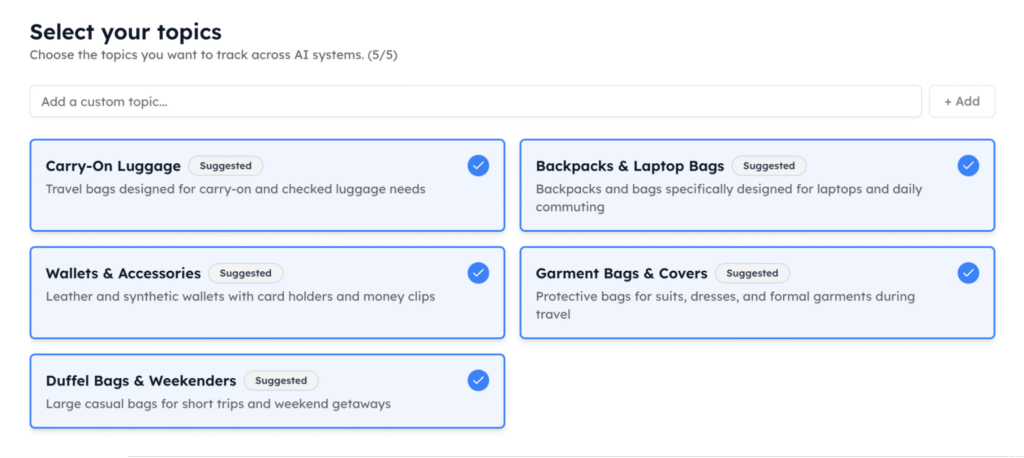
You can then choose how many prompts you want to include based on your available tracking capacity. This gives you a structured baseline without requiring you to manually brainstorm every possible customer question.

Instead of starting with an arbitrary number of prompts, you have a categorized set that can be reviewed and adjusted before tracking begins.
2. Add the prompts the business actually cares about
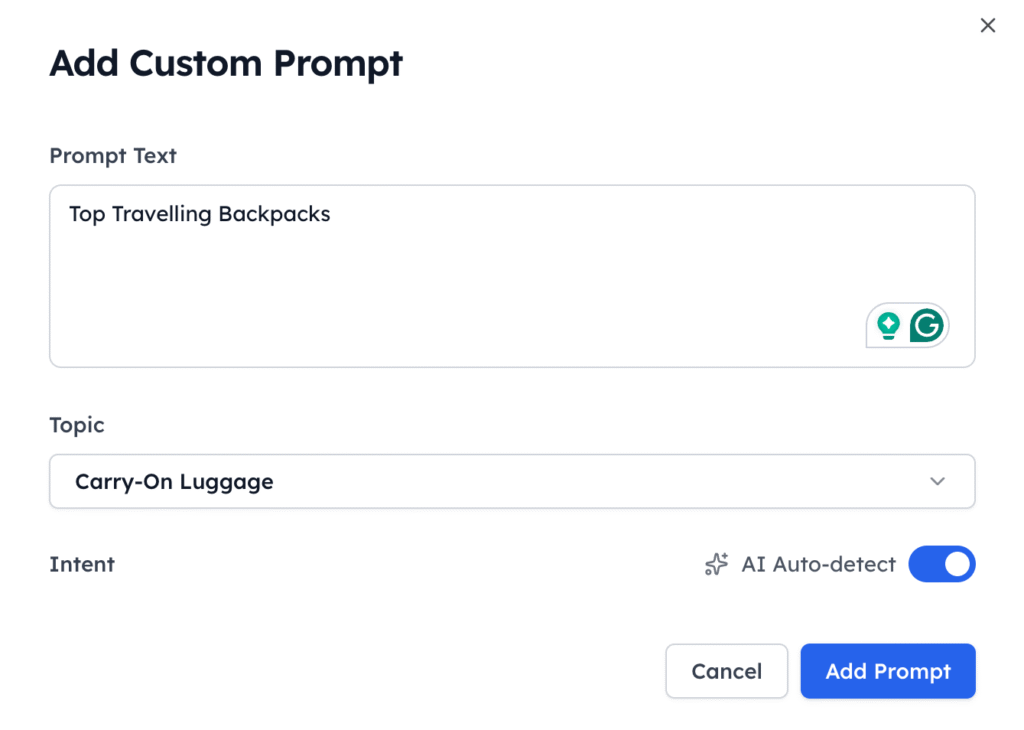
With Track My Visibility, you can review suggested prompts by topic and add custom prompts for products, competitors, use cases, markets, or other priorities that may not be captured automatically.
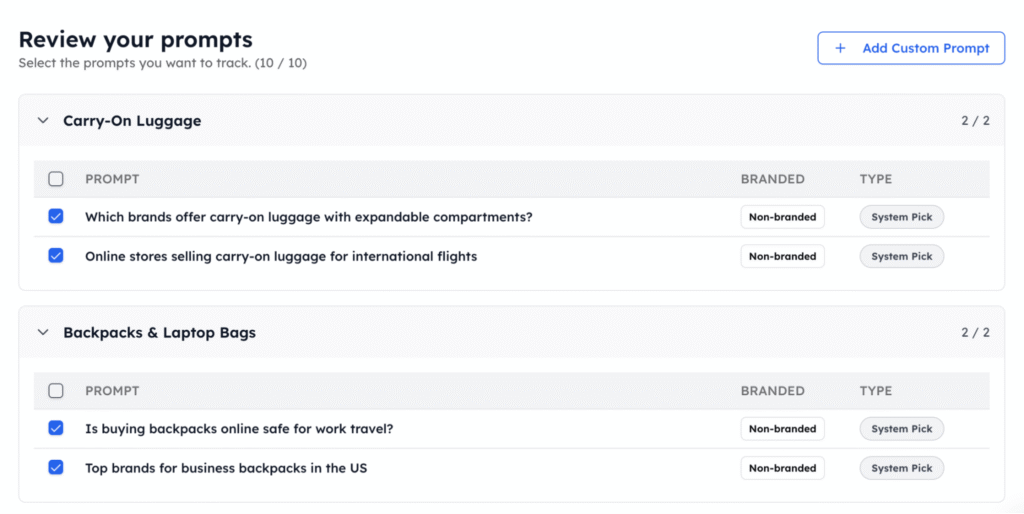
For example, a SaaS company may want to track questions about specific features, alternatives, integrations, pricing, or competitors. An e-commerce brand may need prompts around product categories, comparisons, recommendations, and use cases.
Track My Visibility lets you add these custom questions, assign them to relevant topics, and use AI intent detection to organize them more consistently. This helps turn a generic prompt set into one that reflects your actual market and customer journey.
3. Refine after the first tracking run
Once tracking begins, the results can be seen in the dashboard where your initial coverage is strong. Use visibility, position, sentiment, competitors, and citation data to identify which areas need deeper monitoring.
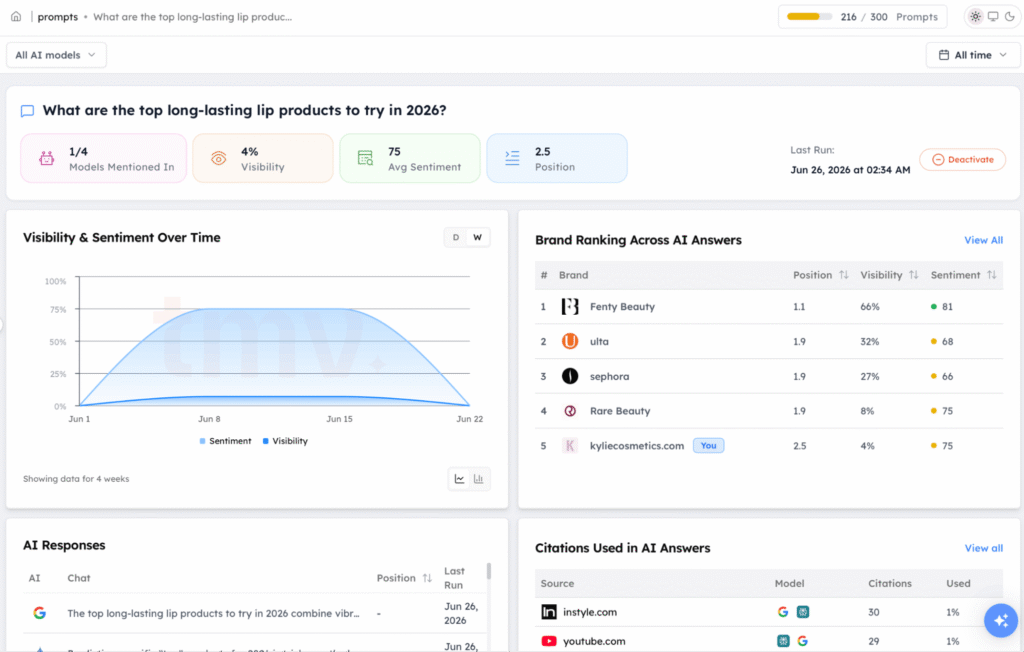
These insights can uncover a competitor consistently appearing for a particular topic, your brand being visible for one type of query but absent from another, or certain sources repeatedly influencing AI answers.
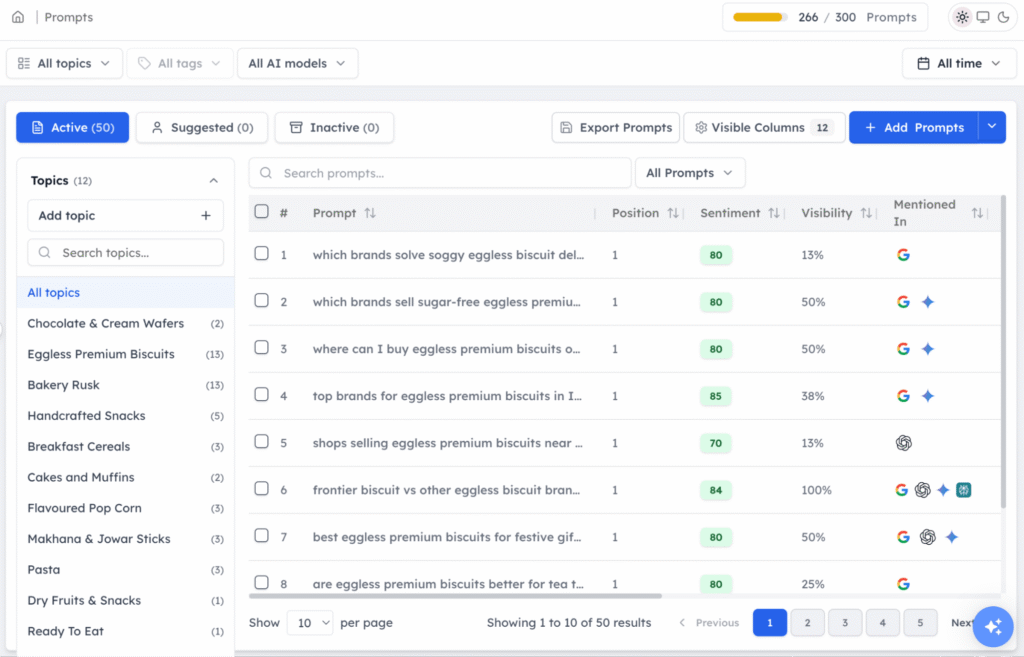
Use those findings to decide what deserves deeper monitoring. Over time, Track My Visibility helps you expand or refine prompts based on observed AI search visibility patterns, rather than continuously adding queries without a clear reason.
Final Take
Start with around 25 high-value prompts.
You don’t need to track every question a customer could ask an AI platform. Start with the prompts that have the highest potential to influence discovery, consideration, and purchase, because those are the ones that actually move the needle on whether someone finds you or finds a competitor instead.
Then use your visibility data to find gaps, optimize those prompts, and expand your library when you have a reason to monitor new topics, products, competitors, or markets.
Start your 7-day trial with Track My Visibility to see where your first prompts should come from.
FAQs
No. A larger set of repetitive prompts can add noise, while a smaller set of relevant, diverse prompts can provide more meaningful insights.
Review your prompt library whenever you launch products, enter new markets, face competitive changes, or notice new customer search patterns.
Yes. Using consistent prompts across models makes it easier to compare how your brand appears across different AI search experiences.
Include a mix of informational, comparison, commercial, transactional, and brand-specific questions that reflect different stages of the customer journey.